




Introduction
In this third post in our ExCyTIn-Bench series, we’re moving from concepts to hands-on tooling. To help security teams run their own investigations against the benchmark, we’re releasing two Python 3.13 scripts: one to load the ExCyTIn incident data into Azure Data Explorer (ADX), and another to automate end-to-end question testing and scoring against any AI-powered webhook you control. Together, these tools let you stand up a local benchmark environment, plug in your own AI orchestration (Security Copilot, open-source LLMs, or custom agents), and generate repeatable metrics on investigative performance. The goal is to make it practical to evaluate and iterate on your AI investigation workflows using the same benchmark Microsoft published.
If you’d like to get caught up on our previous blogs from this series, follow the links below:
- Part 1: Closing the Gap in Cyber Resilience: Why AI Investigation Benchmarks Matter for CISOs
- Part 2: Examining the ExCYTIn-Bench Approach for Benchmarking AI Incident Response Capabilities
Directory Setup
Both scripts are designed to run from the root of your project folder and depend on a simple, consistent directory layout. After creating your project directory, place `adxDataLoader.py` and `excytinBenchmarkPublic.py` in the root, and create two subfolders: `incidents/` for the raw log exports and `questions/` for the benchmark’s Q&A JSON. To connect to ADX, you have a number of options, but it is recommended you use your own identity via the Azure command line tools, running ‘az login’ prior to executing the importer. You must download the official ExCyTIn-Bench dataset from https://huggingface.co/datasets/anandmudgerikar/excytin-bench, then populate the `incidents/` folder with the per-incident data files (CSV + `.meta`) and the `questions/` folder with the corresponding question JSON files. At runtime, the testing tool will also create and populate a `results/` folder automatically to store test runs and scoring output, so you don’t need to pre-create that directory.
Download from Github
Get these free Excytin-Bench tools on SRA’s GitHub repository.
Tool 1: `adxDataLoader.py`
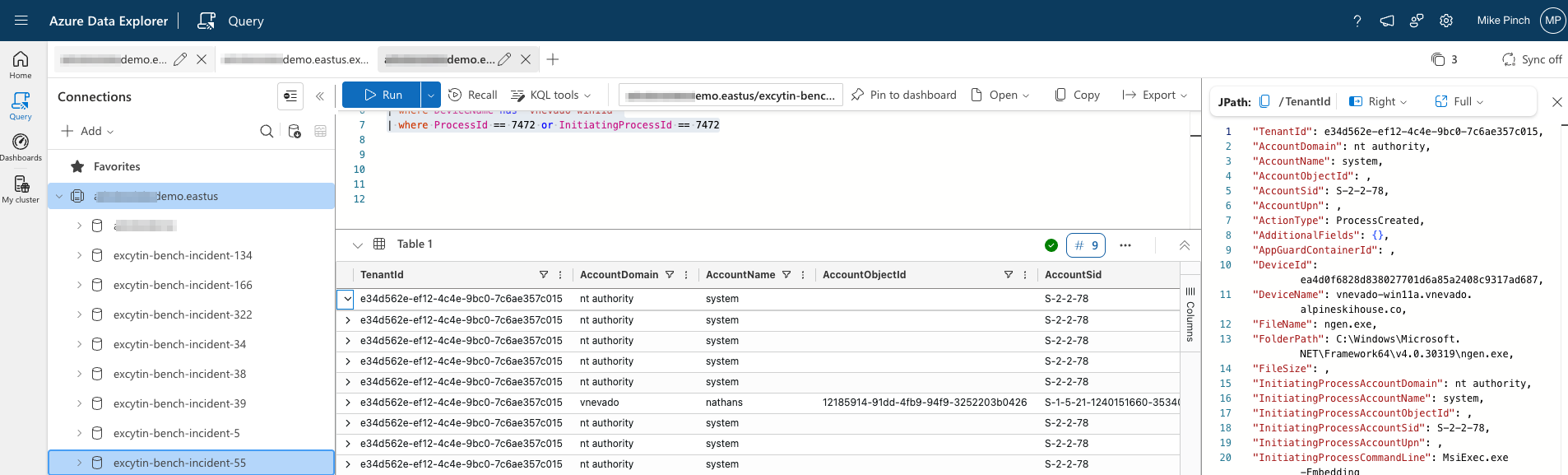
The first tool, `adxDataLoader.py`, handles ingesting the ExCyTIn incident data into your ADX cluster so AI agents can query it. When you run it from the project root, it prompts for your ADX cluster URL, database name, and which incident subfolder under `incidents/` to import. It connects to both the data and ingest endpoints, discovers all `*.csv` files and their matching `*.meta` schema definitions (from the HuggingFace download), and then automatically creates or merges ADX tables and CSV ingestion mappings per data source. It converts the benchmark’s custom-delimited CSVs into standard comma-separated files in the background and queues ingestion for each table, so you get a ready-to-query ADX environment without manually defining schemas or ingestion jobs.
Tool 2: `excytinBenchmark.py`
The second tool, `excytinBenchmark.py`, drives the actual benchmark runs by sending questions to an AI Endpoint webhook that you implement and then polling for answers and scoring. It reads incident-specific question sets from `questions/<incident_name>`, lets you choose how many questions to run (all, first N, or random subsets), and for each question, sends a JSON payload in `”testing”` mode to your webhook (defaulting to `http://localhost:8000` but configurable). Your endpoint is expected to return a token (typically via HTTP 202) and then later, when polled in `”polling”` mode, return the final `aiAnswer` and `aiRationale` once processing is complete; the tool persists these per-question results into `results/` as JSON. It also supports a `”scoring”` mode where it replays each tested question and AI answer back to your webhook so your service can synchronously return correctness, a 0.0–1.0 score, and a scoring rationale, enabling strict pass/fail or more nuanced grading.

AI Endpoint Flexibility
Critically, the AI Endpoint is intentionally generic: it can be anything that speaks HTTP and JSON like an Azure Function, Logic App, API Management front end, or a custom service that orchestrates one or more LLMs or tools. The toolkit includes workflows for restarting runs, resuming partial tests, retesting only incorrect or “abend” cases, and maintaining separate result sets for retests, which makes it easy to compare different models or orchestration strategies against the same underlying incident data.
Future Developments
In future posts, SRA may release a reference implementation of an AI Endpoint that plugs directly into this harness, but our intent is to let you integrate whatever AI stack you’re evaluating today. With Python 3.13 as the foundation and ExCyTIn-Bench as the shared benchmark, you now have a practical way to quantify how changes in models, prompts, and workflows impact real investigative performance in your environment.

Mike Pinch
Mike is Security Risk Advisors’ Chief Technology Officer, heading innovation, software development, AI research & development and architecture for SRA’s platforms. Mike is a thought leader in security data lake-centric capabilities design. He develops in Azure and AWS, and in emerging use cases and tools surrounding LLMs. Mike is certified across cloud platforms and is a Microsoft MVP in AI Security.
Prior to joining Security Risk Advisors in 2018, Mike served as the CISO at the University of Rochester Medical Center. Mike is nationally recognized as a leader in the field of cybersecurity, has spoken at conferences including HITRUST, H-ISAC, RSS, and has contributed to national standards for health care cybersecurity frameworks.