




We perform a lot of purple teams here at SRA and one thing we stress when reviewing outcomes is that it’s not enough to simply detect an attack. Detections need to be at an appropriate layer and have robust logic. Detecting C2 by detecting the initiating payload on the endpoint is not enough for covering Technique ID T1071.001 (Command and Control, Web Protocols) since it says nothing about the communications channel, only the execution method. Similarly, detecting scheduled tasks by looking at process invocations for schtasks.exe only gets you part of the way as there are many other viable alternatives, like PowerShell.
Since testing tends towards using specific implementations in the interest of time/effort, detection logic can also tend toward implementation specifics. But this can lead to issues in detection coverage when logic focuses too much on the implementation and not enough on the capability. Ideally, detections should focus more on the abstract, the capability itself. To that end, we developed the “ALLCAPS” project (https://github.com/SecurityRiskAdvisors/allcaps), a payload generation framework, to make testing at a capability level easier. ALLCAPS makes testing and detection development better aligned in approach. In this blog, we will cover ALLCAPS and its place in purple team testing.
ALLCAPS Overview
ALLCAPS is a command-line payload generation framework. Users write source code template files that provide functionality for attack primitives, like creating scheduled tasks and writing to the Registry, define a payload configuration that uses those primitives, then use ALLCAPS to generate the final payload as either a DLL, executable, or COFF.
For example, take the following ALLCAPS configuration file:
ALLCAPS will search the provided directory for the specified capabilities, add any handling required for runtime arguments, imports, etc, render the combination into a complete program source code, then compile the code into a COFF payload that performs the following activities:
- Create a new local user called “MyNewAdmin”
- Add that user to the local Administrators group
- Clear the Security Event Log channel
A user of the tool would do the following:
First run the tool against the configuration file, specifying -i to view a summary of the payload. Then, running it normally to generate the payload.

A summary of the capabilities included in the payload

Generating the payload
On a target system, you can inspect the local user and Administrator group membership:
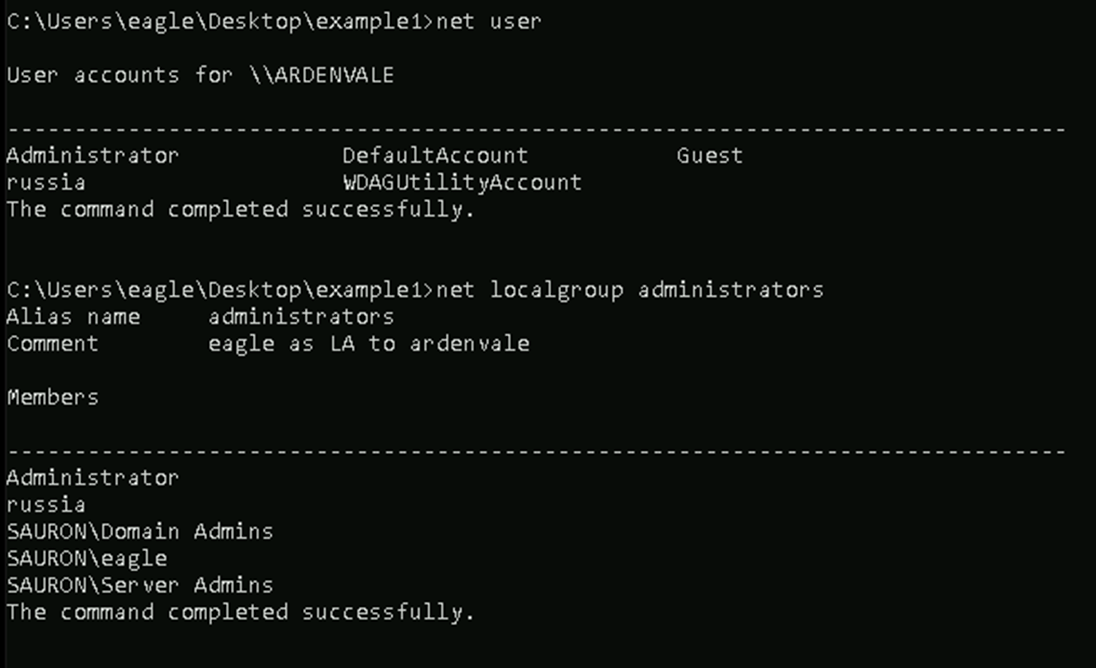
The output of “net user” and “net localgroup administrators”
Then run the generated payload and inspect again:

The output of “net user” and “net localgroup administrators”
after running the payload
As well as the events in the Security Event Log:

The Security Event Log after being cleared
This example is largely simplified but more detailed documentation can be found here: https://github.com/SecurityRiskAdvisors/allcaps/docs/.
Flexibility
This initial feature set, on its own, may seem underwhelming but the real value is in its flexibility. This takes multiple forms. The first being adding support for additional attack techniques. For example, take Technique T1546, Event Triggered Execution. This technique has many sub-techniques (17 as of ATT&CK v17.0), many of which essentially are variations of modifying the Registry to achieve persistence. Rather than maintain source code for each variant of a Registry modification, each of which would require updates if a change were required, you can define the shared Registry modification functionality as a capability. Adding a variant is as simple as calling the capability with the Registry key/value details.
The second form of flexibility is how ALLCAPS can fit into a team’s larger payload management strategy. Developing tools in terms of capabilities rather than complete packages allows members to develop new payloads by mix-and-matching re-usable functionality, like evasion and injection techniques.
In Practice
Our main use of the ALLCAPS tool is purple team exercises. Starting with our 2025 Indexes, we have standardized its use in execution for many of our test cases. Performing tests with ALLCAPS payloads rather than their native OS equivalents allows the testing team to better focus the detection/remediation discussions on the most important pieces of an attack technique, rather than implementation specifics.
In testing our clients year over year, we can see discrepancies in detection and prevention coverage by security tooling after switching execution methods to ALLCAPS. Some notable examples we’ve observed are:
- Registry credential dumping detections not firing due to reliance on the Registry hive and/or key in the command line (
HKEY_LOCAL_MACHINE/HKLM/SAM) - Scheduled task creation detections not firing due to reliance on process invocations of
schtasks.exe - Volume Shadow Copy deletion protections failing due to reliance on process invocations of
vssadmin.exe,wmic.exe shadows, etc
Overreliance on command-line detections is the most common trend we’ve observed with these efforts, which is surprising considering that command lines are notoriously unreliable due to attackers having strong influence over them in almost all regards. What’s more, in all of the above examples, telemetry sources exist for the operating system events (ex: Event ID 4698 for scheduled tasks). Taking a capability-based approach avoids these sources of conflation by placing focus on the underlying operating system behaviors rather than the details of the execution method.
Conclusion
Shifting focus in execution to capabilities allows you to improve your detection coverage by highlighting dependencies on implementation details. ALLCAPS allows users to realize this approach and is available for download on our GitHub here: https://github.com/SecurityRiskAdvisors/allcaps.
If you have any questions or concerns, feel free to reach out to @2xxeformyshirt.

Evan Perotti
Evan specializes in network penetration testing, web application security testing, open source intelligence gathering, and security testing process automation.
He has experience in a variety of industries including retail, insurance, financial services, and healthcare.