




A good security program cannot exist without good data, and for AI platforms, like Microsoft’s Security Copilot, good data is essential to maximizing effectiveness. The diverse set of security tools owned by organizations often don’t natively integrate to work together, leaving the perfect opportunity for AI to tie these different tech stacks together. The visibility gained and response capabilities allowed by endpoint detection and response (EDR) tools make them critical to security programs. To help the security community work with the tool stacks they have, and yield maximum results, SRA is proud to announce CrowPilot to help organizations using Security Copilot interact with their CrowdStrike deployment.

CrowPilot allows you to perform Security Operations functions on your CrowdStrike instance. You can now isolate a host, change an asset’s policies, find incident information, block IOCs and/or a number of other functions. Once integrated you can leverage CrowdStrike right from Microsoft Security Copilot, giving your SOC analysts and Incident Responders the information and functionality they need to make quick decisions and respond to incidents faster. You can add CrowPilot to promptbooks or even utilize its functionality directly from your incidents via SOAR.
Included with CrowPilot, is a system health check that will help give you visibility into your CrowdStrike configuration. CrowPilot will pull all your Prevention Policy information, Machine Learning, and IOA Exclusions then analyze the results and give recommendations on areas to improve. CrowPilot will also score each of your Prevention Policies ranging from 100% where all settings are set to enabled and maximum enforcement, to 0% where everything is disabled. This data can be recalled when reviewing host information by saying “CrowPilot, tell me the host information for ‘<insert hostname>’, and using the system health check data from CrowPilot, tell me if there is a better scoring prevention policy that has the same platform as this host”. While Prevention Policies are a key metric in your configuration’s health, exclusions are also critical. Broad and misconfigured exclusions can leave you vulnerable.
CrowPilot comes with following functionality:
- Retrieve host information
- List all incidents
- Get details of a specific incident
- Perform an On Demand Scan
- Check the health of their configuration
- Isolate a host
- Reverse isolation of a host
- Hide a host
- Unhide a host
- Move a host to a new host group
- Block an IOC
- Unblock an IOC
- Retrieve a Zero Trust Score
- Suppress a detection
- Unsupress a detection
CrowPilot in Action
Isolating a host and running an On Demand Scan via the Security CoPilot Interface

Isolating a host is easy with CrowPilot! Should you not want to utilize some functionality, all you have to do is modify the CrowdStrike API key permissions given in the section below, and Microsoft Security Coplot will no longer have the given functionality!
Using CrowPilot in a Promptbooks
Block IOCs in Crowdstrike
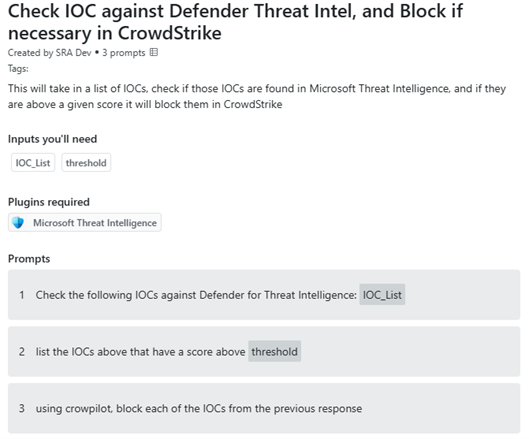
Adding CrowPilot to your promptbooks gives SOC analysts and incident responders easy access to CrowdStrike functionality, allowing you to intertwine different prompts from different sources, into an easy to use and repeatable process, helping analysts make the right call with the right information.
The example above takes in a list of IOCs, checks them against Defender’s Threat Intelligence service, and if they are high enough confidence, it will tell CrowdStrike to block them, thus extending protection beyond your firewall and directly on your endpoint. This allows you to intertwine different technologies from different vendors, without the need to create complex API calls. This promptbook can be used right in the chat interface, or you can call it from an incident, and have action already taken before your analysts review the rest of the incident for more malicious behaviors.
Review IOCs from Articles and Take Action
Ever have your boss, or business leader forward you security articles they are concerned about? What if you could automate reviewing the article for IOCs, and block them if they are high enough confidence? The promptbook below allows just that! This solution, like the example above, helps you easily stitch multiple technologies together, allowing for quick actions to be taken by your analysts, freeing up their time while also responding to the needs/wants of the business.

Reference CrowPilot from a Logic App
Check Incident and Block in Different Applications
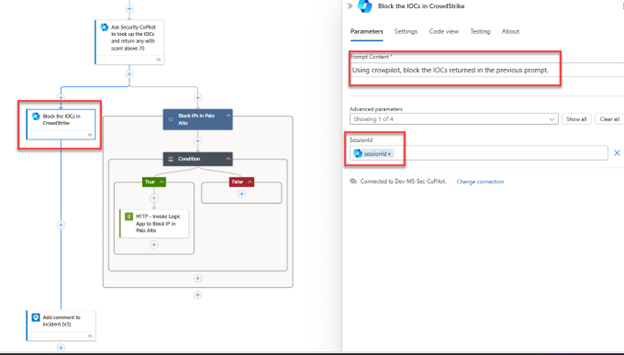
Use a Promptbook to check if a better CrowdStrike Prevention Policy exists for a host
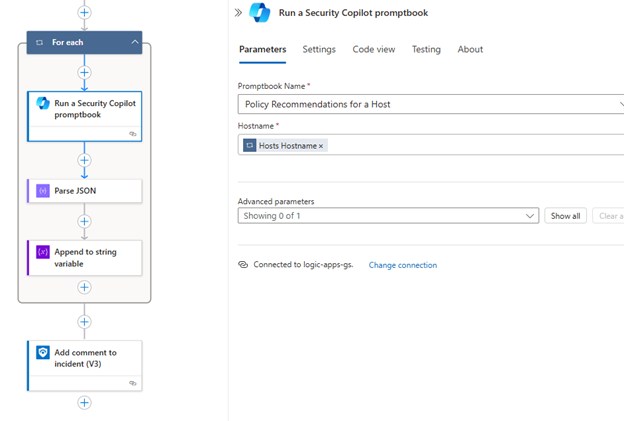
(“Policy Recommendations for a Host” Promptbook uses CrowPilot calls to lookup a host and check all available Prevention policies, for a more secure policy)
As seen above, you can use native Logic App Connectors to call a prompt book or inject a prompt using CrowPilot automatically from an incident. This allows you to easily leverage CrowdStrike functionality, without writing API calls, or creating a complex Logic App, but still act quickly to remediate an active threat.
How to Get CrowPilot
There is no license fee to run CrowPilot. The only charge is for the App that runs in your Azure infrastructure used for the connector. The recommended B1 App Service plan is approximately $50/month in most regions. Configuration is easy, and you can deploy in minutes. All you will need is a CrowdStrike API key with the necessary permissions, and your Microsoft Security Copilot instance will be integrated with CrowdStrike.
CrowdStrike API Key Permissions
| Permission | Function |
| Custom IOA Rules – Read |
|
| Device Control Policies – Read |
|
| Firewall Management – Read |
|
| Hosts – Read |
|
| Hosts – Write |
|
| HostGroups – Read |
|
| HostGroups – Write |
|
| Incidents – Read |
|
| IOA Exclusions – Read |
|
| IOCs – Read |
|
| IOCS – Write |
|
| Machine Learning Exclusions – Read |
|
| Prevention Policies – Read |
|
| OnDemandScan – Read |
|
| On Demand Scan – Write |
|
| Response policies – Read |
|
| Sensor Update Policies – Read |
|
| Zero Trust Assessment – Read |
|
CrowdStrike API Key Generation Instructions
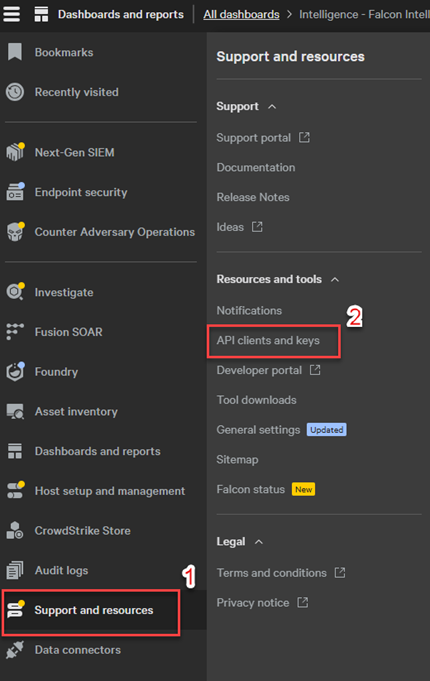
- From your CrowdStrike console, open up the menu in the upper right corner and click Support and resources followed by API clients and keys.
- In the upper right, click Create API Client.

- A new dialog box will appear. Give the API Client a name and description, the provide the following permissions for full usability of the CrowPilot plugin (refer to the CrowdStrike API Permissions table above, if you would like to limit some functionality of the CrowPilot plugin).
- Custom IOA Rules – Read
- Device Control Policies – Read
- Firewall Management – Read
- Hosts – Read and Write
- Host Groups – Read and Write
- Incidents – Read
- IOA Exclusions – Read
- IOC Management – Read and Write
- Machine Learning Exclusions – Read
- Prevention Policies – Read
- On Demand Scan – Read and Write
- Response Policies – Read
- Sensor Update Policies – Read
- Zero Trust Assessment – Read
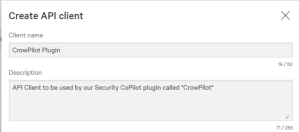
- Click Done when completed filling out all permissions.
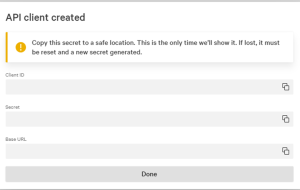
- A new window will appear with the Client ID, Secret and Base URL. Make sure to record each of those, as they will be needed when deploying the app from Azure Marketplace.
Installing CrowPilot from Azure Marketplace
- Follow the link here to SRA’s Azure Marketplace Catalog.
- Click on Get it now as seen below

- Click Continue in the new pane that appears

- A new page will be displayed. Click Create to start the App Service creation process.

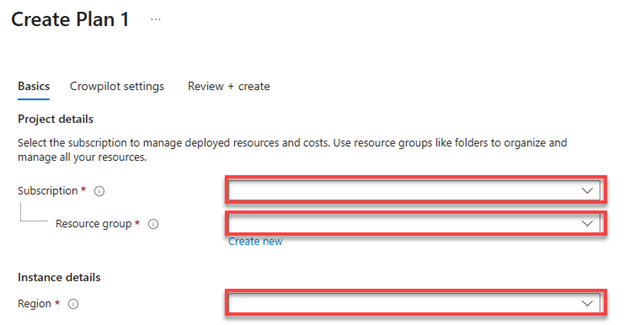
- On this new page in the Basics tab, select the Subscription and Region, and either select an empty Resource Group, or create a new one. Click Next once the highlighted boxes are filled out.
-
- In the CrowPilot Settings tab, as seen below, fill out each entry and click Next when done.

-
-
- Subscription – Select the subscription that will house the CrowPilot App Service
- Resource Group – Select or create a new resource group to house the CrowPilot App Service
- Site Name – use the default “crowpilot” or modify as desired to give a name to the App Service. Ensure if you change the name, note it for potential use later
- Asp Sku – We recommend using the B1 App Service Plan Sku. This will cost roughly $50/month (check rates based on your Region).
- Crowdstrike Base Url – Enter in the CrowdStrike Base Url recorded when the API key was created (the default ‘api.crowdstrike.com’ will be used if not modified to match your CrowdStrike instance, and thus the plugin may not work)
- Crowdstrike Client Id – Enter in the Crowdstrike Client Id that was recorded when creating the Crowdstrike API key.
- Crowdstrike Client Secret – Enter in the Crowdstrike Client Secret that was recorded when creating the Crowdstrike API key.
- Crowpilot Api Key – Enter in a unique and randomized set of characters. This will be used as the authentication key by the App Service. No calls to the App Service will be accepted without this Key, so ensure it is a long and random set of characters.
-
- You will be brought to the Review + Create tab to review all of your settings before deployment. If all the information is accurate, click Create at the bottom of the screen.
- A Deployment window will open and you will be able to watch the Deployment’s progress. Wait for deployment to complete, and click Go to resource group as seen below.
-

-
-
- Click on the App Service you created (If you kept the default it will be called ‘CrowPilot’)
-

-
-
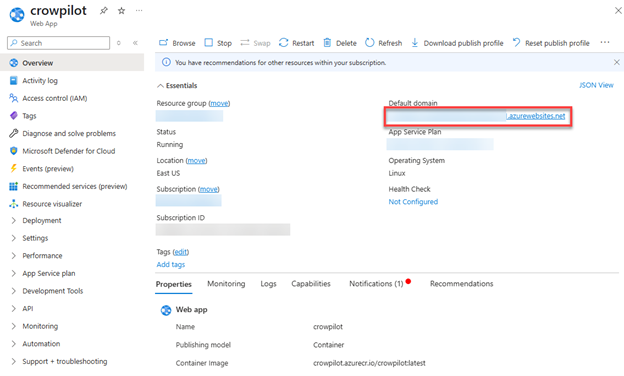
- The App Service Window will open. You will need to copy the Default domain as highlighted below. Copy the entire URL. This will be used later when we configure the plugin within Microsoft’s Security Copilot.
-
-
- Save that domain, and the CrowPilot API key you generated in step 6. Continue to the next section.
Adding CrowPilot to Microsoft’s Security Copilot
- Navigate to securitycopilot.microsoft.com.
- In the chat input box, click on the Sources icon as seen below

- Scroll down to the bottom of this new window to the Custom section and click the Upload Plugin button.

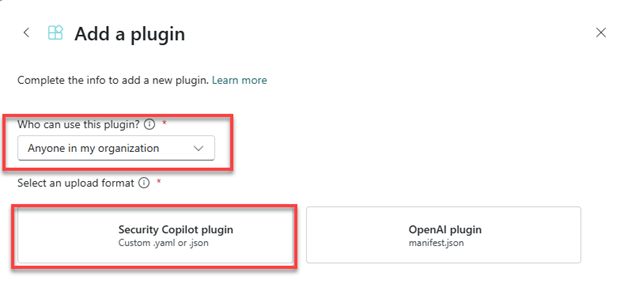
- The Add a plugin window appears. Here, choose whether to add the functionality to anyone in your organization or just yourself, then click on the Security Copilot plugin button as seen below.
- New options will appear in the window. Click the slider labeled Upload as a link.

- The Upload file section will be replaced with a text box and a drop down as seen below:
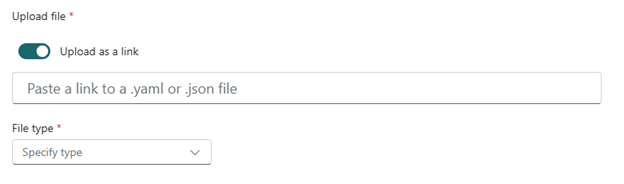
- For the File type select .yaml.
- For the link copy and paste: https://raw.githubusercontent.com/SecurityRiskAdvisors/azure-security-tools/refs/heads/main/CrowPilot/plugin.yaml
- The plugin will now be added, but not yet configured:
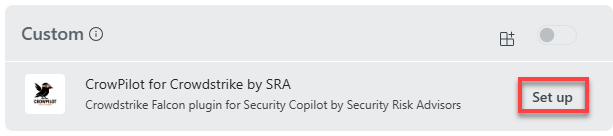
- You should not automatically be taken back to the Manage sources section. Scroll back down to Custom click the Setup button next to CrowPilot for CrowdStrike by SRA.
- The window below will now appear. You will need the URL of the App Service, and the API key setup in the CrowPilot from Azure Marketplace section above. (Note: when entering the URL, make sure you include the ‘https://’ as copying directly out of Azure will not include that portion of the URL.)

- Once the information is entered, click Save in the bottom right and CrowPilot is ready to go (Note, if you have IP restrictions on your CrowdStrike console you will need to continue to the Allowing CrowPilot to Connect to CrowdStrike section below)
(Optional) Allowing CrowPilot to Connect to CrowdStrike
Note: This step is only required if you limit access to your CrowdStrike console based on IP addresses.
- In the Azure portal, navigate to the newly created App Service called “CrowPilot”, or the name you designated during the deployment phase if modified.
- From the Overview section, scroll to the bottom of the page in the right pane to see Networking, as seen below.

- Record the IP addresses in the Outbound IP addresses and the Additional Outbound IP addresses
- With the IP addresses from step 3, follow CrowdStrike’s documentation provided here to add these IPs to a new IP Group. (Note: Ensure that the once created you turn the IP Group on, as it will be off by default).

Greg Stachura
Greg focuses on Incident Response and the Cyber Security Operations Center. Greg has experience managing SIEM, as well as orchestration and automations platforms. He also has extensive background in Incident Response playbook development, forensics and log analysis. Prior to joining Security Risk Advisors, Greg worked extensively in the financial, healthcare and education sectors.

Mike Pinch
Mike is Security Risk Advisors’ Chief Technology Officer, heading innovation, software development, AI research & development and architecture for SRA’s platforms. Mike is a thought leader in security data lake-centric capabilities design. He develops in Azure and AWS, and in emerging use cases and tools surrounding LLMs. Mike is certified across cloud platforms and is a Microsoft MVP in AI Security.
Prior to joining Security Risk Advisors in 2018, Mike served as the CISO at the University of Rochester Medical Center. Mike is nationally recognized as a leader in the field of cybersecurity, has spoken at conferences including HITRUST, H-ISAC, RSS, and has contributed to national standards for health care cybersecurity frameworks.