




TLDR; We built a plugin for Copilot for Security to go to Azure Data Explorer and retrieve, summarize, and analyze netflow data within 30 minutes on either side of a noted malicious event to determine if there was potential for lateral movement or other key indicators of attack.
At SRA, we were as excited as anyone to start playing with Microsoft’s latest Copilot for Security tool. As many know, our SCALR™ XDR service is a comprehensive SOC solution built around the power of Azure Sentinel. As you can read in recent blog posts, in using Azure Sentinel, we tap the full power of Microsoft Azure to add features and capabilities to our SOC services.
We preach data-centric SOC architecture, meaning we use Azure Data Explorer as a fully-hot complete log storage solution for any-and-all logs. We use this in conjunction with Azure Sentinel to store logs we might want much further down the road, such as endpoint telemetry, and we keep all this data hot and searchable.
One particular log source we love for this approach is network flow data, such as netflow, ipfix, or sflow. SRA provides all its SCALR™ clients with a free log collector to help ingest flow into Azure Data Explorer. A really valuable use case of flow data is to quickly look up network traffic activity at any given point. This can give insight to understand if an attacker may have attempted to move laterally on your network, and if so where, and using which protocols.
We know that Copilot for Security is delivered out of the box with the ability to understand key data from Azure Sentinel, Intune, and Microsoft Defender. We wanted to build a custom Copilot for Security plugin that would take advantage of this data source. Our specific idea is to use the power of Copilot for Security to extract the exact time and IP address of a host involved in a security incident, and then go retrieve, summarize, and analyze the netflow data within 30 minutes on either side of the first noted malicious event to determine if there was potential for lateral movement or other key indicators of attack.
There are many ways to build plugins for Copilot for Security, including API, GPT, and KQL. While the API approach can give you ultimate flexibility, for this particular application we really only needed to run Kusto Query Language (KQL), against our Azure Data Explorer cluster. Time to dig in!
This entire plugin can be built in a single YAML file that be written in any text editor in a matter of minutes. We will show the full codebase below and link to it here in our Azure Security Tools Github, but important points will be called out below.
- DescriptionForModel – This is an extremely important field to document correctly and thoughtfully, as Copilot for Security has to use its AI power to identify both IF and WHEN it should use a particular plugin. Your description field here is the content that it uses when it’s asked a query to determine if it should invoke your plugin or not. These descriptions should try to clearly delineate what the tool does, what it returns, what kinds of values it needs, and when it might be invoked.
- Format – In our case, we choose KQL. Other approaches, such as API will require additional configuration files and details, but the KQL connector allows you to contain the entire plugin within a simple single file. All you can do is execute KQL, but in this case, it’s the right tool for the job.
- Inputs – Inputs in this case identify the key values that Copilot for Security must identify on its own, and pass to your KQL query as parameters. We want an IP address for the impacted device, and the time of the security event identified. Providing a detailed description of each is important, because it informs Copilot for Security exactly what data it should go and gather and send on to your KQL query.
- Template – This is where the KQL goes. You’ll note in our KQL statement here, we search for all netflow for the given IP address and use the datetime_add() function to take our event time and add/subtract 30 minutes to dynamically create the time window to search. We aggregate the volume and number of connections by destination IP address and port so that the query returns a clean summary for Copilot for Security to digest. Notice that our ‘Inputs’ from above are encoded in the query as {{ipaddress}} and {{eventtime}} – when the plugin is executed!
Plugin in Action
Alright, time to deploy and put this into action! Simply click add a plugin, and upload your YAML file!

Let’s see this in action. We are going to log into Copilot for Security and ask it simply to research a particular incident. Our exact prompt for this example is:
For incident 774, analyze the impacted device’s netflow traffic within 30 minutes of the initially observed activity. Summarize that traffic and determine if anything malicious may have occurred.
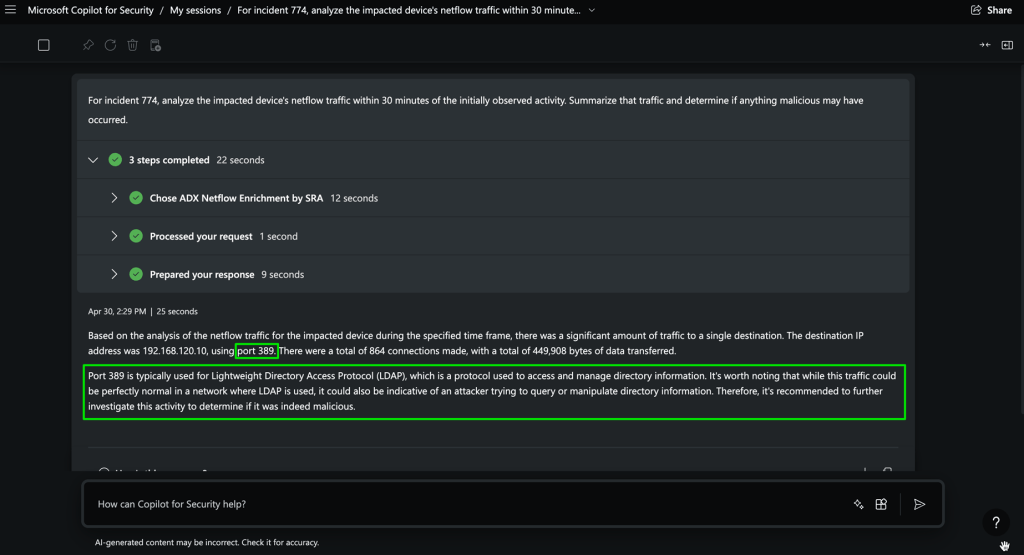
It worked! It successfully grabbed the required fields from the incident we specified, then went to Azure Data Explorer and executed our query. Even better, highlighted in green, we see that Copilot for Security not only retrieved the data, but reasoned over it. You’ll notice in our example, we see a high amount of traffic on port 389 (LDAP), and it recognized that and flagged it as high risk and something that warrants additional investigation.
We are excited to continue exploring and building new solutions around this cool new technology.

Mike Pinch
Mike is Security Risk Advisors’ Chief Technology Officer, heading innovation, software development, AI research & development and architecture for SRA’s platforms. Mike is a thought leader in security data lake-centric capabilities design. He develops in Azure and AWS, and in emerging use cases and tools surrounding LLMs. Mike is certified across cloud platforms and is a Microsoft MVP in AI Security.
Prior to joining Security Risk Advisors in 2018, Mike served as the CISO at the University of Rochester Medical Center. Mike is nationally recognized as a leader in the field of cybersecurity, has spoken at conferences including HITRUST, H-ISAC, RSS, and has contributed to national standards for health care cybersecurity frameworks.