




Introduction
As we discussed in our prior posts, we are enjoying experimenting with Azure’s new AI capabilities by way of Copilot for Security. As many of our clients know, SRA has an excellent threat intelligence program called TIGR that provides both IOCs and regular threat summaries to our clients. (Sign up here to get that, btw!). This service gives us a perfect example to accomplish two things:
- Educate about what vector databases are, how they work, and why security teams should start considering them
- Demonstrate a cool integration capability with Copilot for Security (or other AI tools you may be developing)
What is a Vector Database and Why Should I care?
A vector database is a relatively new type of database that is specifically designed to aid in powering AI search, by providing natural language searching capabilities, and the ability to quickly and accurately retrieve relevant information from within large bodies of text, all without the necessity of needing to have exact matches. In reality, this technology isn’t that new, its probably been driving your favorite search engine for years!
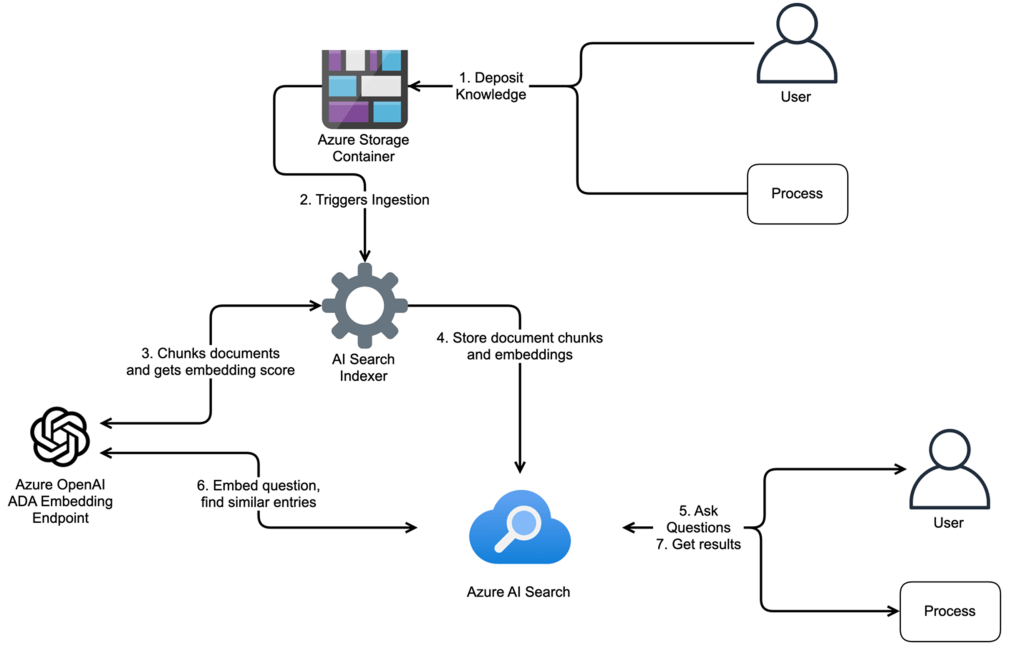
A vector database isn’t all that different from a traditional database, except it typically exposes an interface for ‘preprocessing’ (ingestion) and then a natural language interface for asking questions. So how does it work? The first bit of magic is in the preprocessing phase. In this phase, your data, typically unstructured documents, text, and images, is broken up into small chunks, like say 500 characters, and run through an embedding algorithm. If you’ve heard of embedding before, it is because it is one of the backbones of the modern AI revolution. Embedding algorithms take a block of text and numerically classify the text in hundreds or thousands of different attributes. This means that every block of text broken into little chunks is stored in the vector database in both human readable form, and with numerical scores on all those different attributes and weights. Why would we do this? We can easily then compare two different data entries vector scores against one another using a mathematical algorithm called cosine similarity.
A vector database allows us to store our vector scores of all the little bits and pieces of our documents, but then also allows us to ask questions of our data. The vector database will take a natural language search request, immediately run it through the same embedding algorithm to generate a score, and then return the most similar and relevant results.
In Azure, you can quickly stand up a vector database by simple enabling the Azure AI Search service (formerly known as Azure Cognitive Search). This is a SaaS style vector database that takes only a couple of button clicks to get fired up and running.
Within Azure AI Search, there are many ways to set up data ingestion into your AI Search database, but we will use one of the simplest; setting up an Azure Storage Container to deposit our data into. Azure AI Search will automatically sense changes to that container and ingest and manage your data automatically! A quick overview of the process as it works in Azure, and using the concepts we outlined about vector databases in the last section is depicted below:
That’s great, what does this have to do with my Security Program?
Let’s shift immediately to a real world example that shows a cool integration we are using to augment a modern threat intelligence program using vector databases and Copilot for security. The possibilities are nearly endless, but this example should help kickstart the process for coming up with more use cases!
As we mentioned at the very beginning, the SRA TIGR team puts out regular qualitive threat intelligence updates to all our subscribers. Several months ago, we had the idea to start to also store those threat briefings in an Azure AI Search index, so that we could retrieve and utilize that data with AI if needed. How did we do that? We can spin up a logic app to do that in no time! We simply create a new logic app with an HTTPS Request trigger that receives the SRA threat intel headline and summary, and then use a logic app action to connect and store that data in a new storage container blob as a text file.
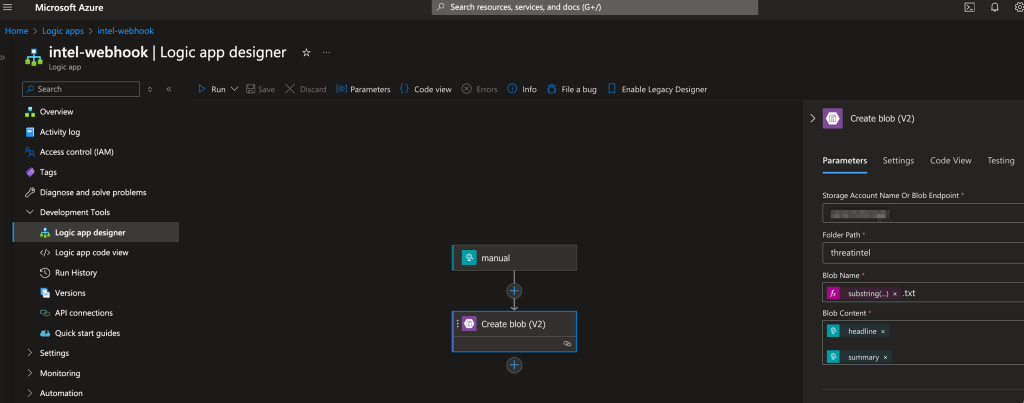
While we tie into our threat intelligence vetting process via a webhook, you could also use an email inbox listener to automatically ingest our emails, or other contextual info you’d want to store.
Once this is complete, we can quickly go to our Azure AI Search instance and bring in all this data by choosing “import and vectorize data” from our main screen. This will walk you through a few simple steps to connect your database to your Azure OpenAI ADA embedding API endpoint. It will also create an ‘indexer’, which will regularly look at your storage container, find new files, and import them into the vector database.

Once you do this, any files you put into your storage container, or send through your logic app will end up ready to be consumed by Azure AI solutions!
Putting it to Use
Within Copilot for Security, we have the ability to connect it to an Azure AI Search index. This is done by clicking the plugins menu, enabling Azure AI Search, and plugging in the name, index, and api keys of your search. You will map fields as well, but the default settings work nicely and are shown below (the value field is your API key which you can get from the Azure AI Search service):

That’s all you need to do to complete to allow Copilot for Security access to this data. To use it, you need to indicate ‘Azure AI Search’ in the plugin name explicitly, at this point in time. Let’s gather some information first from an incident using Copilot for Security:
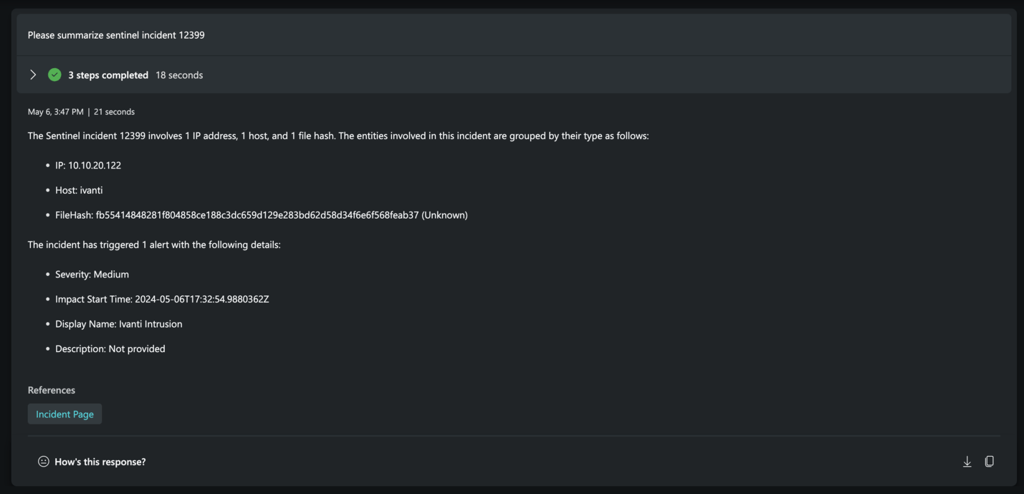
Now, let’s ask it to go to our Azure AI Search index to enrich the IOCs that were just extracted by Copilot for Security. Since our above incident is related to a potential Ivanti breach, we expect to see much of the TIGR threat intel team’s prior work!
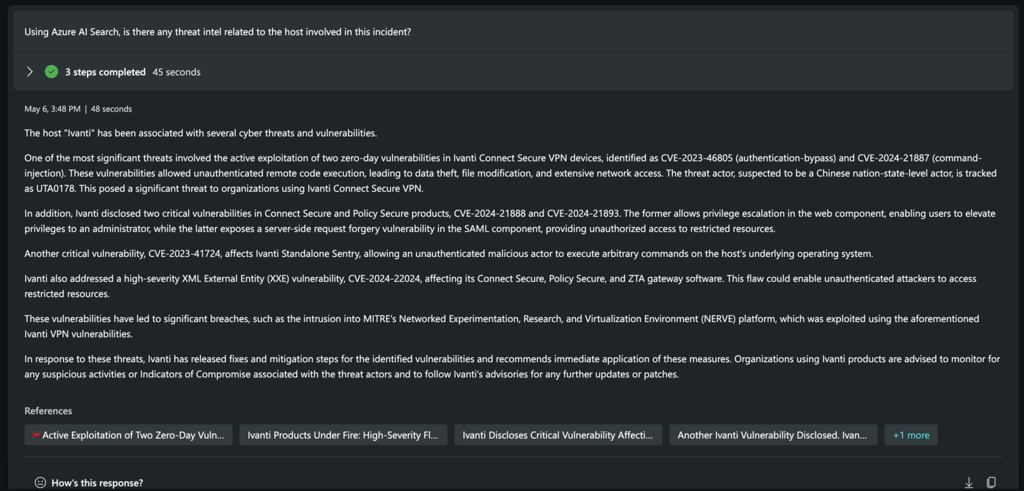
Success! We see Copilot for Security successfully extracted key indicators from Sentinel and was able to retrieve relevant threat intelligence from our custom curated data source.
Summary
In this example, we take the use case of creating an AI enabled vector database and using it to store our threat intelligence summaries, so that we can expose them to Copilot for Security when we need them. Copilot for Security already has excellent integration with Defender Threat Intelligence, but this example shows a great way to add your own custom curated threat intelligence. This is one of dozens of potential use cases for the technology, and while admittedly simple, is one that should illustrate the power of adding contextual relevance to your Copilot for Security experience.

Mike Pinch
Mike is Security Risk Advisors’ Chief Technology Officer, heading innovation, software development, AI research & development and architecture for SRA’s platforms. Mike is a thought leader in security data lake-centric capabilities design. He develops in Azure and AWS, and in emerging use cases and tools surrounding LLMs. Mike is certified across cloud platforms and is a Microsoft MVP in AI Security.
Prior to joining Security Risk Advisors in 2018, Mike served as the CISO at the University of Rochester Medical Center. Mike is nationally recognized as a leader in the field of cybersecurity, has spoken at conferences including HITRUST, H-ISAC, RSS, and has contributed to national standards for health care cybersecurity frameworks.