




Mythic C2 is a popular command-and-control framework and Apollo is one of its more full-featured agents. As part of a purple team exercise, you may want to automate parts of the execution to ease the burden on operators. In this blog, we’ll walk through our approach for building attack automations into our purple team plans, integrations with Mythic C2, and community efforts.
Requirements
An attack automation platform will typically need support for the following capabilities:
- Phased approach to execution (prep/execute/cleanup). Attacks may have dependencies on other resources, so a prep phase is required to create any necessary dependencies, such as an expected directory. Similarly, attacks may create resources that need to be cleaned up after execution to limit any impact after the exercise, such as a scheduled task.
- Support for user inputs, such as specifying a target known only during the exercise
- Support for file uploads (payloads, utilities, etc)
- Multi-step execution. Attacks may require multiple commands to achieve a specific end. For example, creating a new local administrator may require creating a new user, then adding them to a group.
Jupyter
Since we use Mythic C2 and Apollo as part of our standard purple team exercises, we wanted our automation efforts to work within those platforms while meeting the above requirements. The approach we settled on was to leverage the JupyterLab service deployed with Mythic as an interface for operator-managed execution automation. Jupyter notebooks, which are text documents with inline code, are suitable for this use case as they are essentially scripts that can be run with a human in the loop. When hosted within the Mythic JupyterLab service, notebooks also get access to the Mythic SDK and API service.
To create our purple team attack plans, we use the open-source Market Maker tooling. As the tooling is designed to be extensible, we developed two components to integrate Jupyter notebook automation into attack plan development workflows. The first is the “Arbitrageur” script, which generates the notebook using an automation mapping and your existing test case content. The second is an extension for the Darkpool library viewer to add support for downloading the generated notebooks from the UI. Both components are now available on the public Market Maker repository. Refer to the script and extension documentation for details.
A generated attack automation notebook contains all the standard test case details and organization as in VECTR (test cases groups by campaign and containing the descriptions, commands, etc).

List of campaigns within a Jupyter notebook
For each test case that can be automated, a section is added to the notebook with the details. Here, the test case is creating a scheduled task via schtasks.exe:

Example test case within a Juptyer notebook
Prior to running a test, the user connects to Mythic and selects their implant callback.

Mythic login prompt and callback selector within a Jupyter notebook
Then, they can then execute any command cell to have the attack run in the callback. Executing the scheduled task cell will send the schtasks.exe command to the active callback then add the output below the cell
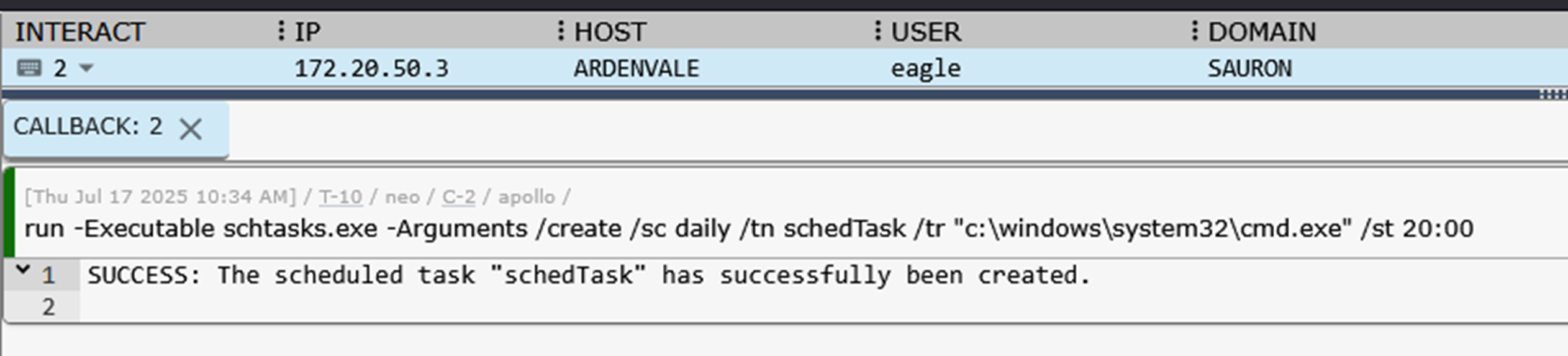

Execution of schtasks.exe in Apollo callback (top) and output mirrored to notebook cell (bottom)
The notebook can also take in data and payloads during execution:
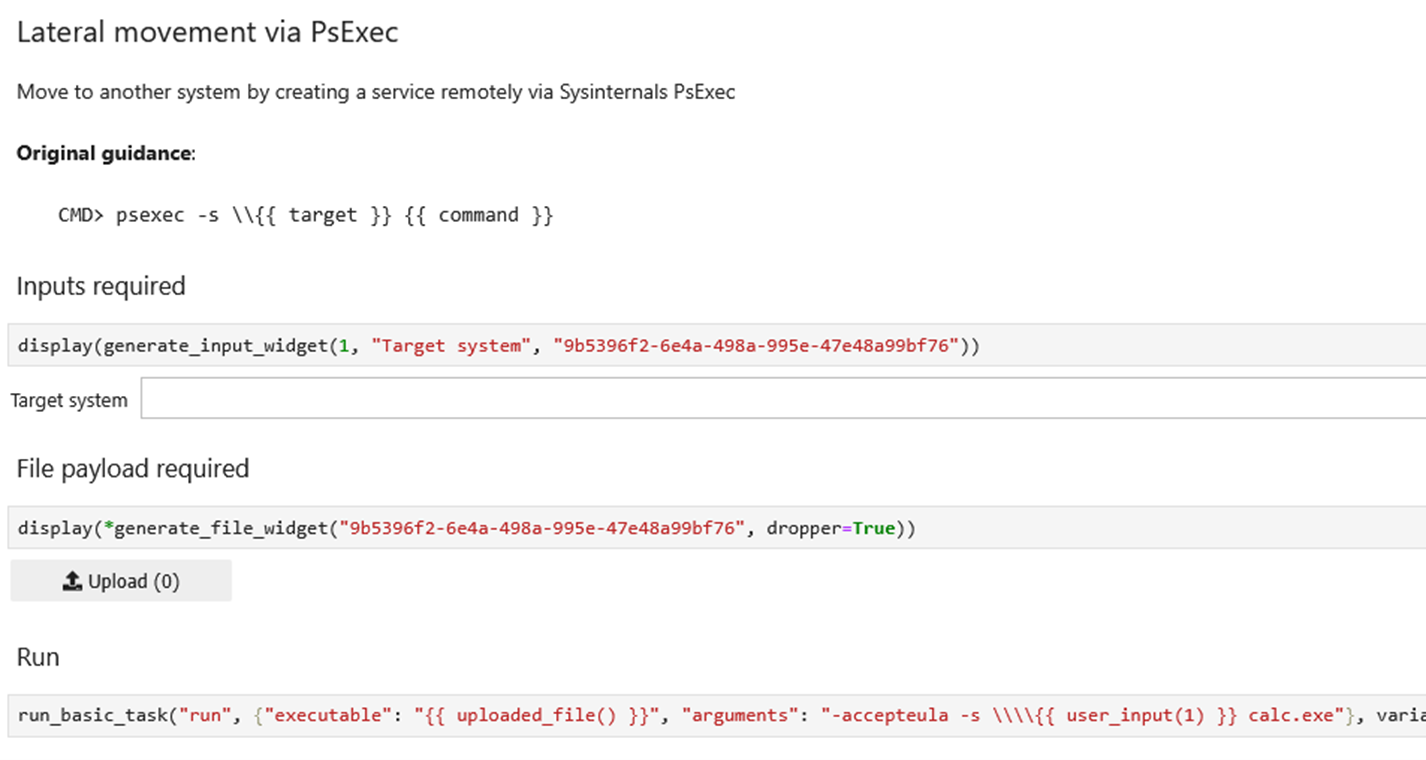
Notebook cells with user provided data
Here, the test case is lateral movement via PsExec. This requires both a target to move to and the PsExec binary.
Logging execution
If you use VECTR to track your exercises, there are typically two ways you update attack details, by hand in the UI or by uploading an ATTiRe log(s), structured logs that contain details about the execution timing, commands, outputs, and targets.
However, if you are also using Mythic, you can alternatively use the VECTR Mythic agent. This agent creates a service connection from Mythic to a VECTR instance and allows for test case management directly in Mythic (via a callback).


VECTR service installed in Mythic and connected
The primary way to update/create test cases using this agent is by targeting a callback task. Commands run via the Jupyter notebooks are ultimately executing within an Apollo callback, so they can be easily imported into VECTR via this agent. In the above scheduled task example, the implant task had ID #10. To import, you only need that task ID and some basic metadata:


Creating a VECTR test case from Mythic (top) and viewing the created test case in VECTR (bottom)
Shout out to Alfie Champion (@ajpc500) for creating this agent. If you are looking to simplify data imports from Mythic to VECTR, give their project a look: https://github.com/MythicAgents/vectr.
Conclusion
If you are looking to automate your Mythic executions, consider Jupyter. You can download the Arbitrageur scripts from the Market Maker repo here: https://github.com/SecurityRiskAdvisors/marketmaker.

Evan Perotti
Evan specializes in network penetration testing, web application security testing, open source intelligence gathering, and security testing process automation.
He has experience in a variety of industries including retail, insurance, financial services, and healthcare.