




Do I really need to store all my logs for 6 years?
Effective October 2nd, 2024, New York State released new Hospital Cybersecurity Requirements, in section 405.46. In it, there are several bold new requirements that start to mimic other standards, such as HIPAA and PCI. Understandably, this caused some concern amongst healthcare CISOs in the state, particularly around Part 405.g.2:
Each hospital shall also securely maintain systems to include audit trails designed to detect and respond to cybersecurity events that have a reasonable likelihood of materially harming any material part of the normal operations of the hospital, and cybersecurity incidents as defined herein. Records pertaining to such audit trail systems shall be maintained for a minimum of six years.
For many this immediately triggers the thought: ‘Do I need to move my SIEM log retention period to 6 years now? I can barely afford 90 days!’
While you should always consult your internal counsel for their advice, SRA and our SCALR solution architecture have an excellent ‘easy button’ to address this particular need. First off, by virtue of our Azure Data Explorer based data lake platform that is at the core of the SOC/SIEM solution, storing logs for 6 years is as easy as a button-click on a table by table basis, but the good news is that you don’t need to do that!
Let’s look a little closer at the definition of a key term used in 405.g.2, ‘cybersecurity events’. It is defined earlier in the document as:
“Cybersecurity event” means any act or attempt, successful or unsuccessful, to gain unauthorized access to, disrupt or misuse the hospital’s information system or information stored on such information system, including but not limited to health records.
This definition seems to use similar wording to other regulations that are generally interpreted to mean actual detected security incidents, not the raw logs and telemetry that our systems see all day every day. As it states, successful or not, those events and the corresponding audit trails for just those events appear to be in scope for retention for the six year period. This is probably only .001% of the volume of all your telemetry.
But how do we solve this?
If you’re in an Azure / Sentinel ecosystem, these steps are adaptable:
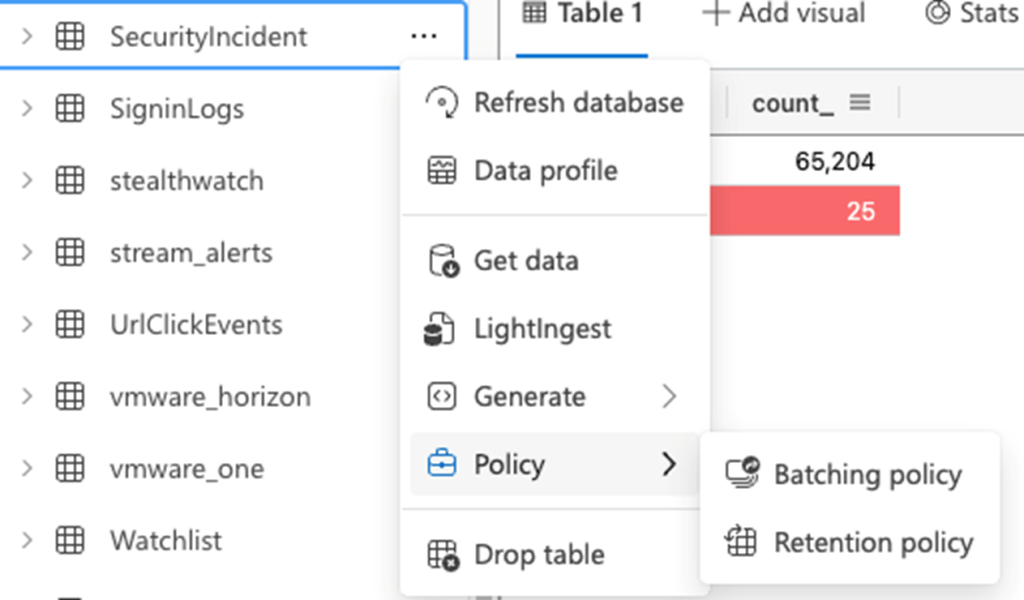
- Set your Security Incidents table to a 6 year retention period. In SCALR XDR, we use an event hub to replicate all security incidents to Azure Data Explorer. You can right click on a table and go to Policy -> Retention policy, and then adjust your table to the 6 year period, after telling this table to no longer inherit values from the overall database for retention. This will set all your security incidents from Sentinel to have a 6 year retention period.
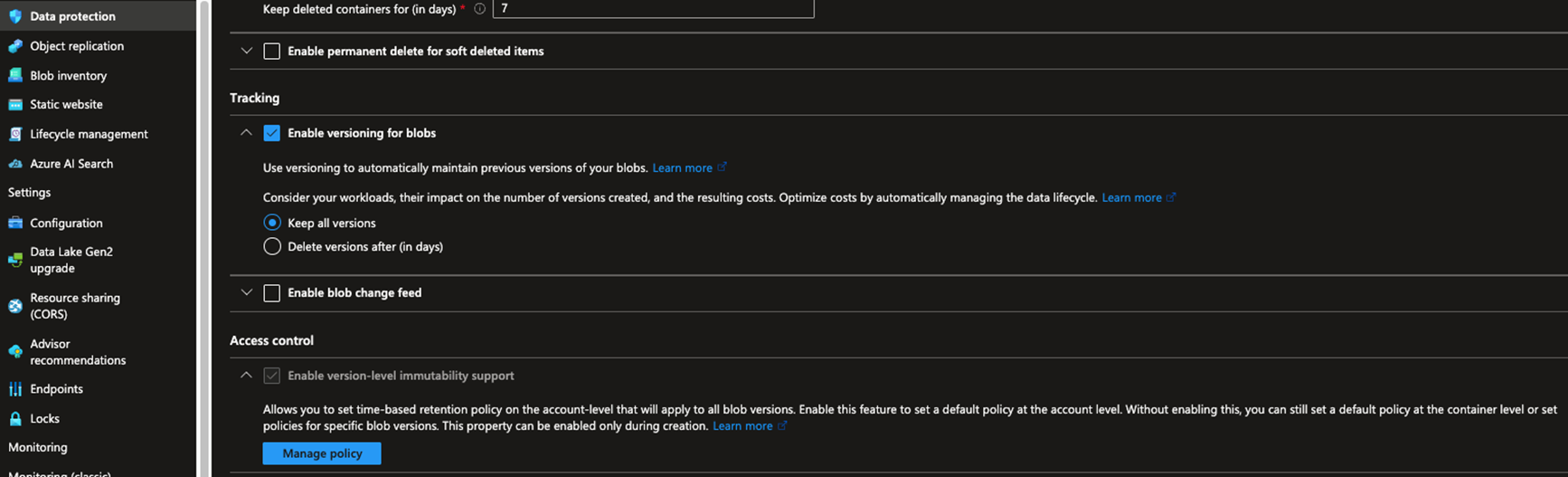
- Establish Azure Storage Containers for accumulated evidence gathering. See my earlier blog about how to create SOAR automation using Azure Logic Apps to create a storage folder for each incident, and use it to store artifacts related to an incident. For this storage container, navigate to Data Protection and enable the immutability policy to support 6 years, so that data can’t deleted from this storage container for the 6 year period.
Please reach out for additional questions or ideas on how to quickly solve challenges with native Azure services!
SRA Can Help!
Get help from SRA’s experts to achieve compliance with New York State’s Hospital Cybersecurity Requirements, Section 405.46.

Mike Pinch
Mike is the CTO at Security Risk Advisors (SRA), where he leads AI innovation, research and development, software, and platform architecture. He was a pioneer in security data lake design and builds cross-platform with depth in Azure and AWS.
Mike has been an IANS Faculty Member for over 10 years and has spoken at many conferences, contributing also to cybersecurity standards. Mike advises the Rochester Institute of Technology GCCIS National Council. Prior to joining SRA in 2018, Mike served in multiple CISO and CTO roles.