




1. A Prelude: The Evolution of Microsoft’s Security Measures
In the past year, Microsoft has opened up its premium audit logs to users with E3 licenses. Previously, premium audit logs such as email access records were accessible only to those with E5 licenses This discrepancy in access led to significant gaps in visibility, leading to greater risk exposure and numerous false positives, as defenders could not determine the scope of an attack. For example, in a situation where a user is phished, without the ‘MailItemsAccessed’ log, it is exceedingly difficult to tell which email items were accessed by the attacker. In many cases, missing this information forces an organization to have to declare all contents of the inbox stolen, when in actuality, it is unlikely that the attacker actually read or exfiltrated every email in the inbox.
Recognizing the critical need for accessibility to audit logs, Microsoft decided to expand access beyond premium licenses. This made vital security logs available to a wider audience at no additional cost. However, the transition wasn’t without its challenges.
2. Navigating the Maze: Accessing Microsoft’s Audit Logs
Acquiring access to Microsoft’s audit logs is not as straightforward as one might think. While the logs exist, accessing, interpreting, and storing them require a bit of finesse. The primary challenge this solution solves is that we will eliminate the need to use powershell cmdlets to access this data, and instead write it out to an Azure Data Explorer table, where it can be stored for a year or more (instead of 180 days) and searched anytime via KQL from Azure Data Explorer or Sentinel. We do this by providing a function app that will coordinate all the data ingestion and storage into Azure Data explorer.
To embark on this journey, one must first ensure that the audit logs are enabled. This can be done through the Microsoft compliance portal or via PowerShell commands.
- Go to https://compliance.microsoft.com/auditlogsearch
- Or use PowerShell:
- Connect to Exchange Online PowerShell
Set-AdminAuditLogConfig -UnifiedAuditLogIngestionEnabled $true
- Source: https://learn.microsoft.com/en-us/purview/audit-log-enable-disable
Microsoft provides a couple of avenues for retrieving audit logs, including Exchange Online PowerShell and the Office 365 Management API. While these logs are not natively exportable, the API comes to the rescue, offering a pathway to extract and process the data.
By tapping into the Office 365 Management API, one can unlock the treasure trove of audit logs. However, the journey doesn’t end there; the data must be processed, filtered, and shaped to derive actionable insights.
Here’s a high-level diagram of the overall flow of email access audit logs to an Azure Data Explorer cluster (and, optionally, to a Microsoft Sentinel SIEM instance).
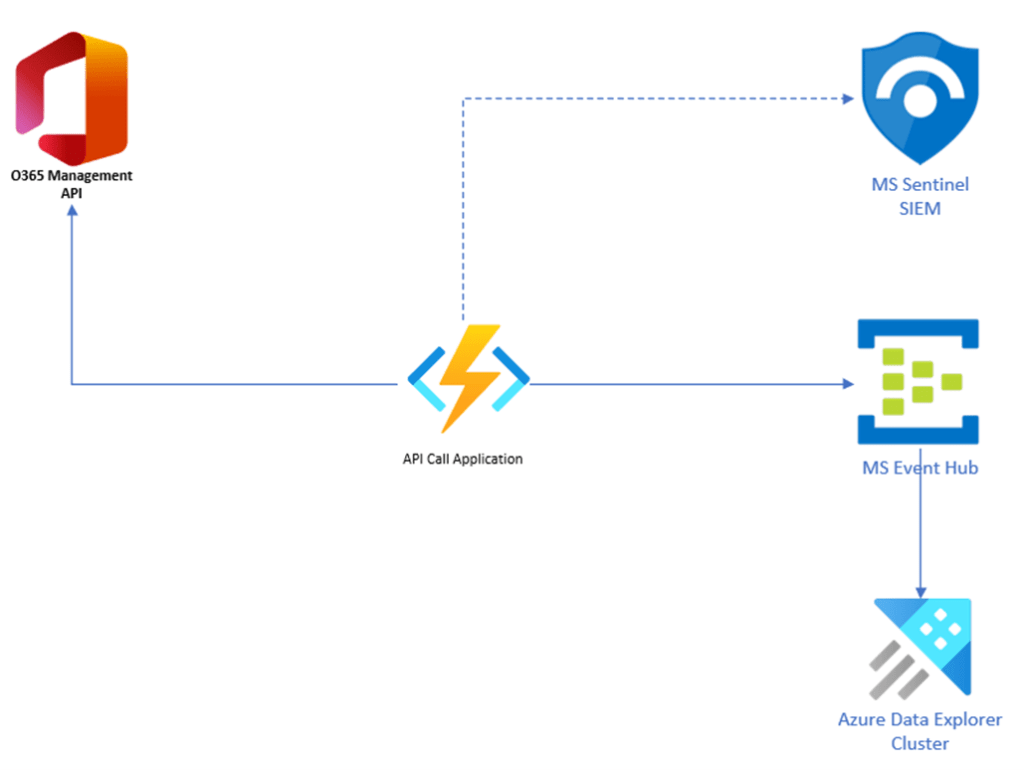
Now that we have an overview of how we’re going to ingest and route this data, let’s try out the API call and see those elusive email access audit logs. Here’s the raw output from the API of a selection of Mail Access audit logs:

As you can see, the API just returns URIs linking to Azure storage blobs. We need a way to extract the contents of these storage blobs and stream them into our SIEM and data lake solutions.
3. Crafting Solutions: Building a Serverless App in Node.JS
Armed with the knowledge of how to retrieve the logs, the next step is to translate this knowledge into action. Building a serverless app in Node.JS proves to be an efficient and cost-effective solution.
The process entails obtaining a bearer token, fetching a list of storage blob URIs, accessing the logs at each blob, and forwarding them to the desired destination. This orchestrated sequence of actions forms the backbone of the serverless app. The overall application logic can be visualized below:
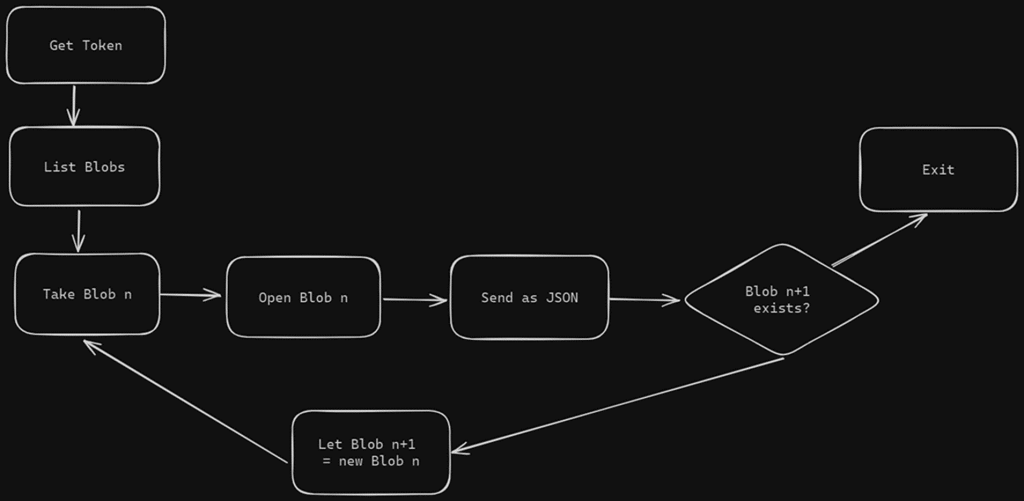
With the application logic mapped out, the execution involves obtaining the necessary credentials, fetching and processing the logs, and ultimately, sending them to the designated destination for further analysis.
4. Real-world Application: Increased Investigation Efficiency
Confronting Reality
In the event of a security breach, having access to audit logs becomes paramount. By leveraging the audit logs and conducting join queries, organizations can gain insights into the extent of the breach and take appropriate measures to mitigate further risks.
A Real-World Example
Now we’ll show how to apply this tool in a real-world scenario, using KQL to investigate logs in our data lake.
Let’s say a client has been compromised.
- We discovered an attacker gained access to a user account and could log in to their email inbox.
- From our org’s MFA logs we can see that a request was sent from a suspicious IP address (logged) and accepted.
- The attacker had access from 7am UTC on 3/14/2024 to 1:30pm UTC on 3/18/2024.
- What emails did the user access?
In our example, we assume that the client already has their Microsoft 365 Email logs (the EmailEvents table) flowing into their Sentinel and ADX instances. This enables us to use a JOIN operation on the InternetMessageId field in both the EmailEvents table and the newly-created microsoft_unified_access_mail table, which contains the data pulled from the API.
In the screenshot below, we ran a KQL JOIN query, looking for records of the suspicious IP (which we obtained from tour MFA logs) accessing company emails during the timeframe of the attack. The results show us the sender, recipient and subject line of the emails accessed, which allows us to narrow the scope of our investigation.

You can see from the above example the relative ease of investigation versus working at the command prompt to manually examine these logs with PowerShell, as recommended by Microsoft here.
Further Exploration
For those eager to delve deeper into the realm of cybersecurity and audit log management, Security Risk Advisors offers additional resources. Stay tuned for updates on SRA’s GitHub repository and blog for insights and practical guidance.

Richard Smith
Richard has a wealth of experience in the IT field, having spent 10 years in hospital-based systems and network engineering before moving into Cybersecurity. In his time at SRA he has managed security operations for Fortune 100 companies and engineered Secure Data Pipeline solutions for many SCALR XDR clients. He holds Master's degrees from Cambridge, Yale and Bellevue Universities and is CySA+ certified.
Prior to joining SRA, Richard worked as a virtualization consultant, where he architected, engineered and deployed converged and hyper-converged infrastructure solutions across a broad range of industries.