




If you haven’t checked in on Intune lately, it has come a long way from its MDM origins. Intune has steadily grown beyond simple device configuration into something that operates like a full endpoint management platform.
Microsoft has announced that Intune Suite capabilities will be included for Microsoft 365 E3 and E5 customers starting July 2026. Although E5 is still required for full Intune Suite functionality, the separate Intune Suite add‑on license that previously cost around ten dollars per user per month is now included. This removes the additional licensing expense and, in many environments, allows organizations to save on external tools with overlapping functionality.
For organizations already licensed for Microsoft 365 E5, the Intune Suite components that were once optional add‑ons are now part of the baseline investment. That change alone is likely to prompt renewed attention from teams that may have previously evaluated Intune Suite but delayed adoption (we see you MacOS).
Below is a quick breakdown of what’s included in Intune Suite:
E3
- Remote Help
- Intune Advanced Analytics (AA)
E5
- Endpoint Privilege Management (EPM)
- Enterprise App Management (EAM)
- Cloud PKI
- Plus, what’s in E3 (Remote Help/Advanced Analytics)
SRA has worked with several organizations test, configure, and deploy Intune Suite. In some of these organizations the features were compared against their existing solutions such as Tanium, Patch My PC, and Delina. In our experience, organizations tend to evaluate/adopt Intune Suite in the following order:
1. Advanced Analytics: A Quick Win to Turn on First
Advanced Analytics is one of the fastest ways to start gaining value from Intune Suite. It builds upon the existing Intune Endpoint Analytics capabilities by providing more detailed and granular insights into device performance, reliability, and overall health (often related to EDR products). Endpoint telemetry data is streamed to a lightweight Log Analytics workspace, providing a clearer picture of how endpoints are behaving and helping teams proactively identify and resolve issues before they impact users.

Example of Intune Audit Logs in Log Analytics Workspace
In our experience, organizations often start by using this data to build structured KQL queries for role‑specific Power BI dashboards that visualize trends across devices, users, and support scenarios. This allows IT, Security, and Operations teams to work from a shared view of endpoint health rather than relying on isolated tooling or anecdotal user reporting. A common starting point is using these dashboards to identify devices or user groups with recurring performance or reliability issues, allowing teams to proactively address underlying causes rather than reacting to individual tickets.
One standout feature of Advanced Analytics is the ability to export telemetry data to an Azure Data Explorer (ADX) data lake. This enables deeper querying and long‑term analysis of device trends, as well as the ability to correlate endpoint data with other operational datasets to support centralized reporting strategies. Some teams extend this further by leveraging Azure Foundry (AI) to analyze Intune data in ADX, helping accelerate incident investigation and troubleshooting while maintaining visibility into AI token usage.
Because Advanced Analytics builds on existing Intune management capabilities, there is no need to install additional agents or disrupt end users. Once the Endpoint Analytics and Device Inventory policies are assigned to Intune‑managed devices, telemetry begins flowing automatically into the Log Analytics workspace. For many IT teams, Advanced Analytics delivers immediate value without adding complexity. The longer‑term challenge is determining how to integrate the data into existing operational processes and metrics.
2. Endpoint Privilege Management: The Biggest Differentiator
Endpoint Privilege Management (EPM) is one of the most impactful Intune Suite features, as it introduces a capability many organizations did not previously have or were required to use additional third-party tools.
EPM lets you manage and restrict the use of local admin privileges in more defined ways, including:
- Time-Bound Elevation – Helpdesk team temporarily elevating privileges to change configurations.
- Automated and semi-automated approval workflows – Web Development team requires approval for routine edit rights to Hosts file to preview a website in development.
- Logging and reporting – Visibility and reporting for “unmanaged” local admin activities.
- Automatic elevation for approved apps – Standard users temporarily elevating privileges to update display drivers or install a printer.
Compared to other Intune Suite modules, EPM deployment does require more upfront planning. Organizations need to identify and define elevation scenarios and workflows before deployment, which is why we recommend starting with a focused pilot and expanding as use cases are refined.
A common early adoption use case focuses on how Helpdesk teams get admin rights on devices for end user support. Instead of assigning broad, permanent local admin access, teams move to just-in-time elevation structure where specific pre-approved use cases can automatically be achieved with or without approval. These activities are then logged and can be sent to the data lake for reporting, auditing, or future troubleshooting purposes.
For users with existing local admin rights, EPM will log and report on elevation activity. This visibility also helps inventory additional use cases that are better managed through structured EPM workflows over time. That reporting can then be coupled with a Log Analytics workspace or centralized data lake as part of a broader monitoring and analytics strategy, enabling your organization to correlate privilege activity with other endpoints or security data. This structure its perfect for visualizing data in PowerBi dashboards for Security, IT, and Audit to track approved and non-approved usage.
The main limitation today is that EPM currently only works with Windows. If your organization has a large MacOS user base, a different tool is needed.

EPM Elevation prompt with a business justification required
3. Enterprise App Management: Fewer Packaging Headaches on Windows
Many organizations have long relied on separate third-party tools like Tanium and Patch My PC out of necessity to fill gaps in 3rd party app management. With EAM and the rest of the Intune Suite, many organizations are rethinking the need for another standalone 3rd party app management platform.
EAM offers a growing catalog of pre-packaged Win32 applications ready for deployment (933 as of this post), which can be a real time-saver if you are tired of manually packaging common apps or constantly maintaining installers. For apps in the catalog, updates are automatically detected but require admin approval before deployment. This lets admins control when and how updates are rolled out, helping maintain stability and reduce unexpected disruptions. For apps not in the catalog, you use standard Intune Win32 app deployment processes.
The immediate value of EAM often comes not from adopting new software, but from better managing applications organizations already depend on. Tools like Dell Command Update or widely used productivity applications such as Snagit are already common in many environments, yet they are often managed through custom packaging, scripts, or separate tools. EAM eliminates that overhead by handling common apps centrally within Intune, allowing organizations to realize benefits quickly without changing their existing application portfolio.
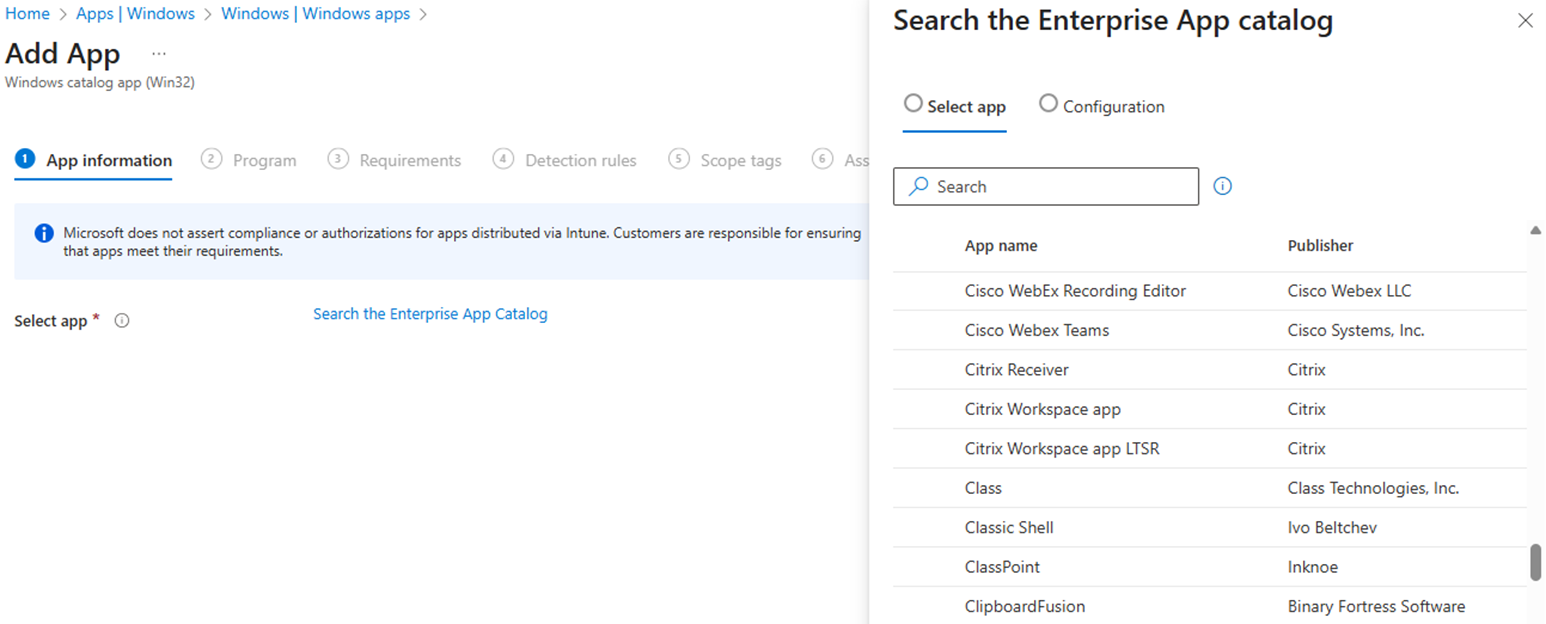
EAM App Catalog
One of EAM’s biggest differentiators is how naturally it integrates into Intune. It requires no additional agent, no separate infrastructure, and no separate admin experience. App deployment, configuration management, and OS patching all happen in the same place, making it a straightforward way to simplify app deployment, reduce tool sprawl, and leverage Microsoft’s unified endpoint management platform. Unless you have many custom or line-of-business apps not in the catalog, EAM tends to be a good fit for most organizations’ needs.
It is also worth noting that the EAM app catalog currently supports Windows applications only. Organizations with MacOS environments can still manage applications via Intune, but through the existing, more manual processes.
4. Remote Help: A Good Way to Standardize Windows Support
The Remote Help module provides Helpdesk teams with a secure, consistent way to assist users through cloud-based remote sessions. For many organizations, it replaces ad-hoc screen sharing, phone troubleshooting, and scattered third-party tools with something centralized, auditable, and integrated with Intune.
Remote Help uses the Entra ID roles and group structures organizations already have in place to control access. There is no separate identity model or permissions framework to build and maintain inside the remote access tool. Support roles map directly to existing Entra groups, which simplifies administration, keeps access aligned with standard onboarding and offboarding processes, and makes auditing and access reviews easier to manage.
From there, the Remote Help client is deployed through Intune using the same app deployment approach already in place for Microsoft 365 applications. IT teams assign the client to specific user or device groups, then technicians sign in using Entra ID and connect when support is requested. Session activity is tied to identity and logged, which improves traceability and supports both security and help desk operations.

Remote Help session initiation
One of the main limitations to broader adoption so far has been the lack of unattended access. This capability, which allows Helpdesk teams to connect to devices without requiring a user to be present, is expected to roll out early this year (2026). Once available, it should enable off‑hours maintenance and remote troubleshooting when users are unavailable, addressing a common operational gap we see today.
Remote Help currently focuses on Windows and offers partial MacOS support. For many organizations, that already covers the majority of enterprise support scenarios. Microsoft continues to expand capabilities, and it is reasonable to expect broader device coverage and deeper integration over time.
5. Cloud PKI: Certificate Management Without Servers
Cloud PKI is Microsoft’s cloud-hosted certificate authority built to work with Intune-managed devices. If you are a cloud-first/cloud only organization or if you are just trying to move away from maintaining on-premises PKI infrastructure, this is one of the most meaningful additions. Notably it also supports Windows, MacOS and mobile device platforms.
In practice, adoption has been relatively limited in our experience so far. We believe this has largely been driven by historical cost considerations and the fact that many organizations already have on‑premises PKI environments in place. For teams that have already invested in certificate servers, connectors, and operational knowledge, the incentive to move away from that model has not always been strong.
Functionally, Cloud PKI secures device authentication and encryption across platforms without requiring on‑premises servers or certificate connectors. It centrally handles certificate issuance, renewal, and revocation, removing the traditional dependencies on local infrastructure. By eliminating on‑premises PKI components, Cloud PKI also reduces the ongoing maintenance burden associated with server management, patching, connector upkeep, and troubleshooting.
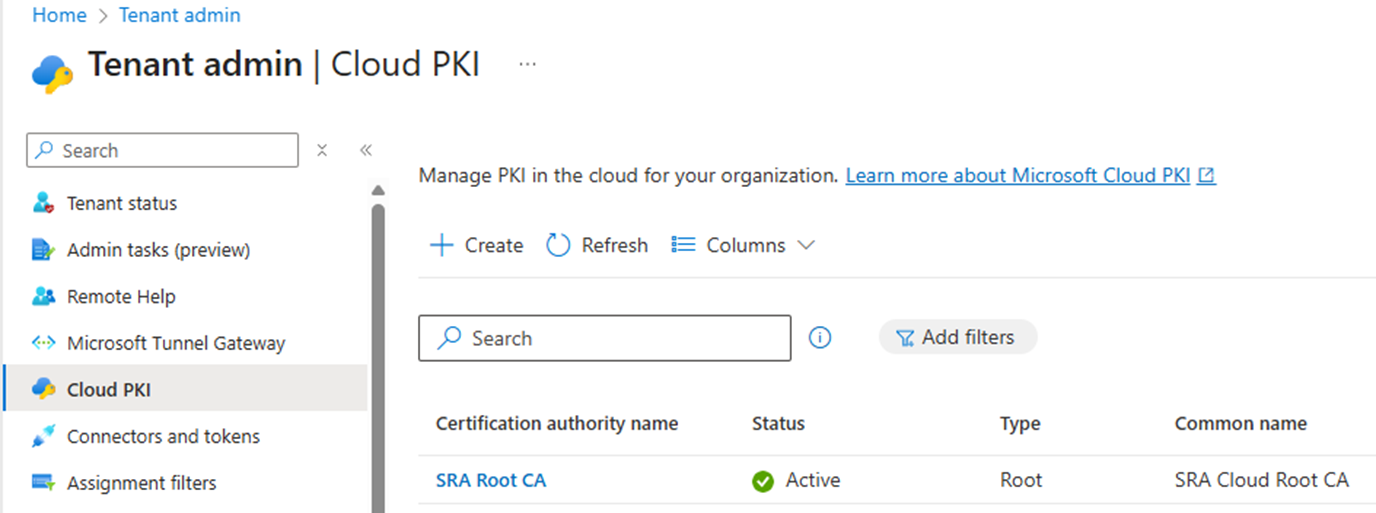
A Root CA managed in Cloud PKI
This is where the inclusion of Cloud PKI in E5 becomes more significant. With cost no longer a primary barrier, organizations can start evaluating whether it still makes sense to operate and maintain on‑premises certificate infrastructure at all. As teams revisit their broader Intune and cloud strategies, Cloud PKI is likely to come up more often as a way to simplify certificate management without introducing new infrastructure.
That said, Cloud PKI will not be a priority for every organization. If an existing PKI environment is stable, well‑managed, and meets current requirements, there may be little urgency to change. However, for cloud‑first organizations, Cloud PKI offers a simpler approach to certificate management without relying on on‑premises or home‑grown solutions.
Why This Matters
In July 2026, when Intune Suite features become part of E3 and E5, the default capabilities for Endpoint teams will improve significantly. Put simply, with Intune Suite organizations can mature endpoint management without having to negotiate extra funding or manage multiple products.
You’ll get:
- The chance to simplify your endpoint stack by reducing third-party tools and licensing costs, especially in Windows-heavy environments
- Better visibility into device health and performance on Windows and macOS
- Stronger just-in-time privileged access management controls for Windows
- Easier third-party application management through a growing app catalog focused on Windows
- A consistent, secure support experience for remote support on Windows
- Cloud-native certificate services that eliminate legacy PKI headaches across Windows, macOS, and mobile
What You Should Do Next
You have time before July 2026 to get ready and make the most of this change:
- Review your current endpoint management and support tools to identify overlapping capabilities, legacy systems, and gaps that Intune Suite can address.
- Pilot Intune Suite features using trial licenses to evaluate how they fit your environment and identify any operational impact before a broader rollout.
- Plan how to consolidate tools, adjust processes, and realign licensing to simplify your endpoint management and reduce ongoing costs.
Getting ahead now means you’ll be ready to take full advantage when these capabilities become part of your standard E3/E5 Microsoft 365 licenses.
We provide a half‑day Intune workshop to help organizations assess the maturity of their endpoint management practices and define a practical, high‑level roadmap for Intune.
Intune Workshop
In this half-day workshop, discover how Microsoft Intune helps your organization secure and manage endpoints across your entire environment. We will cover core Intune capabilities such as device enrollment, compliance policies, configuration profiles and app protection policies along with advanced Intune Suite features like Endpoint Privilege Management (EPM) and Advanced Analytics. Our experts will guide you through best practices for strengthening security across corporate and BYOD devices, enforcing technical policies to protecting sensitive data without compromising user productivity. This session is designed to help you maximize the value of Intune by leveraging the full potential of E3/E5 licensing.
Workshop Agenda:
- Discuss common challenges in endpoint management and security
- Understand your organization’s device and application landscape
- Review existing Intune configurations and identify opportunities for improvement
- Explore advanced Intune Suite capabilities such as Endpoint Privilege Management and Advanced Analytics
Outline next steps and roadmap initiatives for a modern endpoint management program
Deliverables:
- High-Level Intune Maturity Overview and Roadmap Document
Centralize endpoint management and security across identities, devices, apps, and data while lowering costs and maximizing your Microsoft 365 E3/E5 investment with Intune and the Intune Suite.

Alex Papadoplos
Alex is a security leader focused on enterprise IT, endpoint management, and Operational Technology (OT). He serves as a lead for the endpoint security and OT security practices, guiding teams and translating hands‑on technical work into clear, actionable direction for technical and senior leadership.

Matt Schneck
Matt focuses on incident response, forensics, and advanced endpoint security solutions with various Endpoint Detection and Response (EDR) platforms including Tanium, CarbonBlack, CrowdStrike, Cybereason, and others.
Matt works to develop detection rules for emerging attacks and has significant experience engineering and implementing detection solutions with a focus on mining endpoint data.
Matt frequently crosses the bounds of technical configuration and effective communication to solve problems for clients. He frequently works with clients in the financial, pharmaceutical, and manufacturing fields, among others.
Matt is a GIAC Certified Forensic Examiner (GCFE).

Jonathan Sechrist
Jonathan specializes in endpoint security engineering and device hardening. He designs and implements strategies to secure enterprise, cloud, and mobile devices, ensuring alignment with client’s security goals to industry best practices such as CIS Benchmarks and MITRE ATT&CK Mitigations.
Prior to his current role, Jonathan honed his expertise at SRA’s CyberSOC, where he focused on incident response, threat hunting, and detection engineering.
Jonathan holds a degree in Computer & Information Sciences concentrating in Cyber Security from Harrisburg University of Science & Technology.