




Executive Summary:
Adversary-in-the-Middle (AiTM) phishing has become a dominant technique for bypassing Multi-Factor Authentication (MFA). Rather than simply stealing credentials, AiTM attacks intercept the session cookies generated after a successful MFA event, allowing threat actors to replay authenticated sessions and gain account access, often without triggering additional authentication prompts. The commercialization of this technique through Phishing-as-a-Service (PhaaS) platforms has dramatically lowered the barrier to entry. Today, a threat actor with minimal technical skill can subscribe to a polished, subscription-based phishing platform for as little as $120 and execute MFA-bypass campaigns targeting hundreds of thousands of organizations. In early 2026, a dominant platform — Tycoon 2FA — was sending over three million phishing messages per month before being disrupted by a coordinated Europol-led takedown in March 2026. This blog provides a current overview of the AiTM threat landscape, active phishing kits, and hardening guidance for Microsoft 365 and identity-driven environments against AiTM attacks.
What is Adversary-in-the-Middle (AiTM) Phishing?
In traditional phishing, the attacker simply collects a username and password. In AiTM, the attack goes further: a malicious reverse proxy server is positioned between the victim’s browser and the legitimate authentication service. When the victim enters their credentials and completes an MFA challenge on the fake login page, the proxy relays everything to the real service. This captures the resulting session cookie in the process. The attacker can then replay that cookie to access the victim’s account as if they had authenticated legitimately, without ever needing the MFA code again.
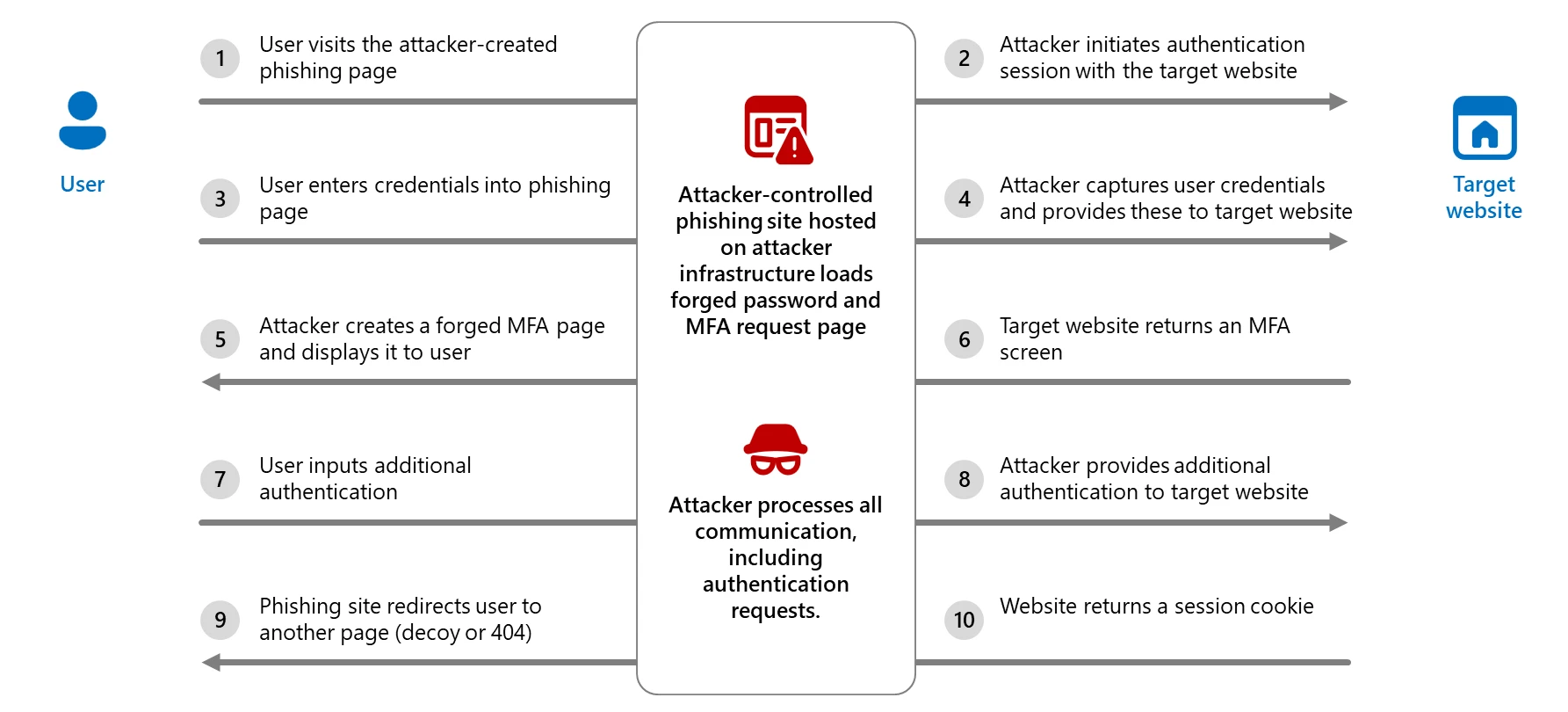
After initial compromise, AiTM attacks commonly lead to:
- Business Email Compromise (BEC) – using the stolen session to send fraudulent financial requests
- Lateral phishing – using the compromised account to target the victim’s contacts
- Data exfiltration from cloud storage (SharePoint, OneDrive, Google Drive)
- Persistent access via inbox rules, OAuth app grants, and registered MFA methods
- Ransomware deployment following initial cloud access
Why Threat Actors Favor AiTM
Bypasses Standard MFA: Unlike password-only attacks, AiTM defeats TOTP codes, SMS codes, push notifications, and app-based authenticators. Only phishing-resistant MFA methods such as FIDO2 hardware security keys and certificate-based authentication are immune to AiTM relaying. According to Proofpoint, in 2025, 59% of successfully compromised accounts that experienced account takeover had MFA enabled at the time of compromise.
Operates Through Legitimate Infrastructure: Modern AiTM kits leverage legitimate cloud platforms like Cloudflare for domain hosting, legitimate redirect services to obscure malicious URLs, and real TLS certificates so the padlock icon in the browser offers no warning to victims.
Phishing-as-a-Service Lowers the Barrier: Turnkey PhaaS platforms provide pre-built templates, automated MFA relay infrastructure, campaign management dashboards, and customer support to criminal subscribers. Barracuda Networks found that approximately 30% of credential attacks in 2024 used PhaaS, a figure expected to reach 50% in 2025. By year-end 2025, 90% of high-volume phishing campaigns ran on PhaaS platforms.
Anti-Analysis and Evasion Built In: Commercial kits include CAPTCHA challenges, IP filtering that blocks security vendor ranges and known crawlers, browser fingerprinting, URL randomization, domain rotation, and code obfuscation to stay ahead of detection rules and URL reputation services.
The AiTM Threat Landscape: Active Kits as of Early 2026
Several commercial platforms now enable large-scale AiTM campaigns. The following table highlights widely observed kits as of early 2026.
| Kit / Platform | Category | Primary Targeting |
| Tycoon 2FA | PhaaS (Commercial) | Microsoft 365, Gmail; broad enterprise sectors |
| EvilProxy | PhaaS (Commercial) | Microsoft 365, Google, Apple, GitHub, and others |
| Sneaky 2FA | PhaaS (Commercial) | Microsoft 365 accounts |
| NakedPages | PhaaS (Commercial) | Microsoft 365; consistent activity through 2025 |
| Mamba 2FA | PhaaS (Commercial) | Microsoft 365 / Entra ID; enterprise SSO |
| Salty 2FA | PhaaS (Commercial) | Microsoft 365 |
| Storm-1167 | PhaaS (Commercial) | Banking, financial services; targeted enterprise |
| Greatness | PhaaS (Commercial) | Microsoft 365 business accounts |
| Whisper 2FA | PhaaS (Commercial) | Broad; minimal infrastructure footprint |
| BlackForce | PhaaS (Commercial) | Disney, Netflix, DHL, UPS; consumer and enterprise |
| Caffeine | PhaaS (Commercial) | Microsoft 365 and Russian-language platforms |
| Dadsec / Rockstar 2FA | PhaaS (Commercial) | Microsoft 365; broad enterprise |
| Evilginx / Evilginx2 | Open Source Framework | Any service with available phishlet |
Threat Hunting and Detection Opportunities for AiTM Phishing
As with any hunting and detection effort, effectiveness depends heavily on the visibility available in the environment and how often similar activity occurs as part of legitimate business operations. AiTM activity can blend into normal cloud authentication patterns because the victim often completes a real login against a legitimate identity provider. That means defenders should avoid treating any single sign-in anomaly as definitive proof of compromise. Instead, hunting should focus on correlated signals across identity, email, clickstream, and endpoint telemetry.
For Microsoft 365 and Entra ID environments, the most useful starting points are:
- sign-in telemetry showing risky browser based access from unmanaged or unknown devices
- email URL click activity that immediately precedes a risky sign-in
- post authentication behavior that suggests session hijacking rather than normal user activity
- endpoint/network artifacts consistent with captive portal or staged redirection workflows
A practical detection strategy is to hunt for the sequence, not just the event:
phishing lure → click → suspicious browser sign-in → anomalous post authentication activity.
Key Hunting Areas
| Hunting Focus | Why It Matters | AiTM Relevance |
| Risky browser sign-ins (anomalous geo location, impossible travel, or unusual user agents) from unmanaged devices | AiTM kits commonly operate through browser sessions and often result in successful authentication from devices lacking normal trust attributes | Helps surface session theft and attacker reuse of authenticated sessions |
| URL clicks from email immediately before risky sign-in | Many AiTM attacks begin with phishing emails linking to proxy infrastructure or staged redirect flows | Helps connect the lure to the suspicious login |
| Captive portal or redirect-based downloads | Some AiTM operations, including more advanced interception scenarios, may use staged redirects before payload delivery or further authentication abuse | Useful for niche but high value hunts |
| Post login mailbox or cloud changes | AiTM frequently leads to inbox rules, read/delete actions, or follow on phishing rather than stopping at login | Helps distinguish harmless anomalous sign-ins from actual compromise |
Interpreting Hunt Results
The biggest mistake in AiTM hunting is assuming that a single suspicious sign-in equals confirmed compromise. A better approach is to treat these hunts as stackable indicators.
The following combinations are more meaningful than any one signal alone:
| Combined Signals | Investigative Value |
| Risky browser sign-in + unmanaged/untrusted device + missing device identifiers | Strong initial indicator of suspicious session activity |
| Risky sign-in + recent email URL click | Strong evidence of phishing driven authentication abuse |
| Risky sign-in + post login inbox rule creation or message deletion | Suggests account takeover rather than benign anomaly |
| Redirect event + file download + unusual sign-in activity | Higher value signal for advanced or staged AiTM activity |
In practice, the strongest AiTM investigations are built by correlating telemetry across Entra ID, Defender for Office 365, Defender XDR, Exchange Online, and endpoint/network events.
Recommended Follow On Investigation Steps
When one of these hunts returns a meaningful lead, the next steps should focus on proving or disproving session hijacking rather than just confirming that a suspicious login occurred.
Investigators should review:
- the full sign-in history around the event
- MFA details and whether the user recalls approving a prompt or entering a code
- mailbox rule creation, read/delete activity, and external forwarding
- OAuth app grants or token related post authentication changes
- SharePoint, OneDrive, and Teams access following the suspicious session
- other recipients of the same lure email or clicked URL
Additional Recommendations and Mitigations
Phishing-Resistant MFA and Conditional Access Enforcement: Deploy FIDO2/passkeys, Windows Hello for Business, or Certificate-Based Authentication, then enforce them through Conditional Access authentication strength policies for employees and external users accessing critical applications. Enabling phishing-resistant methods without enforcement allows attackers to force victims down to weaker authentication paths during the phishing flow.
Intune Compliant and Trusted Device Enforcement via Conditional Access: Design and implement Intune compliance policies for all workstations used by admins, especially Global Administrators. Require all accounts used by admins (standard, privileged, etc.) to use Intune Compliant and Trusted devices via Conditional Access. *Note – Dependencies such as Intune, as well as Emergency Access Accounts (Break Glass) must be configured prior to enforcing these CAPs.
Safe Links and Safe Attachments: Enable Safe Links and Safe Attachments in Microsoft Defender for Office 365, including time-of-click URL verification across email, Teams, and SharePoint Online.
Zero-Hour Auto Purge (ZAP): Enable ZAP in Defender for Office 365 to retroactively quarantine malicious phishing, spam, or malware messages already delivered to mailboxes based on newly acquired threat intelligence.
Automatic Attack Disruption: Configure Automatic Attack Disruption in Microsoft Defender XDR to contain AiTM campaigns in progress, limit organizational impact, and provide security teams additional remediation time.
Centralized Logging and Detection: Forward Entra ID sign-in logs, audit logs, and Defender XDR alerts to a SIEM.
Incident Response Readiness: Build playbooks assuming session theft, not just credential theft. Scope response to include session revocation, MFA method review, inbox rule inspection, OAuth grant audits, and cloud service access review.
User Awareness: Train users that HTTPS does not validate legitimacy, to verify login domains precisely, and to use bookmarks over email links for M365 and other critical services.
Sources
- https://www.microsoft.com/en-us/security/blog/2026/03/04/inside-tycoon2fa-how-a-leading-aitm-phishing-kit-operated-at-scale/
- https://www.proofpoint.com/us/blog/threat-insight/disruption-targets-tycoon-2fa-popular-aitm-phaas
- https://www.huntress.com/phishing-guide/man-in-the-middle-phishing
- https://www.threatlocker.com/blog/aitm-phishing-attacks-against-microsoft-365-mfa-bypasses-session-hijacking-and-bec
- https://windowsforum.com/threads/cloud-hosted-aitm-phishing-how-enterprise-socs-fight-mfa-bypass.400028/
- https://www.microsoft.com/en-us/security/blog/2026/01/21/multistage-aitm-phishing-bec-campaign-abusing-sharepoint/
- https://www.sentinelone.com/cybersecurity-101/threat-intelligence/what-is-an-adversary-in-the-middle-aitm-attack/
- https://www.microsoft.com/en-us/security/blog/2025/07/31/frozen-in-transit-secret-blizzards-aitm-campaign-against-diplomats/
- https://attack.mitre.org/techniques/T1557/
- https://securitylabs.datadoghq.com/articles/investigating-an-aitm-phishing-campaign-m365-okta/
- https://windowsforum.com/threads/typosquatting-and-aitm-the-new-wave-in-microsoft-phishing.391893/
- https://windowsforum.com/threads/defending-against-advanced-aitm-phishing-attacks-on-microsoft-365-and-google-accounts.370057/
- https://www.proofpoint.com/us/blog/email-and-cloud-threats/aitm-phishing-attacks-evolving-threat-microsoft-365
- https://www.darktrace.com/blog/detecting-and-mitigating-adversary-in-the-middle-phishing-attacks-with-darktrace-services

Richard Andrews
Cyber Security Professional & DEI Leader, with years of experience in the field of information security in both a corporate consulting space and the federal government. Richard is particularly passionate about Cyber Threat Intelligence and transforming threat intelligence into actionable insights, specializing in security operations, incident response, and threat detection. Richard attended Penn State University, where he majored in Security and Risk Analysis and is a proud Air Force veteran.

Vanessa Joseph
Vanessa is a experienced cybersecurity professional who's passionate about cyber threat intelligence, threat hunting, and incident response. Her work focuses on proactive threat hunting and intelligence analysis to identify threats and strengthen detection and incident response capabilities.
She earned her B.A. in Administration of Justice and M.S. in Homeland Security with concentrations in Digital Forensics and Cybersecurity from Salve Regina University.

Kofi Atuobi
Kofi holds a BS in Computer Science and a MS in Cyber Security. He is certified by CompTia in Security+, CySA+, and SSCP (Systems Security Certified Practitioner) and is currently pursuing his SANS GMON.
Kofi daily tasks include 24/7 monitoring and incident response for irregular events in corporate environments.
He serves as a Deputy Client Lead. His duties can include analyst training, analyst access management, proactive threat hunts, and tool engineering (CrowdStrike and Cylance) and develop procedures for a more efficient team and process.
Kofi has worked with clients across industries such as healthcare, pharmaceutical, and financial services.
Prior to joining SRA, Kofi worked as a Solutions Architect and Application Developer for finance and retail companies.