




Threat actor groups such as Akira Ransomware, Curly COMrades, and UNC3886 have been observed abusing native Windows Hyper-V virtualization features to create hidden Virtual Machines (VM), establishing covert, long term operations that include the adversary performing internal reconnaissance, deploying malware implants and proxying network activity whilst evading host-centric monitoring tools.
Organizations that aren’t auditing virtualized endpoints and that don’t have tailored endpoint detections alongside network observability may be at risk.
This blog post will examine the methods used by these malicious actors to abuse native virtualization features and detection strategies organizations can implement against these attacks.
What is Hyper-V?
Hyper-V is a built-in virtualization platform in Windows operating systems known as a hypervisor.
There are two main hypervisor types, type-1 (bare-metal) and type-2 (hosted). Hypervisors allow virtual environments to share hardware resources from a single host.
Type-1 hypervisors, such as VMware ESXi and Microsoft Hyper-V, are hypervisors that run directly on a host’s hardware with no other software or operating system in between it and the hardware.
Type-2 hypervisors, such as VirtualBox and VMware Workstation, run as an application on top of the host’s operating system, sharing hardware resources with the host.
Malicious Actors Abusing Hyper-V
Threat intelligence reports of this activity show malicious actors beginning these operations by executing commands aimed at enabling Microsoft’s Hyper-V features and disabling Hyper-V’s management interface using DISM.exe on their victim’s host.


Deployment Image Servicing and Management (DISM) is a command-line tool that is used to modify Windows images, allowing for Windows features to be enabled or disabled directly from the host’s command line.
Once the victim’s host has Hyper-V enabled and the Hyper-V management interface disabled, the malicious actors can either create a virtual machine or import a custom virtual machine image.
In the below example the malicious actors obfuscated and redirected commands to download their custom virtual machine image from a malicious C2 domain.
The files were masqueraded as a video file (mp4) when downloaded but were saved as a RAR file, which contained the attackers compressed VM image.

Subsequently the attacker extracted their downloaded VM image to a folder on their victim’s host using WinRAR.

They then used PowerShell’s Import-VM cmdlet to import the VM image into Hyper-V Manager.

Finally, the attacker started the malicious virtual machine using PowerShell’s cmdlet.

Covert Operations
As first reported by BitDefender in Curly COMrades: Evasion and Persistence via Hidden Hyper-V Virtual Machines, Russian-backed threat actor group “Curly COMrades” used this technique to deploy a hidden minimalistic Alpine Linux based virtual machine that only utilized 120MB of disk space and 256MB of memory.
This virtual machine hosted the malicious actor’s custom malware “CurlyShell”, which was used to execute commands remotely on the VM, and “CurlCat”, which was used to tunnel SSH traffic within HTTP traffic.
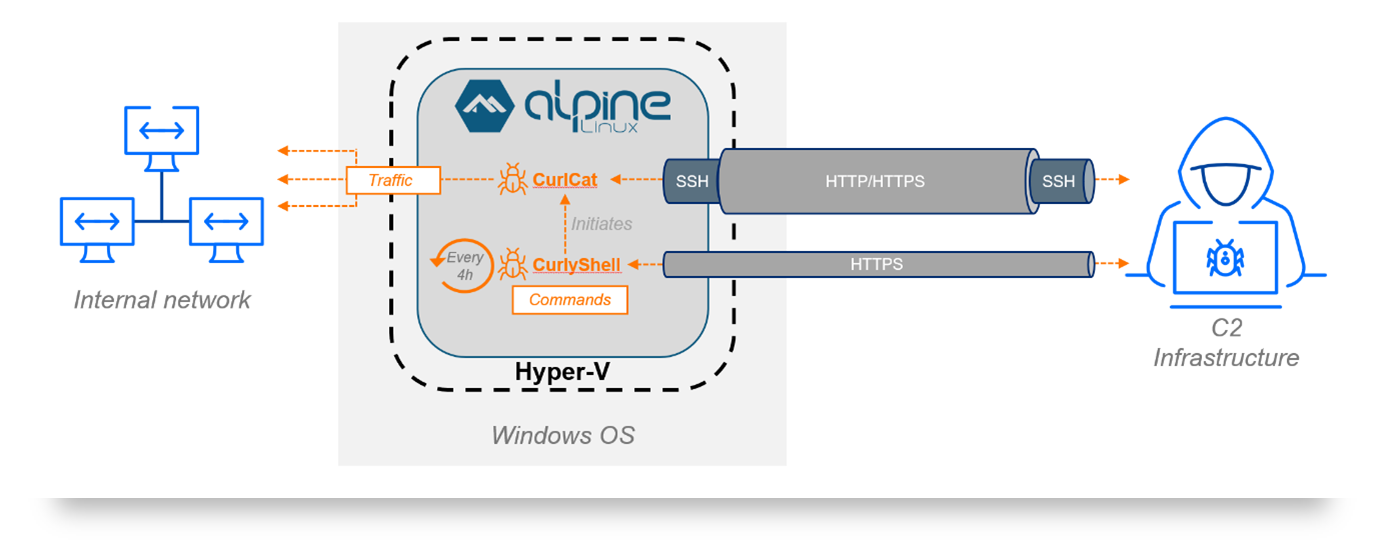
Diagram of “Curly COMrades” minimalistic Alpine Linux based VM utilizing “CurlyShell” and “CurlCat” to conduct covert operations on their victim’s network.
The attackers named their malicious virtual machine “WSL” to look related to the Windows Subsystem for Linux (“WSL”). This was presumably done to deceive analysts reviewing logs of the incident as WSL is another Windows virtualization feature that leverages Hyper-V and is commonly used for benign development purposes. Logs from the malicious “WSL” virtual machine might receive less scrutiny if response analysts assume the activity is related to the legitimate WSL.
Abusing Hyper-V also allowed the attackers to bypass behavioral analysis, static signature scanning and EDR detections as the malware was executed within the isolated VM.
The attackers configured the VM’s network settings to use the hosts network adaptor in Hyper-V. Paired with the use of “CurlCat”, which wrapped all outgoing SSH traffic in HTTP request payloads, the malicious traffic blended in with the host’s network.
The attackers deployed PowerShell scripts designed for remote command execution, Kerberos ticket injection scripts, local account creation, and proxy tools. Traditional EDR tools struggle to detect this activity due to limitations with the EDR agent’s visibility. The agent only monitors the host’s operating system. From an EDR agent’s perspective, the virtual machine is only one of many hypervisor processes, such as hvix64.exe, hvax64.exe, VirtualBoxVM.exe, or vmware-vmx.exe. No processes, registry, or system changes inside the virtual machine are visible to the EDR agent that is installed on the host.
Threat hunting/Detection Strategies
In environments where Hyper-V virtual machines are not commonly used, you can potentially detect abuse by looking for events related to enabling Hyper-V Windows features. These activities create corresponding logs in the Event Log under Event ID 7 (enable feature) and 8 (disable feature). The details of these events indicate which feature was affected, so you can filter for ones related to Hyper-V.
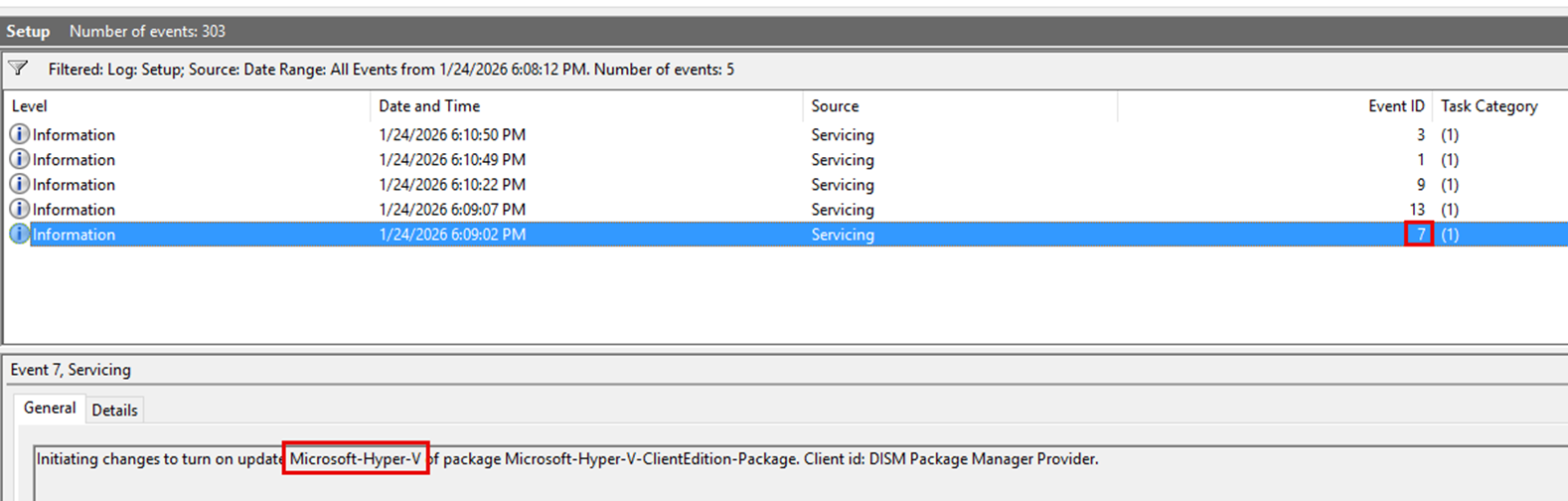
Example log of enabling Hyper-V
Additionally, you can monitor driver load events for Hyper-V drivers to identify instances of endpoints running Hyper-V. Drivers include: vmswitch.sys, vmcompute.sys, vmstorflt.sys, vmbus.sys, vmchipset.sys, winhv.sys, hvix64.sys, hvax64.sys.
In environments where Hyper-V is commonly used, detection is considerably more difficult as the feature will already be enabled and the driver loads will be expected. You can instead look for anomalous instances of virtual machine creations as compared to a baseline of normal creation activities.
Conclusion
Abuse of native Hyper‑V functionality is an effective technique employed by threat actors and allows them to bypass endpoint detection capabilities like EDRs as well as logging. Organizations should be monitoring blind spots related to virtualization features to limit the impact of abuse.

Joel Wadley
Joel is currently focusing on SOC Operations and Threat Hunting capabilities, Joel has experience in SIEM and EDR platforms including Sentinel, Splunk, SentinelOne, Defender, and CrowdStrike.
Joel has additional experience in Incident Response and GRC (Governance, Risk and Compliance), Joel contributes to monthly threat hunting capabilities for his clients and is member of the SOC Tuning Opps Team.
Prior to SRA, he was a Security Systems and Infrastructure Officer for a large private education organization and an IT Analyst for a global manufacturing company.
Joel is ISC2 CC, AUSCERT IR and Juniper JNCIA certified, Joel is currently studying for the SC-200 certification.