




Microsoft released several new, AI-specific capabilities as part of the Purview suite in 2025. These latest enhancements are intended to streamline the analysis of DLP alerts, discover unprotected sensitive data, and investigate potential data loss events – all powered by AI. While each of these modules has great potential – there are many nuances that analysts and administrators need to consider before they’ll realize any value. This post provides an overview of the latest modules, deployment challenges, and cost considerations.
| Data Security Investigations | |
| Description: | AI powered investigation tool that utilizes semantic search to analyze compromised files, emails, and messages. It classifies data by risk severity and displays insights through interactive dashboards. |
| Use Case: | During a breach investigation with thousands of exposed emails, analysts can quickly identify high risk data like API tokens or source code within hours instead of reviewing manually. |
| Pros: | For incidents that involve files in the M365 ecosystem, correlation and summarization makes investigation more efficient for analysts. |
| Cons: | Files larger than 4MB may not be indexed for searches, creating an obvious way for malicious actors to exfiltrate or store sensitive information where Purview can’t see it. |
| Cost Model: | Users are billed based on the amount of investigation data stored (in GB per month) and the number of SCUs provisioned which are charged on an hourly basis. |
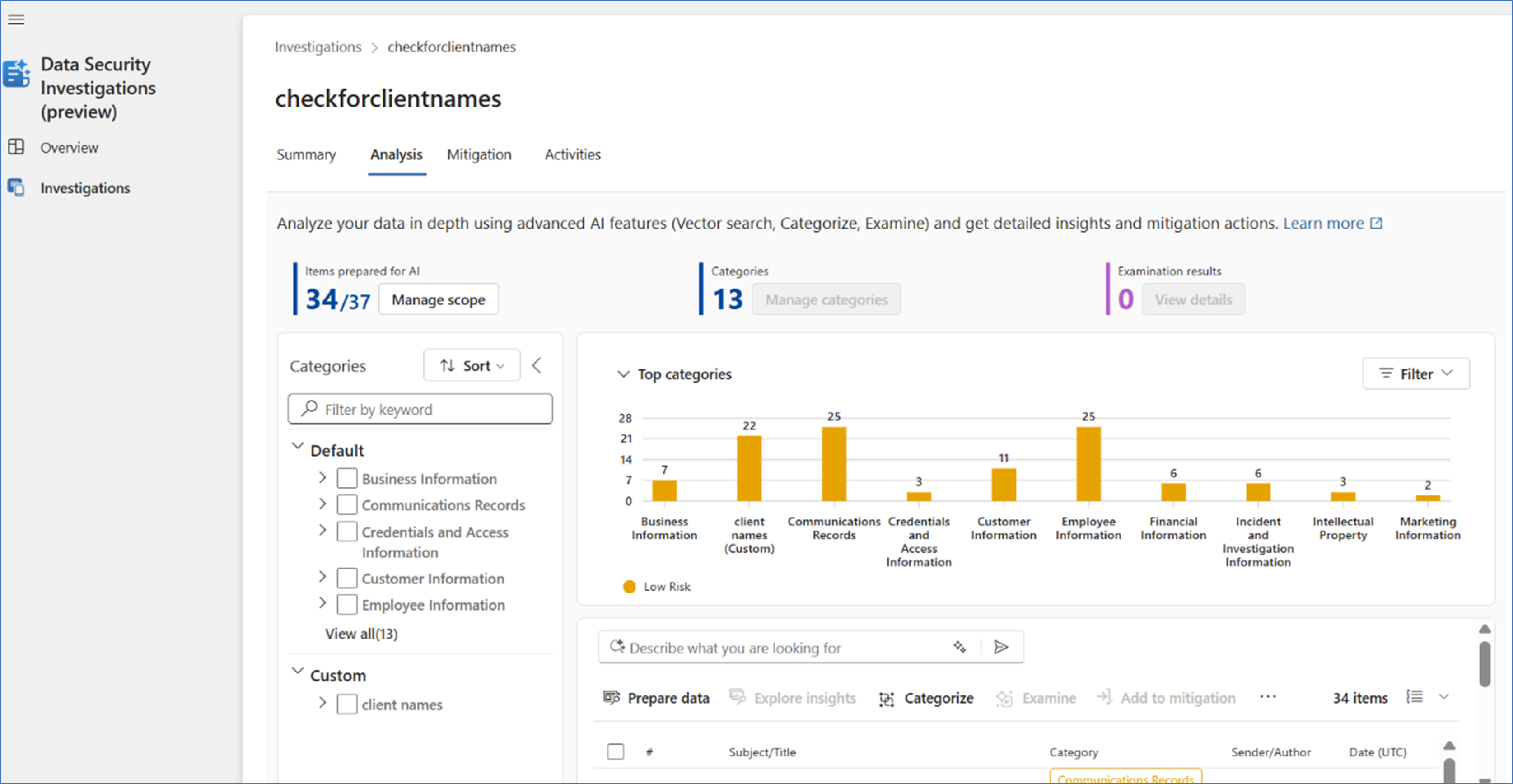
Figure 1: Sample Data Security Investigation
| Data Security Posture Management for AI | |
| Description: | Centralized console that secures data and governs AI usage. It provides visibility into AI activity, premade policies to prevent data loss in chat prompts, risk assessments to detect oversharing and compliance controls for optimal data handling. This is a re-brand and repackaging of a former suite called the “AI Hub”. |
| Use Case: | IT teams identify employees exposing confidential data through AI prompts. |
| Pros: | Efficiency gains through having all policies in one part of the console, with convenient links to edit policies separately in their respective solutions. Dashboard views make reporting easier. |
| Cons: | Limited visibility into AI interactions outside the M365 ecosystem (entering data into ChatGPT, e.g.). Additional integrations and configurations required for greater insights (onboarding through Defender, using the Purview extension for Chrome). |
| Cost Model: | Included in E5 License |

Figure 2: Sample Data Security Posture Management for AI reporting dashboard.
| Security Copilot for Purview | |
| Description: |
AI powered, role-based assistants that triage data loss prevention and insider risk management alerts, analyzing the data and grouping them by priority. This helps analysts review alerts in an organized noise-free queue, enabling faster and more efficient investigations. |
| Use Case: |
Security analysts receive explanations of complex alerts and reduce their investigation time by allowing them to focus on high-priority threats instead of parsing through logs. |
| Pros: |
Triage DLP and IRM alert queues at scale, creating significant efficiency gains by prioritizing the most important alerts for further human analysis. |
| Cons: |
Security Copilot cannot evaluate custom Sensitive Information Types – so the triage functionality is limited to alerts that are based only on default SITs. Not all the default SITs have security value. |
| Cost Model: |
Included in E5 License + SCU Billing |
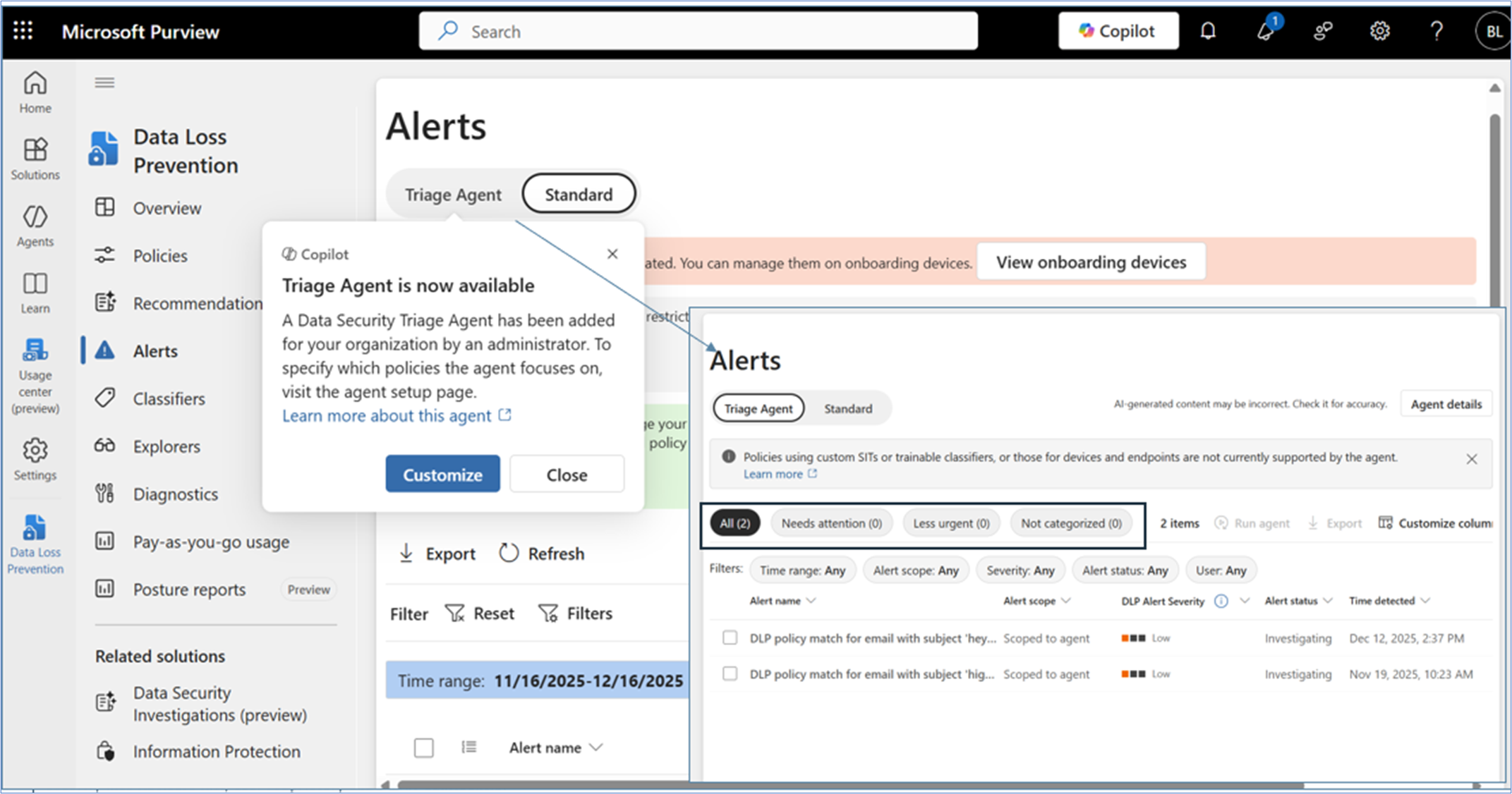
Figure 3: Agent triage view of a DLP alert queue.
What Else Should You Know?
The features described above are just the AI-related ones. There is even more new functionality on the roadmap for 2026. This includes other things that SRA is currently testing in private preview like the Usage Center, Posture Reports, and a Sensitive Information Remediation Agent (we’ll be sharing our insights on those soon). However, many organizations are still working on the configuration and operationalization of the basics (think Information Protection, Data Loss Prevention, and Insider Risk Management). Trying to maximize DSPM for AI without proper labeling and policy in place is like building a house on a shaky foundation. CISOs risk wasting valuable resource-hours pivoting to the latest and greatest functionality and never fully implementing anything before the next new feature is released. Consider:
- Cost is hard to predict: While Microsoft offers a billing forecast tool, and a “Usage Center” (in private preview), it is difficult to know just how much additional spend will be required to use anything SCU-based. Most orgs do not have a representative volume of alerts in their dev environments, and this is difficult to simulate. Note: some SCUs are included monthly based on license count.
- Security Copilot can’t see everything: The current Security Copilot agents can’t process custom sensitive information types – only the standard ones that Microsoft provides. If your organization is reviewing alerts generated from custom labels, Copilot can’t help with triage. And ask yourself: why is my alert queue so unmanageable that I need an AI assistant to help with triage in the first place? Consider policy tuning as a cheaper cost alternative to reduce alert volume as a predecessor task.
- This may change again soon: Before it was “DSPM for AI”, it was “AI Hub”. Copilot prompt monitoring was Communication Compliance policy before it moved into DSPM for AI. And alerts for each policy type were nested in their respective solution (DLP, IRM, etc.). By the time most organizations can build processes and workflows around these capabilities, there is a good chance that Microsoft repackages them and moves them somewhere else.
Conclusion – Are you ready to use any of these?
Yes, there are some exciting new AI-powered Purview capabilities, but most organizations are probably not ready to use these features effectively. The limiting factor isn’t technical availability, but foundational maturity. If an organization has weak sensitivity labels and classifications or they choose to use the overly broad default ones, the output from AI risk reports, posture dashboards, and summaries becomes noisy or meaningless. Default policies are intentionally generic so smaller organizations can get started, but they function more like a net rather than a filter.
Before you adopt or configure any of these new AI capabilities, make sure you understand what data you’re trying to protect in the first place. As we wrote last year (Microsoft Purview: You Get Out What You Put In), with Purview, you get out what you put in. Purview can amplify your understanding – but won’t create it for you – even with AI.

Bill Lyons
Bill is a cybersecurity consultant with experience leading framework-based assessments including NIST, CIS, HIPAA, HICP and other customized maturity frameworks. Additionally, Bill has experience performing cloud configuration assessments across Azure, AWS, and GCP with a focus on Microsoft 365 tenant hardening. In the last few years, Bill has developed SRA’s Purview service offerings to help clients get the most out of their Microsoft license model.

Dior White
Dior is a cybersecurity consultant with a background in security engineering. She's experienced in conducting NIST-based and customized maturity framework assessments, and performing cloud configuration evaluations across Azure and AWS environments. Dior has worked with multiple organizations across healthcare, energy, and aerospace to enhance their security strategies and is currently pursuing cloud certifications to deepen her expertise.