




Executive Summary
Social engineering attacks are increasingly effective, with researchers noting it’s the highest initial access vector for 2025. We previously reported on ClickFix, which tricks users into executing malicious commands through fake verification prompts and CAPTCHAs . Since then, ClickFix has surged to 47% of initial access attacks per Microsoft’s 2025 Digital Defense Report. In June 2025, researcher mr.d0x introduced FileFix—an evolution using Windows File Explorer’s address bar instead of the Run dialog. While using the same clipboard manipulation tactics, FileFix may feel more routine to victims by leveraging a familiar interface, and unfortunately, we’ve begun seeing our clients impacted by this tactic too. FileFix transitioned from proof-of-concept to active exploitation in 14 days, with sophisticated variants emerging within 75 days. This advisory examines FileFix’s technical mechanisms, documents active campaigns, and provides detection strategies and mitigation recommendations for security teams.
A Brief Review of ClickFix
Before examining FileFix, it is important to understand its predecessor, ClickFix.
The core ClickFix attack chain involves:
- User presses Windows+R (Run dialog)
- Presses Ctrl+V (pastes malicious code from clipboard)
- Presses Enter to execute
- Command uses mshta.exe or PowerShell to download payloads
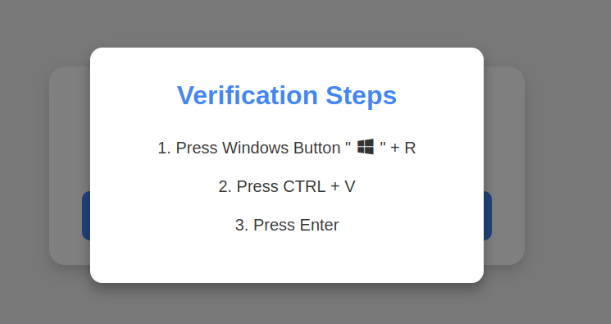
Please see our previous advisory for detailed explanation as well as mitigation and detection strategies related to ClickFix as this continues to be a highly adopted and effective initial access method for threat actors.
What is FileFix?
FileFix is a technique first disclosed by security researcher mr.d0x on June 23, 2025. It is an evolution of ClickFix that uses Windows File Explorer rather than the Run dialog. This adaptation makes it appear more legitimate to users and may bypass security controls designed to detect ClickFix patterns in the Run dialog.
How FileFix Works
- Initial Engagement
Users encounter a malicious webpage (typically through phishing emails, compromised websites, or malicious advertisements) that displays a fake verification screen or error message requesting file upload.
- File Explorer Manipulation
The webpage triggers the HTML file upload functionality, which opens a legitimate Windows File Explorer window. Simultaneously, malicious JavaScript running on the webpage silently copies a disguised PowerShell command to the user’s clipboard.
- Social Engineering
The victim receives instructions to:
- Press Ctrl+L to navigate directly to the File Explorer address bar
- Press Ctrl+V to paste what appears to be a legitimate file path
- Press Enter to execute the command

- Execution
Instead of a legitimate file path, the pasted content is a malicious PowerShell command (often prefixed with conhost.exe –headless to run invisibly). The command typically downloads and executes additional payloads, establishes persistence, or deploys malware directly.
Process Hierarchy: In FileFix attacks, the initiating process is the web browser (e.g., msedge.exe, chrome.exe) which subsequently spawns File Explorer. This differs from ClickFix where the Run dialog is invoked via Windows+R keyboard shortcut.
Registry Artifacts: FileFix leaves evidence in the TypedPaths registry key (HKCU\\Software\\Microsoft\\Windows\\CurrentVersion\\Explorer\\TypedPaths) rather than RunMRU, which was specific to ClickFix.
How FileFix 2.0 Works
Shortly after the disclosure of the original FileFix technique, an advanced variant dubbed FileFix 2.0 emerged that incorporates a Mark of the Web (MoTW) bypass capability. FileFix 2.0 exploits a subtle but dangerous loophole in how Windows and major browsers handle locally saved web content:
- Social Engineering Setup
The attacker creates a malicious webpage with social engineering lures (such as fake “MFA backup codes” or “compliance checkers”). The page title is carefully crafted to include an .hta extension (e.g., “_.hta” or “Save Backup Codes.hta”).
- File Save Manipulation
Users are instructed to save the webpage using the browser’s “Save as” function (Ctrl+S). When saved with “Complete HTML” format, browsers do not apply the MoTW tag to locally saved pages – this is the critical vulnerability.
- File Renaming
The instructions trick users into manually renaming the saved .html file to have an .hta extension. If the user modifies the filename in any way during the save process or renames it afterward, the browser does not append the .html extension, resulting in a file with only the .hta extension.
- Execution Without Warning
When the user double-clicks the .hta file, Windows treats it as a trusted local application since it lacks the MoTW tag. The file is executed by mshta.exe without security prompts, allowing embedded malicious scripts (JavaScript, VBScript, etc.) to run with full user privileges. This can lead to malware installation, credential theft, ransomware deployment, or other malicious activities.
Active Campaigns
In July 2025, researchers from The DFIR Report and Proofpoint documented KongTuke, a suspected initial access vendor operating a Traffic Distribution System (TDS), deploying a new PHP-based variant of Interlock RAT through FileFix campaigns. The Interlock RAT provides comprehensive system reconnaissance, command execution, lateral movement capabilities, and serves as a platform for deploying additional payloads including ransomware. KongTuke operates by injecting compromised websites with single-line JavaScript hidden in HTML pages, employing IP filtering to serve payloads only to targeted victims. The group is assessed to function as an initial access broker, selling compromised credentials and system access to ransomware operators including 8Base, Akira, ShadowSyndicate, AlphV, Rhysida, and Interlock. SRA has observed suspected KongTuke campaigns in client environments. Research on a similar campaign exploiting FileFix to distribute Interlock ransomware was also conducted in late July by Artic Wolf.
Around the same time, Check Point Research observed an unnamed threat actor actively testing FileFix techniques within two weeks of its public disclosure, with the group previously known for ClickFix campaigns targeting cryptocurrency exchanges deploying phishing infrastructure featuring multilingual support and mimicking Cloudflare CAPTCHA screens combined with SEO poisoning and malvertising.
By September 2025, more sophisticated FileFix implementations emerged, with Acronis documenting a campaign using advanced steganography to embed PowerShell scripts and encrypted payloads within JPG images to deliver StealC infostealer globally. Expel researchers uncovered a novel variant employing cache smuggling techniques that bypass traditional security monitoring by embedding malicious ZIP archives within fake images served with image/jpeg headers, allowing PowerShell scripts to extract payloads directly from browser cache directories without explicit downloads.
Recommendations
Mitigations
System Configuration Hardening
Disable, Rename, or Restrict mshta.exe:
- Navigate to C:\\Windows\\System32 and C:\\Windows\\SysWOW64
- Rename mshta.exe to mshta.exe.disabled (requires administrator privileges)
- This prevents HTML Applications from executing, neutering both FileFix 2.0 and traditional HTA-based attacks
Configure File Extension Visibility:
- In Windows Explorer, select View > Options > View tab
- Uncheck “Hide extensions for known file types” – this helps users identify .hta files
- Open Windows Settings > Apps > Default apps
- Search for “.hta” under “Set a default for a file type”
- Change the default application from “Microsoft (R) HTML Application Host” to Notepad
Restrict File Explorer Command Execution:
- Modify registry key HKCU\\SOFTWARE\\Microsoft\\Windows\\CurrentVersion\\Policies\\Explorer to restrict code execution in File Explorer address bar
Group Policy Object (GPO) Controls:
- Restrict WScript.exe and mshta.exe usage via AppLocker GPO or Windows Defender Application Control (WDAC)
- Apply group policy restrictions to disable Windows+R functionality as ClickFix remains a concern
- Consider restricting PowerShell execution for non-privileged users where possible
- Consider implement Constrained Language Mode for PowerShell to limit dangerous operations
Email Security Controls:
- Block .HTA and .HTML email attachments at the email gateway
Detection Opportunities
Registry Monitoring:
- TypedPaths Registry Key: Monitor for suspicious entries in HKCU\\Software\\Microsoft\\Windows\\CurrentVersion\\Explorer\\TypedPaths containing PowerShell commands, especially those with base64 encoding or web request commands
- Run Key Persistence: Monitor for new Registry run keys being added (HKCU\\Software\\Microsoft\\Windows\\CurrentVersion\\Run) which may indicate successful malware installation
Process Monitoring:
- Browser-to-PowerShell Chains: Detect process chains where browsers (chrome.exe, msedge.exe, firefox.exe, brave.exe) spawn PowerShell or CMD with suspicious parameters
- mshta.exe Execution: Monitor for mshta.exe executing remote payloads (http/https/ftp) or running inline scripts (JavaScript/VBScript)
- Encoded PowerShell Commands: Flag PowerShell execution with -EncodedCommand, -enc, or similar parameters, especially when spawned by browsers
- Curl.exe Usage: Monitor for curl.exe downloading payloads, particularly when using the -o switch to save files locally
- Conhost.exe Headless: Detect conhost.exe running with –headless parameter, which is used to hide command execution
Conclusion
ClickFix proved to be an effective technique widely adopted by threat actors in 2024-2025. Given ClickFix’s proven success rate and FileFix’s similarity and rapid adoption, organizations should expect more of these FileFix campaigns in the future. The technique requires minimal infrastructure, bypasses standard controls, and exploits routine user behavior—the same factors that made ClickFix so effective. Key protections for FileFix are monitoring TypedPaths registry keys and disabling mshta.exe for users without a business need. This blog aims to provide protections against a TTP that will likely be a growing threat in 2026.
Safeguards for SCALR XDR Customers
SRA’s Detection Engineering team is regularly adding new detections. This is intended to highlight potential safeguards observed in the common attack chain and may not be exhaustive of full protection.
SCALR XDR customers are protected by the following detection rules:
| Alert | Prerequisites | Description |
| MSHTA Execution via Remote Payload | Necessary Logs: Process Creation Events
Compatible EDR(s): Microsoft Defender CrowdStrike SentinelOne |
MITRE Technique: T1218.005: Mshta
This alert will fire when mshta executes a remote file using either http or ftp. Threat actors can use mshta.exe, which is a trusted Windows utility, to covertly download and/or execute malicious files to bypass application control solutions. |
| Registry Run Key Added | Necessary Logs: Process Creation Events
Compatible EDR(s): Microsoft Defender CrowdStrike SentinelOne |
MITRE Technique: T1547.001: Registry Run Keys / Startup Folder
This alert detects a new Registry run key being added. Adversaries may add a run key in order to establish persistence on a system. |
| MSHTA Execution via Inline Script | Necessary Logs: Process Creation Events
Compatible EDR(s): Microsoft Defender CrowdStrike SentinelOne |
MITRE Technique: T1218.005: System Binary Proxy Execution: Mshta This detection triggers when MSHTA.exe is used to execute JavaScript or VBscript. Adversaries may abuse mshta.exe to proxy execution of malicious .hta files and Javascript or VBScript through a trusted Windows utility. |
| Payload Downloaded via Curl.exe | Necessary Logs: Process Creation Events
Compatible EDR(s): Microsoft Defender CrowdStrike SentinelOne |
MITRE Technique: T1105: Ingress Tool Transfer
Curl is a command-line tool to transfer data to or from a server, using any of the supported protocols: TTP, FTP, IMAP, POP3, SCP, SFTP, SMTP, TFTP, TELNET, LDAP, or FILE. Curl.exe has increasingly been used by adversaries as part of their attacks to download malicious payloads onto infected systems. This is typically achieved by using the -o switch, which saves the downloaded file on the local machine with the name provided in the parameters, and by defining a URL, which is where the malicious artifact resides. |
| MSHTA Executing Code from Registry | Necessary Logs: Process Creation Events
Compatible EDR(s): Microsoft Defender CrowdStrike SentinelOne |
T1218.005: MshtaThis alert detects Mshta executing code from the registry. Adversaries may store code in the Registry as part of initial access that can then be executed via mshta commands. |
| Suspicious Encoded PowerShell Commands | Necessary Logs: Process Creation Events
Compatible EDR(s): Microsoft Defender SentinelOne |
T1027: Obfuscated Files or Information
This rule is designed to detect the execution of encoded PowerShell commands, which are often used by attackers to obfuscate malicious activities. Encoding PowerShell commands is a common technique to bypass security controls and evade detection. This rule aims to identify and flag such activities to prevent potential security breaches. |

Vanessa Joseph
Vanessa is a experienced cybersecurity professional who's passionate about cyber threat intelligence, threat hunting, and incident response. Her work focuses on proactive threat hunting and intelligence analysis to identify threats and strengthen detection and incident response capabilities.
She earned her B.A. in Administration of Justice and M.S. in Homeland Security with concentrations in Digital Forensics and Cybersecurity from Salve Regina University.

Richard Andrews
Richard Andrews is a cybersecurity professional with experience across corporate consulting, security operations, and the federal government.
He specializes in cyber threat intelligence, threat detection, incident response support, and translating emerging threat activity into actionable insights that help organizations understand risk and strengthen defenses.
Richard currently focuses on operationalizing threat intelligence through research, threat hunting, detection development, and client guidance. He is especially passionate about making complex cyber threats understandable, practical, and useful for both technical teams and business leaders.
Richard attended Penn State University, where he majored in Security and Risk Analysis and is a proud Air Force veteran.