




A new class of tooling has quietly landed on corporate endpoints. Claude Cowork, OpenClaw, Copilot Cowork and a growing list of others are all doing the same thing: acting on behalf of a real user, directly from their workstation. They open File Explorer, edit Word documents, click through Outlook, run PowerShell, talk to APIs, and reach into the same SharePoint sites and shared drives the user has access to. From the operating system’s perspective, it’s the user sitting at the keyboard. From the SOC’s perspective, it can look like the user too, until you ask the obvious question. So we have a who is in the “driver’s seat problem”, more formally referred to as Action Provenance, essentially boiling down to when an action occurs on a host by a user…
Did the human do that, did the AI, or did the human tell the AI to do it?
That distinction matters more than it sounds. Insider threat investigations, DLP escalations, suspicious activity reviews, audit and compliance reporting, incident scoping, all of them depend on the assumption that the SID running the activity equals the human who pressed the keys. AI agents acting on behalf of users break that assumption silently. Worse, an attacker who compromises an AI session, or who tricks a Cowork prompt into doing something it shouldn’t, gets a free ride on the user’s identity and intent. If we can’t separate “the user did this” from “the AI did this for the user,” every downstream control loses precision.
Imagine a scenario where a database is deleted, an unprofessional email is sent, or an inappropriate webpage is visited. With AI acting on behalf of a user, it can now act as a get out of jail free card for users: “it wasn’t me, it must have been the AI”. Attributing behavior is going to be important for cybersecurity, legal, HR and many other purposes within the organization.
While the AI vendors do log some information, of course, there are a multitude of gaps in that information, as well as each vendor may have different information they are logging. Thus, AI vendor logging creates two problems. First, some vendors may log just the prompts, and others may log more detailed info on what the AI is doing behind the scenes. No matter what they are logging, it’s typically not enough and it is left up to you to fill those gaps. Second, not every organization can ingest those logs, and the ones that can are still figuring out the schema, the retention, and the integration. Many of these log sources can be overly verbose with very little helpful information included, causing you to pay a lot for log parsing and storage without helping you understand what is happening on your host. We’ve spent the better part of a decade telling boards that EDR telemetry is the most trustworthy view we have into endpoint activity.
So the question becomes: can we use the EDR data we already have, Defender in this example (ping us for Crowdstrike and SentinelOne if you’d like!), to attribute activity back to an AI agent? The answer is yes, with caveats. This post walks through how, using Microsoft Defender Advanced Hunting and Claude Cowork as the case study, we can use a set of KQL queries you can drop into your tenant as a starting point for assigning attribution to Cowork activities, and performing hunts to gain a better understanding for what the behavior of these on-board AI assistants looks like.
Why EDR is the right place to do this
Endpoint telemetry has matured into the most reliable artifact we have during an investigation. Process trees, file events, network connections, user sessions, all of it stitched together with timestamps and process unique IDs. EDR doesn’t care what tool started a process; it just records what happened. That’s exactly what we want when we’re trying to reverse engineer who really initiated an action.
Claude Cowork runs in a virtual machine on the host. It’s small and invisible to the user, but this adds a unique complexity to attribution, as a VM service may be interacting with the OS and applications, accessing and bridging to the host. EDR’s insight on the host puts it in a unique position to be able to monitor all this activity.
The other reason EDR makes sense is trust. AI vendor logs are useful but they’re also self-reported. If a Cowork session is misbehaving, the very logs we’d want to use to investigate it are coming from the thing under investigation. EDR gives us an independent witness.
Finally, EDR is something most mature security programs already have. Asking a SOC to add another log source, another retention bill, and another set of detections for every AI tool the business adopts is a losing battle. Using what we already pay for, and already know how to query, is a much shorter path to coverage. Adopting a new log source will definitely be useful in the future (tune in for an upcoming blog post on that!), but visibility right now is the key.
What “attribution” actually means here
Before getting into the queries, it helps to be honest about what we can and can’t prove. AI agents act on behalf of a user. They run as that user’s Security Identifier (SID), in that user’s session, often through that user’s regular applications. There is no Defender field that says IsAI = true. We’re not going to get a clean signal that’s right 100% of the time.
What we can do is build a probabilistic attribution model. Score the activity. Categorize it into buckets. Be explicit about confidence. We can do all of this using native KQL analytical capabilities right in Microsoft’s Defender!
The model I’ll walk through has five output buckets:
| Bucket | Score | Meaning |
| Direct AI — local | 90–100 | claude.exe itself or an obvious agentic seed performed the action |
| Direct AI — network | 80–100 | AI process talked to AI vendor or M365 directly |
| AI-mediated | 50–79 | Non-AI process (Explorer, Word, Chrome) acted on a Claude-touched file in the same session, close in time |
| Weak / review | 30–49 | Some signals but insufficient to attribute confidently |
| Background | <30 | Updaters, session 0, telemetry — suppressed |
The first two buckets are where we have high confidence: the AI process itself did something, or it talked to an AI vendor. The third bucket, AI-mediated, is the interesting one and the reason we need a model rather than a single query. When Cowork uses computer-use to open Word and edit a document, the actor on the endpoint is winword.exe, not claude.exe. We attribute mediated activity by looking for files Claude recently read, the same user session, and a tight time window after the AI was active. It’s not deterministic, but it’s defensible, and it’s a lot better than nothing.
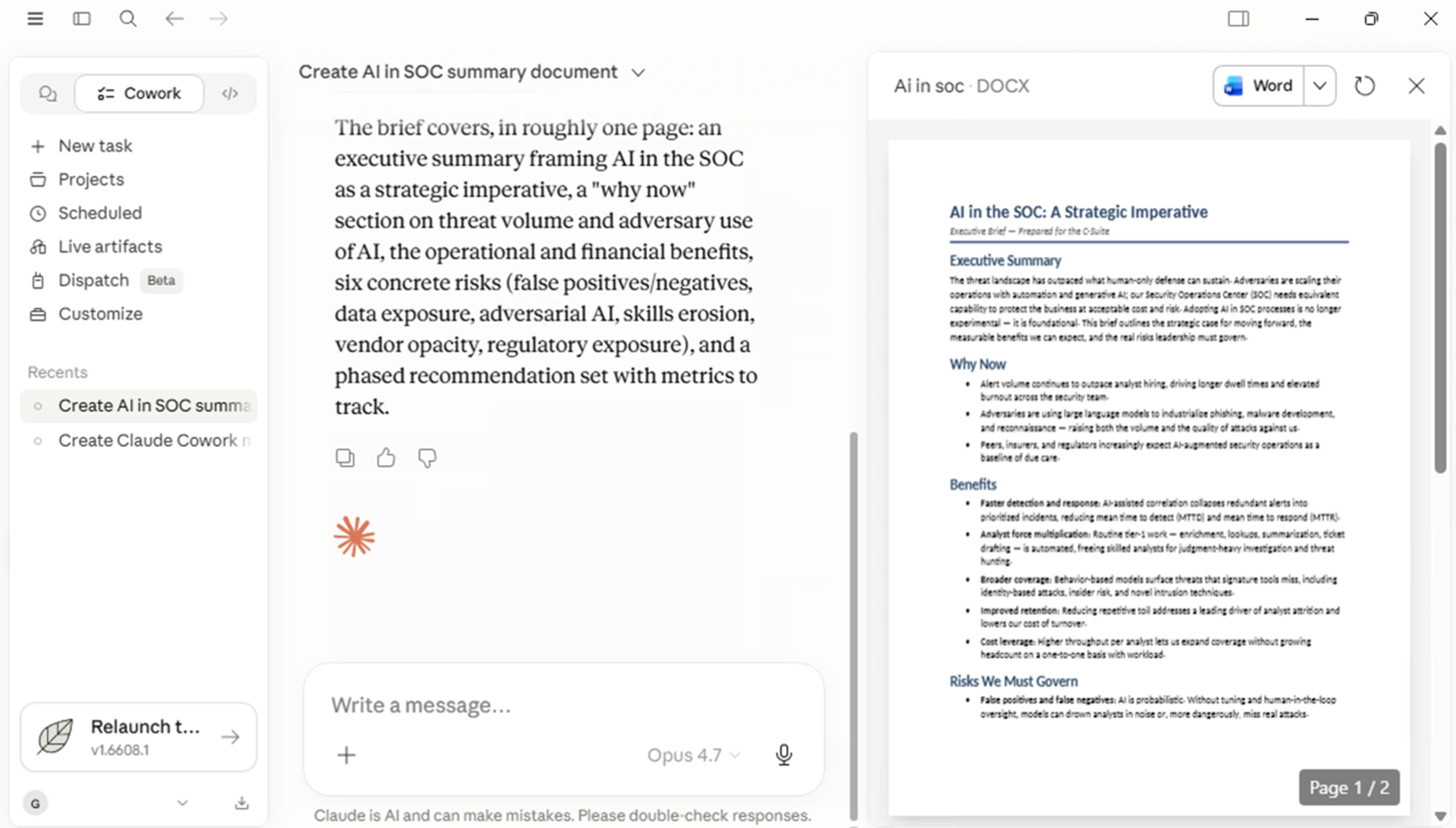
Claude Cowork in action, accessing a file on disk.
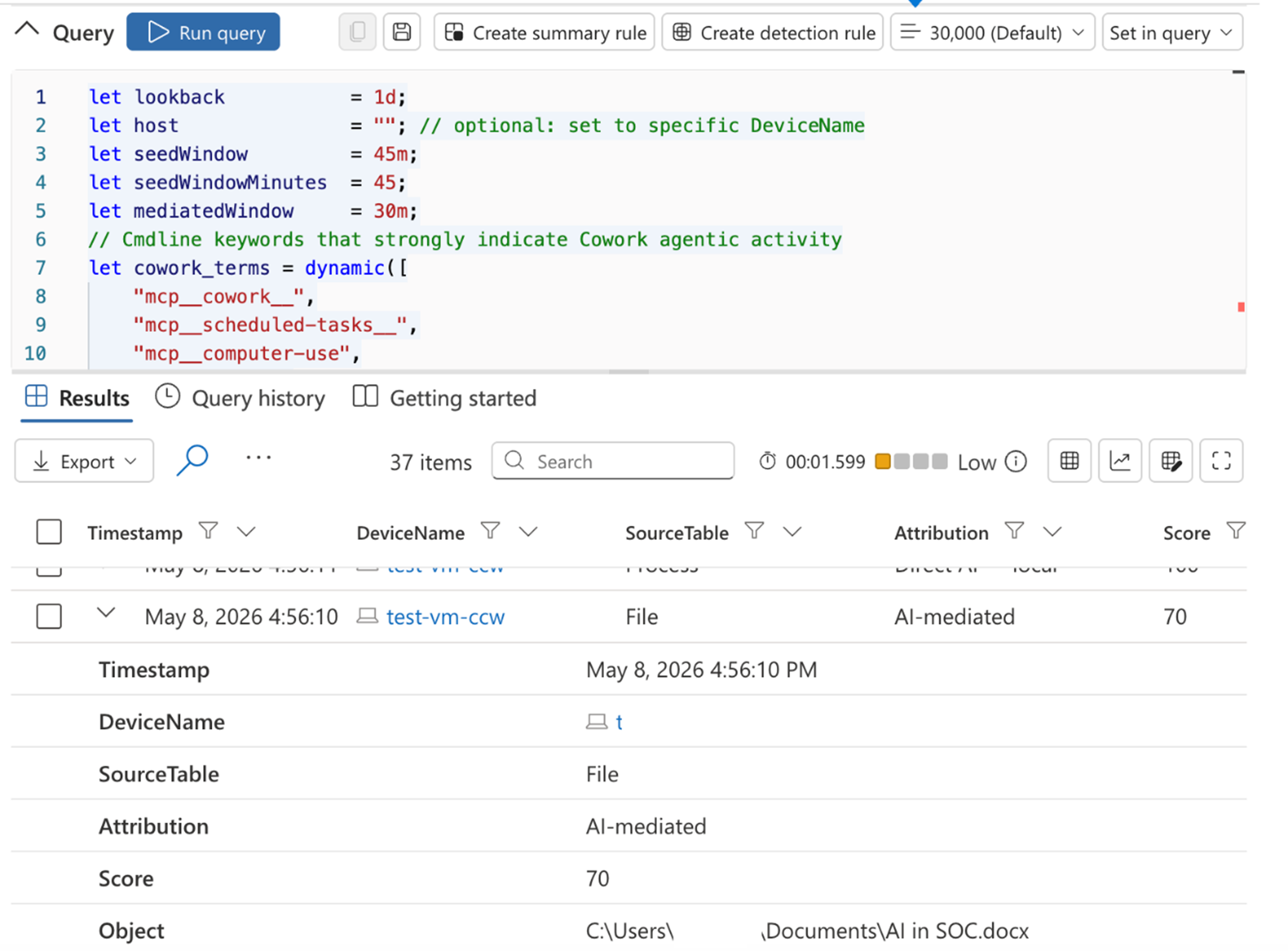
Our Defender logs indicating the activity is associated with AI activity!
Wrap up
AI agents acting on behalf of users are not a future problem. They’re already on endpoints, already touching files, already making API calls under user identities. The vendors will keep their own logs, but the SOC needs an independent view, and the EDR is the right place to build it.
The model in this post isn’t perfect, and it’s not meant to be the last word. It’s meant to be a starting point, something you can drop into your tenant tomorrow, tune to your environment, and use to start asking the right questions. As more AI tooling shows up on more endpoints, our ability to answer “did the human do that, or did the AI?” is going to be the difference between investigations that hold up and investigations that fall apart. EDR-based attribution is one of the most pragmatic ways to keep that ability sharp without waiting for new log sources, new contracts, or new platforms.
If you’re working through this in your environment and want a thinking partner, whether it’s tuning the rubric, integrating it into your detection pipeline, or extending the model to other AI tools, that’s a conversation we’d love to have.
Ready to get technical and geek out with KQL queries? Head to the next blog where we get nerdy…

Greg Stachura
Greg focuses on Incident Response and the Cyber Security Operations Center. Greg has experience managing SIEM, as well as orchestration and automations platforms. He also has extensive background in Incident Response playbook development, forensics and log analysis. Prior to joining Security Risk Advisors, Greg worked extensively in the financial, healthcare and education sectors.

Alex Ioannidis
Alexandra focuses on EDR engineering and detection rule creation, specifically for SentinelOne, Microsoft Defender, and CrowdStrike. Alexandra is also a threat hunt lead, developing and overseeing threat hunts for multiple clients.
Alexandra is a graduate of Rochester Institute of Technology, holding a degree in Computing Security with a minor in Networking & Systems Administration.
Alexandra is also CySA+ certified.