




Executive Summary
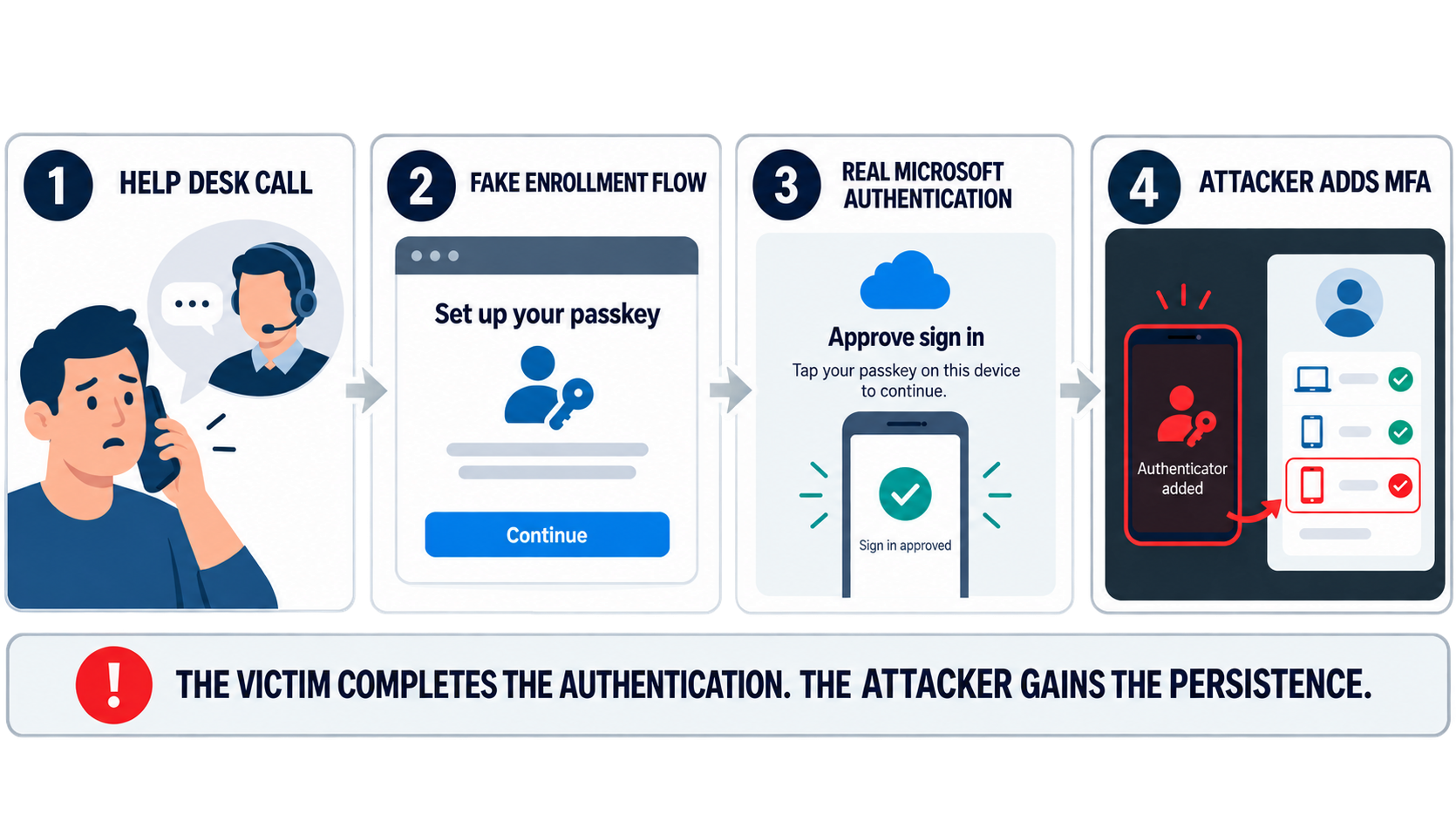
In recent months, SRA has increasingly observed attackers calling hand-picked employees on their personal phones, posing as internal IT help desk members, and walking them through a fake MFA or passkey enrollment. The enrollment page either relays the live session through adversary-in-the-middle (AiTM) infrastructure or acts as a distraction while an operator enrolls their own authenticator directly in the victim’s Microsoft 365 account. In observed cases the actors inventory tenants through Microsoft Graph, and within hours entire SharePoint libraries, OneDrive folders, and executive mailboxes are copied in pursuit of their objectives.
The tradecraft belongs to the English-speaking extortion ecosystem and is shared across several threat groups, many of which operate under or are connected to “The Com” umbrella. Multiple sources have published research covering this threat since May 2026, and SRA incident responders have worked multiple engagements with the same pattern.
Background
Help desk impersonation is not new. CISA and FBI advisory AA23-320A documents Scattered Spider convincing help desks to reset passwords and MFA, and Mandiant’s M-Trends 2026 ranks vishing as the second most common initial access vector overall and the leading vector for cloud compromises. Notably while this TTP is not new, the pretext of many of these lures have changed as of 2026.
Through Spring 2026, the lure shifted from password resets to passkey enrollment. Okta notes the timing: as of May 2026 Microsoft administrators can run passkey registration campaigns that nudge users to enroll at sign-in, and in some tenants those nudges are on by default. Employees now expect to be asked about passkeys. Actors registered domains built around the words passkey, MFA, SSO, and key setup, stood up per-target subdomains carrying each victim organization’s real logo, and started calling.
The result is a campaign family that Microsoft describes as active since May 2026, that Okta traces to April 2026, and that GTIG connects back to the BlackFile extortion operation active since February 2026.
SRA Incident Response Observations
The following reflects what SRA responders observed in telemetry across multiple engagements over recent months.
- Targeted users received calls on personal devices from numbers presenting as the client’s IT help desk. In some cases caller ID displayed the client’s name followed by “IT Support.”
- Callers walked the user through an MFA update on a fake domain structured as clientname[.]lure-domain[.]com, which also functioned as AiTM infrastructure.
- Actors demonstrated prior knowledge of the target’s name, personal number, corporate domain, and MFA stack, including the current vendor and the planned migration to a new authenticator.
- After session theft and MFA enrollment, device registration and inbox rule creation varied case by case. When a device was registered, its name did not follow the client’s convention.
- In a recent case, a senior executive was walked through a fake passkey enrollment, a new MFA device was enrolled, a staff warning email about fake help desk calls was deleted from the mailbox, and more than 100,000 SharePoint FileAccessed events followed in a burst consistent with a client-side clone of the library. The initial sign-in came from a residential address in the user’s home city; the session was then replayed from VPS hosting.
- Across engagements the actor consistently pivoted to VPS-hosted virtual machines rather than commercial VPN services. Providers seen include BL Networks, HostPapa, H4Y Technologies, Heymman Servers, BlueVPS, and GTT ranges flagged for fraud. HostPapa recurs across multiple cases.
Stage 1: Reconnaissance and Infrastructure
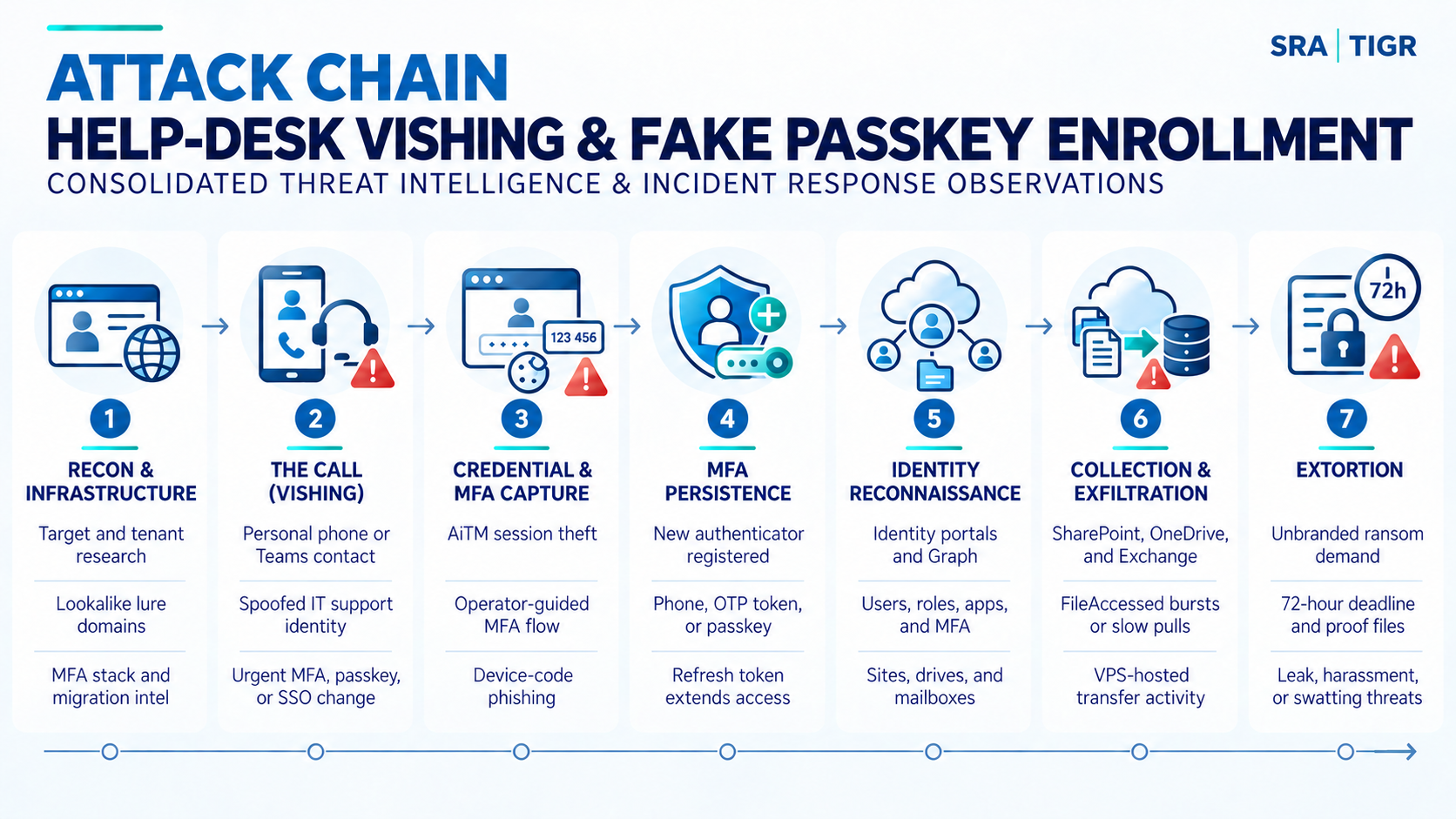
- The actor arrives on the call already knowing the target’s name, title, personal mobile number, corporate domain, current MFA vendor, and in some cases the organization’s planned migration to a new authenticator. Microsoft attributes this to pre-attack research on professional networking platforms. SRA responders saw the same prior knowledge in client engagements. Infrastructure often follows a consistent pattern: a generic lure domain with the victim organization’s name as a subdomain, for example contoso[.]setpasskey[.]com or contoso[.]integratedsso[.]com.
Stage 2: The Call
- The victim receives a call, and sometimes an SMS with the link, often on a personal mobile number. Caller ID is spoofed to show the company name followed by “IT Support” or similar. The caller creates urgency: a passkey, MFA, or SSO change must be completed now to avoid losing access. Because the victim is on a personal device that is not onboarded to EDR, this stage often leaves no endpoint telemetry at all. In many investigations the employee’s recollection of the call is the earliest evidence of how the compromise began. A smaller number of cases use a compromised internal account to send the same passkey lure over Microsoft Teams.
Stage 3: Credential and MFA capture
- Transparent AiTM proxy: The lookalike page relays the victim’s traffic to the legitimate Microsoft sign-in, captures the password and the resulting session cookie, and the actor replays the session from their own infrastructure.
- Operator-controlled panel: Okta’s analysis of the Pink kit found something different: not a transparent proxy but a PHP panel in which a human operator steers the victim through authentication pages in near real time using a one-second heartbeat. The operator types the captured password into the real Microsoft sign-in, sees which MFA challenge appears, and pushes the matching page to the victim (SMS OTP, TOTP, or a push prompt with the number to enter). Once the operator is in, the kit shows the victim a fake passkey registration flow, including a “save your recovery key” page built from BIP-39 seed phrases. Okta notes that BIP-39 has no role in Entra passkey enrollment. The pages exist to keep the victim busy while the operator enrolls a real passkey, named something benign, in the victim’s account. When Microsoft’s legitimate “new passkey registered” email arrives, it confirms the pretext rather than raising an alarm.
- Microsoft documented a third access path: device code phishing. The passkey narrative guides the victim to enter a code on the legitimate Microsoft device login page, which issues a token to an attacker-controlled client. No cookie is stolen and the sign-in looks like a normal device code authentication.
- In a fourth variant, Microsoft observed an actor signing in with previously stolen credentials and satisfying MFA with a PhoneAppOTP method that had been registered days earlier, suggesting the enrollment call and the data theft can be separated in time.
Stage 4: MFA Persistence
- The actor’s first move after access is to register an authentication method they control: a new phone number, a new Microsoft Authenticator instance, a software OTP token, or a passkey. Microsoft published the audit artifact for the software token case: an Update user. operation on the AzureActiveDirectory workload where StrongAuthenticationPhoneAppDetail gains a second entry with DeviceName: NO_DEVICE, DeviceToken: NO_DEVICE_TOKEN, DeviceTag: SoftwareTokenActivated, and HashFunction: hmacsha1. In Entra audit logs the same event surfaces as User registered security info.
- In SRA engagements, when a device was registered it did not follow the client’s naming convention. Arctic Wolf saw password resets alongside the MFA registration in a subset of cases.
- MFA persistence alone does not survive a full credential and session reset, but combined with an unrevoked refresh token it keeps the actor in the tenant through the first round of remediation.
Stage 5: Identity Reconnaissance
- Microsoft’s investigated timeline shows the OfficeHome sign-in (error 50074 for the MFA interrupt, 50140 for the keep-me-signed-in prompt, then success) followed within four minutes by My Apps, My Profile, Microsoft Approval Management, Microsoft Account Controls V2, and My SignIns, all from the same session and browser identifier. Arctic Wolf independently reports that initial malicious sign-ins commonly hit http://mysignins.microsoft.com and http://myaccount.microsoft.com .
- From there the actor moves to Microsoft Graph, often through a Node.js automation. Microsoft’s reconnaissance matrix covers tenant profile (/organization, /subscribedSkus), directory enumeration (/users, /groups, /transitiveMembers), privilege and MFA discovery (/directoryRoles, /roleManagement, /authentication/methods), application and consent discovery (/applications, /servicePrincipals, /oauth2PermissionGrants), repository discovery (/sites, /drives, /drive/items, /search), and mailbox discovery (/messages, /mailFolders, /attachments), with $top, $skiptoken, and /delta paging to walk large result sets.
- In SharePoint itself, Arctic Wolf observed search queries for contentclass:STS_Site and contentclass:STS_Web to map sites and subsites, then a wildcard query paginated with contentindexdocid> to list every document the identity can reach. GTIG saw searches for string literals such as “confidential” and “SSN” to prioritize high-value files.
- Microsoft notes the actor deliberately rotates infrastructure between stages, with separate IP addresses for authentication, reconnaissance, and exfiltration. Piecing the intrusion together requires correlating across stages rather than pivoting on one IP.
Stage 6: Collection and Exfiltration
- Collection targets SharePoint Online, OneDrive for Business, Exchange Online, and connected SaaS such as Box, Salesforce, and Zendesk. Three details from open reporting matter for detection.
- FileAccessed events should not be treated as benign. GTIG found the actor issuing direct HTTP GET requests against document URLs with a replayed FedAuth cookie, streaming file content to attacker infrastructure. Those fetches are logged as FileAccessed rather than FileDownloaded, so SOCs that alert only on downloads miss them entirely.
- User agents are already aging out. GTIG’s early cases showed python-requests/2.28.1 and WindowsPowerShell/5.1, sometimes with a spoofed “Microsoft Office” ClientAppId. Microsoft observed python-httpx. Arctic Wolf reports the newer cases spoof Chrome strings (Chrome/146, Chrome/150, Chrome/151.0.0). Detections keyed on a scripting user agent are a supporting signal, not the primary one.
- Collection pace varies widely across reporting. Microsoft describes measured collection at fewer than 1,000 files or emails per hour, sustained over hours to days to blend with normal usage. GTIG observed a Python script pull over a million files, and SRA saw more than 100,000 SharePoint FileAccessed events in a sync-like burst.
- Exchange collection runs through the REST API using the One Outlook Web client application ID (9199bf20-a13f-4107-85dc-02114787ef48). That AppID is normal. Arctic Wolf’s finding is that the actor’s toolkit uses it to retrieve mail through an unusual API path (API ID c999ed3e-27ae-4cb3-b3a2-46b056af63d3), producing high volumes of MailItemsAccessed and AttachmentAccessed events from hosting or proxy infrastructure.
Stage 7: Extortion
- Unbranded ransom notes arrive from throwaway consumer email accounts, frequently with the subject line pattern [COMPANY NAME] DATA BREACH 72 HOURS TO CONTACT US, a Tox or Session ID, a 72-hour deadline, and an offer to verify three files. Since March 2026 GTIG has seen the notes sent from hijacked internal mailboxes and Teams accounts. Escalation when ignored has included Gmail spam floods against employee mailboxes, threatening voicemails to executives, and swatting.
Threat Actor Landscape
Multiple vendors tracking this activity use different names, and the extortion brands sometimes rotate faster than the tracking names. The table below maps them as reported. Treat overlap as likely and any single-actor label as provisional.
| Tracking Name | Source | Extortion Brands Associated | Notes |
| UNC6671 | GTIG / Mandiant | BlackFile, Redact, Pink, Helix, Falcon | GTIG assesses UNC6671 diversified across multiple brands after announcing the BlackFile shutdown in May 2026. Independent of ShinyHunters (UNC6240) despite co-opting that brand at least once. |
| O-UNC-066 | Okta | Pink | Operates the Pink data leak site (launched May 31, 2026). Same cluster Unit 42 tracks as CL-CRI-1147. |
| PREY-0058 | Arctic Wolf | BlackFile, Redact, Pink, Helix, Cinder | Arctic Wolf assesses the labels may represent affiliates or rebrands rather than one actor, and links Cinder to Pink with moderate confidence based on overlapping victims. |
| Storm-3121 | Microsoft | ShinyHunters, Falcon | Initial access activity leading to ShinyHunters and Falcon extortion. |
| Storm-3032 | Microsoft | Helix | A set of actors Microsoft describes as splintered from BlackFile. |
| CL-CRI-1116 / Cordial Spider | Unit 42 / CrowdStrike | BlackFile | Unit 42 links BlackFile to The Com with moderate confidence. |
Microsoft states plainly that the initial access technique is used by a range of threat actors. SRA assesses the same: the phishing kits, the caller pool, and the exfiltration scripts are shared tooling, and defenses should be built around the behavior rather than the brand.
Detection and Hunting Opportunities
| Stage | Behavior | Data Source |
| Access | Device code authentication for a user who has never used it | SigninLogs |
| Access | Interactive sign-in from an ASN or ISP not seen for the user in 30 days, followed by MFA interrupt codes 50074 then success | SigninLogs |
| Persistence | Security info registration within two hours of a sign-in from new infrastructure | AuditLogs joined to SigninLogs |
| Persistence | Software OTP token added to an identity | CloudAppEvents Update user. |
| Recon |
Three or more identity portal apps |
Recommendations
The recommendations in this blog may help to reduce risk beyond this specific attack, addressing the broader problem of identity compromise and data exfiltration. SRA can help with many of the countermeasures covered here. Reach out with any questions on how you can implement these controls in your environment.
- Harden help desk verification. Treat every MFA reset or enrollment as a high-risk transaction. Never enroll or reset MFA on an inbound call. Require callback to the directory number of record, a second factor that cannot be socially engineered by voice, and manager attestation for executives and privileged accounts. Alert on every help desk initiated reset.
- Restrict security info and device registration. Create a Conditional Access policy on the Register security information user action that requires a compliant or managed device or a trusted location, requires phishing-resistant authentication strength, and sets sign-in frequency to every time. Extend the same logic to the Register or join devices user action, limiting who can register or join devices and requiring an authentication strength or trusted location there as well. Pair both with an Entra ID Protection policy that blocks registration during risky sign-ins, and turn on user notifications for every new authenticator enrollment.
- Deploy phishing-resistant MFA. Roll out FIDO2 security keys, passkeys in Microsoft Authenticator, or Windows Hello for Business, and enforce them through Conditional Access authentication strengths, starting with administrators, executives, and high-access roles. Passkeys cannot be relayed through an AiTM page. They can still be enrolled by an attacker who already has a session, which is why the next two controls matter as much.
- Bind sessions to devices. Enable token protection where licensing allows, require compliant devices for Exchange, SharePoint, and Graph-privileged apps, and enable Continuous Access Evaluation so a replayed session from hosting or proxy infrastructure is revoked in near real time.
- Block device code flow. Use the Conditional Access authentication flows condition to block device code flow and authentication transfer tenant-wide, with documented exceptions only.
- Turn on the logs you will need and ship them to a SIEM or security data lake. Confirm unified audit logging and mailbox auditing are enabled, and enable Microsoft Graph activity logs. Graph audit telemetry was critical to the investigation of this campaign and is the only data source covering the directory reconnaissance stage, which is otherwise invisible. SRA recommends organizations enable this logging proactively.
- Consider deploying decoy files as detection tripwires. This attack chain runs through a personal phone, valid credentials, and legitimate cloud APIs, so most preventive and endpoint controls often never fire. Seed SharePoint and OneDrive with honeyfiles named and filled with what the actor searches for (credentials, “confidential,” SSNs), placed among real content in sensitive-looking libraries and shares tied to executives. Legitimate users should never touch them, so alert on any interaction (access, preview, copy, download) as a high-priority, standalone indicator of intrusion, and keep decoy documentation outside the production tenant. In one engagement matching this pattern, a honeyfile alert was the highest fidelity detection that fired. See CISA’s September 2026 guidance, Using Cyber Decoys to Strengthen Detection and Response.
- Tell users what IT will never do. IT will not call a personal phone to walk a user through an MFA or passkey change. A real passkey enrollment uses the device’s own system prompt, not a website that asks for codes or seed phrases. Lure links combine the company name with passkey, MFA, SSO, or key setup wording. Give users a verified channel to report the call.
Indicators of Compromise
| Indicator | Type | Source | Context |
| 193.149.176[.]91 | IPv4 | SRA IR | BL Networks, session replay |
| 142.111.185[.]146 | IPv4 | SRA IR | GTT Communications, fraud risk flagged |
| 192.158.233[.]196 | IPv4 | SRA IR | H4Y Technologies LLC |
| 192.210.198[.]89 | IPv4 | SRA IR | HostPapa, provider recurs across cases |
| 212.162.151[.]145 | IPv4 | SRA IR | Heymman Servers Corporation |
| 91.236.230[.]122 | IPv4 | SRA IR | BlueVPS OU, September 2026 |
| setpasskey[.]com | Domain | Okta, Arctic Wolf | Passkey lure root, per-target subdomains |
| assignpasskey[.]com | Domain | Okta, Arctic Wolf | Passkey lure root |
| passkeydeploy[.]com | Domain | Okta, Arctic Wolf | Passkey lure root |
| deploypasskey[.]com | Domain | Okta | Passkey lure root |
| passkeyadd[.]com | Domain | Okta | Passkey lure root |
| add-passkey[.]com | Domain | Microsoft | Passkey lure root |
| secure-passkey[.]com | Domain | Microsoft, Arctic Wolf | Passkey lure root |
| setupmypasskey[.]com | Domain | Microsoft | Passkey lure root |
| passkeyhelpdesk[.]com | Domain | Microsoft | Passkey lure root |
| passkey-mfa[.]com | Domain | Arctic Wolf | Passkey lure root |
| mfaregister[.]com | Domain | Arctic Wolf | MFA lure root |
| registermymfa[.]com | Domain | Arctic Wolf | MFA lure root |
| integratedsso[.]com | Domain | Microsoft | SSO lure root |
| oktasession[.]com | Domain | Microsoft | Identity provider lure root |
| nowsso[.]com | Domain | Arctic Wolf | SSO lure root |
| oursso[.]com | Domain | Arctic Wolf | SSO lure root |
| setupsso[.]com | Domain | GTIG | SSO lure root (BlackFile) |
| enrollms[.]com | Domain | GTIG | Enrollment lure root (BlackFile) |
| passkeyms[.]com | Domain | GTIG | Passkey lure root (BlackFile) |
| oskeysetup[.]com | Domain | Microsoft, Arctic Wolf | Key setup lure root |
| oskeysync[.]com | Domain | Microsoft | Key sync lure root |
| oskeyregister[.]com | Domain | Microsoft | Key registration lure root |
| oskeyconnect[.]com | Domain | Microsoft, Arctic Wolf | Key connection lure root |
| oskey[.]com | Domain | Arctic Wolf | Key lure root |
| keysyncos[.]com | Domain | Microsoft | Key sync lure root |
| syncmykey[.]com | Domain | Microsoft | Key sync lure root |
| myconnectkey[.]com | Domain | Microsoft | Key connection lure root |
| validationsetupac[.]com | Domain | Microsoft | Account validation lure root |
| portalsetuphub[.]com | Domain | Microsoft | Portal setup lure root |

Richard Andrews
Richard Andrews is a cybersecurity professional with experience across corporate consulting, security operations, and the federal government.
He specializes in cyber threat intelligence, threat detection, incident response support, and translating emerging threat activity into actionable insights that help organizations understand risk and strengthen defenses.
Richard currently focuses on operationalizing threat intelligence through research, threat hunting, detection development, and client guidance. He is especially passionate about making complex cyber threats understandable, practical, and useful for both technical teams and business leaders.
Richard attended Penn State University, where he majored in Security and Risk Analysis and is a proud Air Force veteran.

Vanessa Joseph
Vanessa is a experienced cybersecurity professional who's passionate about cyber threat intelligence, threat hunting, and incident response. Her work focuses on proactive threat hunting and intelligence analysis to identify threats and strengthen detection and incident response capabilities.
She earned her B.A. in Administration of Justice and M.S. in Homeland Security with concentrations in Digital Forensics and Cybersecurity from Salve Regina University.